Mobile apps don’t compete on features anymore. They compete on experience, and that experience is fragile.
Users spend an average of 3.6 hours in mobile apps every day, but their tolerance for issues is close to zero. A crash, a delay, or a broken flow is often enough to trigger an uninstall, and recovering that user is far more expensive than keeping them in the first place.
At the same time, the environment is getting harder to manage. Release cycles are shorter, device fragmentation is wider, and expectations continue to rise, with projected consumer spending on mobile apps reaching $600-$620 billion by the end of 2026. Mobile application testing sits right at the center of this pressure: it is what determines whether an app performs reliably across real-world conditions or fails when it matters most.
In this guide, we look at mobile app testing as a practical discipline shaped by risk, not theory. From prioritization and real-world failure patterns to automation, AI, and continuous evaluation, the focus is on how testing mobile applications supports stable releases, protects user experience, and drives long-term product performance.
Key Takeaways
Mobile application testing directly impacts user retention, as even minor issues can quickly lead to uninstalls and negative reviews.
Effective mobile app testing and QA is based on prioritization, not full coverage — it’s best to focus on critical user flows and high-risk areas.
Device fragmentation and frequent OS updates continue to increase the complexity of mobile apps testing.
Different app types require different testing priorities, with consumer apps focusing on UX and performance, and enterprise apps on reliability and compliance.
Tracking a small set of meaningful metrics helps identify risks early and maintain consistent app performance.
Accessibility and compliance are integral to mobile app quality assurance testing and should be validated alongside core functionality.
What Is Mobile Application Testing?
Mobile application testing is the process of verifying how a mobile app performs, behaves, and delivers value in real-world conditions — across various devices, operating systems, and user scenarios. It’s worth noting that mobile app testing and QA is not just about checking functionality. It is about ensuring stability, usability, and consistency in an environment where device fragmentation and user expectations leave little room for error.
Testing mobile applications is inherently more complex than testing traditional software. Differences in hardware, OS versions, network conditions, and user behavior mean that the same app can perform very differently depending on context. Because of this, mobile app quality assurance testing is less about covering everything and more about focusing on what truly impacts user experience and business outcomes.
At a high level, mobile apps testing typically prioritizes:
Performance and stability
Compatibility across devices and platforms
User experience and responsiveness
Security and data handling
Compliance and accessibility testing
KYC validation for fintech and banking solutions
There are many types of mobile app testing, but effective mobile application testing comes down to choosing the right areas to focus on, rather than trying to test everything equally.
The Strategic Role of Mobile App Testing
Mobile app testing is no longer a final checkpoint before release — it directly influences how a product performs in the market. With users spending hours in apps and expecting near-instant performance, even small issues can lead to immediate churn, negative reviews, and lost revenue. In this environment, mobile application testing becomes a way to protect both user trust and business outcomes.
The pressure comes from three directions at once:
High user expectations. Slow load times, crashes, or inconsistent behavior are often enough for users to uninstall an app.
Faster release cycles. Updates are expected every few weeks, or even days, leaving little time for slow or reactive QA.
Device and OS fragmentation. Testing mobile apps means accounting for dozens of real-world combinations, not just ideal scenarios.
Words by
Michael Tomara, QA Lead, TestFort
“One of the factors behind user expectations rising higher and higher is the increasing competition among mobile app vendors. Having an app is a must-have for a business or an organization, since more and more users, especially younger generations, prefer getting information and services via their mobile devices.”
Because of this, mobile app testing and QA should be treated as a continuous process rather than a final step. Instead of trying to test everything, effective mobile application testing focuses on what has the highest impact:
Core user flows (logins, payments, key features)
Performance under real conditions
Stability across the most common devices
When done right, it reduces support costs, protects app store ratings, and allows teams to release faster with confidence.
Compliance and regulatory risk
For many products, mobile application testing is not just about quality — it is about meeting regulatory requirements that directly impact business viability. Failing to comply can result in fines, blocked market access, or loss of user trust.
Depending on the domain, compliance testing for mobile apps may need to account for:
Data privacy regulations. GDPR, CCPA, and other regional laws require proper data handling, user consent, and deletion processes.
Industry-specific standards. Fintech, healthcare, and eCommerce apps must meet strict requirements around authentication, transactions, and data protection.
Security validation. Encryption, API security, and session management must be tested consistently, not just implemented.
Testing mobile applications in these areas is not a one-time effort. Requirements change, and compliance must be validated continuously, especially as the app changes over time.
Let’s make sure your app gets nothing less than 5 stars.
Mobile application testing is becoming more complex every year; not because teams are doing something wrong, but because the environment keeps expanding. New devices, faster release cycles, and higher user expectations all raise the bar for what “working” actually means. Several factors are driving this complexity:
Device diversity keeps growing. Testing mobile applications now means accounting for a wide range of devices, screen sizes, and custom Android interfaces, where the same feature can behave differently.
Frequent OS updates. Both iOS and Android introduce regular changes that can break existing functionality or affect performance in subtle ways.
Always-on release cycles. Continuous delivery means mobile app testing and QA has to keep up with rapid updates, often without the luxury of long stabilization phases.
Rising performance expectations. Users expect apps to load instantly, run smoothly, and consume minimal battery — anything less is quickly noticed.
More complex app ecosystems. Modern apps rely heavily on APIs, third-party services, and real-time data, increasing the number of potential failure points.
AI-generated code. With the recent explosion of AI-powered development solutions, building features and entire apps becomes faster — though it doesn’t mean fewer bugs. This is why QA teams need to increase their efficiency and optimize the QA process in order to keep up with faster delivery.
As a result, mobile apps testing is no longer just about verifying features — it is about managing risk in a constantly changing environment. The challenge is not to test more, but to test smarter by focusing on the scenarios that are most likely to impact users and business results.
Where Mobile Apps Fail in Real-World Use
Most issues in mobile apps are not caused by missing features — they happen when real-world conditions expose gaps that were not covered during mobile application testing. This is where mobile app testing and QA often determines whether an app succeeds or quietly loses users.
Some of the most common failure patterns include:
Crashes after updates. New releases introduce regressions that were not caught in time, leading to immediate drops in ratings and user trust.
Device-specific issues. A feature works perfectly on flagship devices but breaks on mid-range or older models, especially in fragmented Android environments.
Performance degradation. Apps slow down over time, drain battery, or lag under poor network conditions — problems that are hard to detect without realistic testing scenarios.
Broken critical flows. Login, payments, or core actions fail intermittently due to backend changes, API issues, or incomplete regression coverage.
Inconsistent user experience. UI glitches, delayed responses, or unexpected behavior across screens make the app feel unreliable, even if it technically works.
These issues rarely appear in isolation. They tend to surface under pressure: after updates, during peak usage, or on less common devices. This is why effective mobile apps testing focuses less on ideal conditions and more on how the app behaves in imperfect, real-world environments.
Given all this, mobile application testing should prioritize the scenarios where failure is most costly: high-traffic user flows, edge cases triggered by real usage, and combinations of devices and conditions that reflect how people actually use the app.
Here is a quick look at the most common failure scenarios for mobile apps.
Failure type
What happens
Business impact
Crash after update
Regression not caught
Immediate rating drop, uninstall spike
Device-specific bugs
Inconsistent behavior across devices
Negative reviews from specific segments
Slow performance
High load time, lag, poor optimization
Lower engagement, higher churn
Broken core flows
Login, checkout, or key actions fail
Direct revenue loss
Data sync issues
API or backend inconsistencies
Loss of trust, support overhead
What to Prioritize in Mobile App Testing
One of the biggest mistakes in mobile application testing is trying to cover everything equally. In reality, not all areas of an app carry the same risk. Effective mobile app testing and QA is about focusing on what has the highest impact on users and business outcomes, not chasing the elusive full coverage.
In most cases, testing mobile applications should prioritize:
Core user flows. Login, onboarding, payments, and other key actions must work reliably across devices and conditions.
Performance under real conditions. Slow networks, background processes, and limited device resources often reveal issues that do not appear in controlled environments.
Device and OS compatibility. Instead of testing every possible combination, focus on the most common devices and versions used by your audience.
Stability during and after updates. Regression issues are one of the most frequent causes of user frustration and negative reviews.
Security and data handling. Especially important for fintech, healthcare, and any app dealing with sensitive information.
There are many types of mobile app testing, but their importance depends on the product. For example, an eCommerce app will prioritize checkout reliability and performance, while a B2B platform may focus more on integrations and data accuracy.
The goal of mobile apps testing is not to eliminate all possible defects — it is to reduce the likelihood of failures in the areas that matter most. Prioritization allows teams to move faster, use resources more effectively, and maintain quality where it has the greatest impact.
Spotless functionality, engaging UX, wide compatibility — your app can have it all.
Mobile application testing covers multiple layers of an app’s behavior, but not all of them carry equal importance. Instead of treating it as a checklist, effective mobile app testing and QA focuses on the areas that directly affect how the app performs in real-world use.
At a high level, testing mobile applications typically includes:
Device-level validation. How the app interacts with hardware such as camera, GPS, sensors, and how it manages memory, battery, and storage under different conditions.
Application behavior. Core functionality, user flows, data handling, and how reliably features work across different scenarios.
Performance and stability. Load times, responsiveness, crash rate, and how the app behaves under stress or poor network conditions.
Compatibility across environments. Consistency across devices, OS versions, screen sizes, and custom Android interfaces.
Security and data handling. Protection of user data, secure API interactions, and correct permission management.
There are many types of mobile app testing, but the goal is not to apply all of them equally. When it comes to practice, mobile apps testing should prioritize the layers where failure would have the greatest impact, especially performance, stability, and core user flows.
Accessibility and inclusive user experience
Accessibility is often overlooked in mobile application testing, but it directly affects how many users can actually use your app. It is not just a compliance concern — it is a usability and reach issue that impacts engagement and retention.
Testing mobile applications for accessibility typically includes:
Support for screen readers and voice navigation
Sufficient contrast and readable typography
Predictable navigation and interaction patterns
Compatibility with device-level accessibility settings
Ignoring these aspects can lead to real usability barriers, especially for users with visual, motor, or cognitive impairments. In some markets and industries, it can also introduce compliance risks.
Mobile app testing and QA should treat accessibility as part of overall user experience, not a separate checklist. Even small improvements can significantly expand your audience and reduce friction across all user groups.
Mobile Test Automation vs. Manual Testing vs. AI: What Actually Works
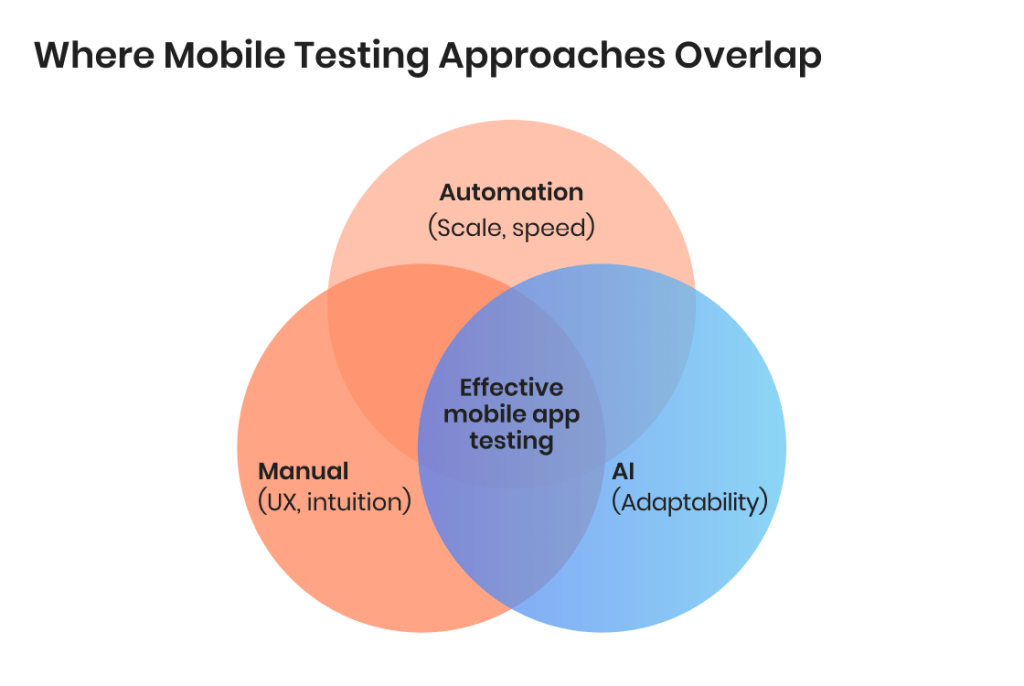
There is no single approach that covers all needs in mobile application testing. The most effective strategy is a combination of manual testing, traditional automation, and AI-powered techniques, each addressing different challenges. Mobile app testing and QA works best when these approaches complement each other.
Manual testing: user experience and flexibility
Manual testing is essential for scenarios that require human judgment. It is particularly effective for:
User experience evaluation
Exploratory testing
Early-stage validation
When testing mobile apps from a real user perspective, manual testing helps uncover issues that automated scripts often miss.
Traditional automation: speed and consistency
Automation testing is the backbone of scalable mobile apps testing. It works best for:
Regression testing
Repetitive workflows
Stable features
It allows teams to test mobile applications faster and release updates more frequently without rechecking everything manually. However, it requires ongoing maintenance as the app grows and changes.
AI-powered testing: adaptability and scale
AI is increasingly used to extend the capabilities of mobile application testing. It is most useful for:
Handling dynamic UI changes
Generating additional test scenarios
Identifying patterns and edge cases
AI can reduce manual effort and improve coverage, but it depends on quality data and still cannot fully replace human insight.
Finding the right balance
Each approach has limitations. Manual testing does not scale well, automation requires maintenance, and AI lacks full context. This is why effective mobile app testing and QA relies on a hybrid model:
Manual testing for user-facing quality
Automation for efficiency
AI for additional coverage and adaptability
This balanced approach allows teams to maintain quality while keeping up with fast release cycles and growing complexity.
Still not sure when to use each? Here is an extra visual aid to help you.
Approach
Best for
Limitations
Manual testing
UX, exploratory testing
Slow, not scalable
Automated testing
Regression, repeated flows
Maintenance overhead
AI testing
Dynamic UI, test generation
Needs data, lacks full context
AI in Mobile Application Testing: What’s Actually Changing
AI is quickly becoming part of mobile application testing, but its role is often misunderstood. It is not replacing traditional approaches — it is extending them. These days, mobile app testing and QA is gearing toward a model where AI supports speed, coverage, and adaptability, while human input remains essential.
Where AI adds real value
AI is most effective in areas where traditional automation struggles:
Test generation and expansion. AI can analyze application behavior and generate additional test scenarios, helping teams cover edge cases that are easy to miss.
Reducing maintenance effort. Instead of rewriting scripts after every UI change, AI-driven tools can adapt tests dynamically, making mobile apps testing more stable over time.
Pattern detection and anomaly spotting. AI can identify unusual behavior across large datasets, helping detect issues earlier, especially in complex or data-heavy applications.
Where AI still falls short
Despite the hype, AI has clear limitations in testing mobile applications:
It lacks a true understanding of user intent and business logic
If used to generate documentation, it can make wrong assumptions and false claims, and therefore requires careful reviews
It can produce irrelevant or low-value test scenarios without proper guidance
It depends heavily on the quality of input data, including prompts, which must be fine-tuned to match the specifics of the mobile app under test
This means AI cannot replace manual testing or fully take over decision-making in mobile application testing.
How teams are actually using AI today
In real-world mobile app testing and QA, AI is typically used to:
Support automation, not replace it
Reduce repetitive effort and speed up regression cycles
Improve coverage in complex or fast-changing apps by finding gaps and developing corner case scenarios
The result is not a fully autonomous testing process, but a more efficient one. Teams that get the most value from AI are those that treat it as an enhancement layer on top of existing mobile apps testing practices, rather than a standalone solution.
Using AI in your mobile app?
Let’s make sure it’s ready for real-world performance.
Choosing tools for mobile application testing is rarely straightforward. One of the most common questions in online QA communities is which tools to use for testing mobile apps across iOS and Android, and the answer is almost always: it depends on your goals, not just your tech stack.
Instead of looking for a single “best” solution, teams typically combine tools for manual testing, automation, and AI-driven support. Effective mobile app testing and QA relies on how these tools work together, not on any individual platform.
Manual testing tools used for mobile app QA
Manual testing remains essential for user experience and exploratory scenarios. When testing mobile applications from a real user perspective, teams rely on tools that help reproduce real-world conditions.
Tool/Approach
Best for
Good to know
Real devices
UX, performance, real conditions
Most reliable way to validate behavior
Emulators/Simulators
Early-stage testing
Faster, but limited realism
BrowserStack/Sauce Labs
Remote device access
Scales device coverage without owning hardware
TestFlight/Firebase App Distribution
Pre-release testing
Useful for beta testing and feedback
Best modern automation tools for testing mobile apps
Automation is where most professional online discussions focus, especially around cross-platform support and long-term maintainability. There is no perfect tool, but several options are widely used in mobile apps testing.
Tool
Best for
Good to know
Appium
Cross-platform automation
Flexible, supports iOS and Android
Espresso
Android native testing
Fast and stable, but Android-only
XCUITest
iOS native testing
Deep integration with Apple ecosystem
Detox
React Native apps
Suitable for end-to-end testing
Flutter Test
Flutter apps
Built-in, optimized for Flutter
AI-powered testing tools for mobile applications
AI tools are a frequent topic in discussions about modern mobile application testing, especially around reducing maintenance and improving coverage. They are not replacements, but they can enhance existing workflows.
Tools
Best for
Good to know
Testim
AI-driven automation
Adapts to UI changes
Mabl
Intelligent test creation
Focus on ease of use
Applitools
Visual testing
Detects UI differences across devices
Functionize
AI-based test automation
Scales test creation and execution
How to Test Mobile Apps Smarter: A Custom Strategy by App Type
Different products require different priorities in mobile application testing. The way you test a consumer app is not the same as how you approach an enterprise platform or a B2B solution. Mobile app testing and QA becomes more effective when it reflects how the product is actually used.
Consumer apps: performance and user experience
For consumer-facing apps, success depends on speed, stability, and engagement. Testing mobile apps in this category should prioritize:
Smooth user journeys (onboarding, search, checkout)
Performance under varying network conditions
Visual consistency across devices
Responsiveness and interaction quality
Even minor issues can lead to uninstalls, so mobile apps testing here focuses heavily on real-world usability.
Enterprise apps: reliability and compliance
Enterprise applications operate in more controlled environments but carry higher risks. Mobile application testing should focus on:
Data integrity and accuracy
Security and access control
Integration with backend systems
Compliance with industry regulations
In this case, stability and correctness matter more than visual perfection, and failures can have operational or legal consequences.
B2B and SaaS apps: workflows and integrations
B2B products often involve complex user flows and multiple integrations. Testing mobile applications in this space should prioritize:
End-to-end workflows across features
API reliability and data exchange
Role-based access and configurations
Consistency across different usage scenarios
Stability of third party components, if there are any
Here, mobile app testing and QA ensures that the system works as a whole, not just as isolated features.
At the same time, across all types, the goal of mobile apps testing remains the same: focus on the areas where failure would have the greatest impact, rather than applying the same level of testing everywhere.
Where Mobile Testing Fits in the Development Process
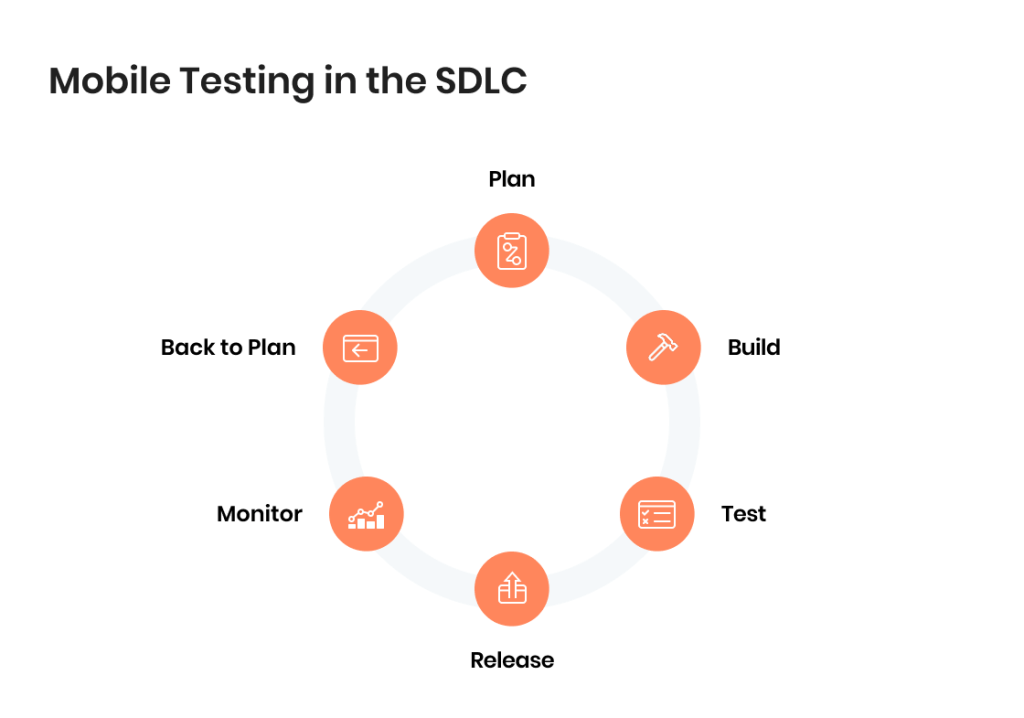
Mobile application testing is not a single phase — it is a continuous activity that runs alongside development. Treating it as something that happens only before release is one of the most common reasons issues reach production. Effective mobile app testing and QA integrates testing into every stage of delivery, creating a software testing life cycle that exists in parallel with the SDLC.
A simplified view of how testing mobile applications fits into the process looks like this:
Planning and design. Define what needs to be tested based on risk, user flows, and product requirements. This is where priorities for mobile apps testing are set.
Development. Testing starts early, alongside implementation. Basic validation, early feedback, and continuous checks help prevent defects from accumulating.
Pre-release validation. Before launch, mobile application testing focuses on stability, compatibility, and performance across the most relevant devices and conditions.
Post-release monitoring. After release, testing does not stop. Crash reporting, user behavior tracking, and performance monitoring provide real-world insights and help identify issues quickly.
This continuous approach allows teams to catch problems earlier, reduce costly fixes, and maintain consistent quality over time. Instead of relying on a final testing phase, mobile app testing and QA becomes part of how the product is built and improved on an ongoing basis.
What to measure in mobile app testing
Mobile application testing is only effective if it is tied to measurable outcomes. Instead of tracking everything, focus on a small set of indicators that reflect real user experience and stability. In most mobile apps testing scenarios, the key metrics include:
Crash rate. A direct indicator of stability. Even small increases can significantly impact user retention and app store ratings.
App launch time. First impressions matter — slow load is one of the most common reasons for early drop-off.
Response time and latency. Delays in interactions, API responses, or screen transitions quickly degrade user experience.
Memory and battery usage. Inefficient resource usage leads to poor performance, especially on mid-range and older devices.
Error rates in critical flows. Failures in login, payments, or core features have the highest business impact.
The goal of mobile app testing and QA is not to track more metrics, but to track the ones that clearly signal risk. These indicators help teams prioritize fixes, evaluate release readiness, and monitor real-world performance after deployment.
Key software testing metrics to monitor: The complete C-level guide
Mobile App Testing Challenges and How to Overcome Them
Mobile application testing comes with a unique set of challenges that go beyond standard software environments. Mobile app testing and QA is as much about managing these risks as it is about validating functionality. Here are the challenges mobile QA teams encounter.
Device fragmentation
A single app must work across dozens of devices, screen sizes, and OS versions. It goes without saying that an average testing operation cannot cover every possible combination, which makes prioritization essential. Focusing on the most widely used devices helps balance coverage and effort.
Gaps between test and real environments
Emulators and simulators are useful for early validation, but they cannot fully replicate real-world conditions such as hardware limitations, background processes, or unstable networks. This is why mobile apps testing must include real-device scenarios for critical features.
Frequent OS and platform updates
iOS and Android release updates regularly, introducing new behaviors, UI changes, and API updates. These changes can break existing functionality, requiring continuous adjustments in mobile application testing.
Network variability
Users interact with apps under unpredictable conditions — slow connections, switching between Wi‑Fi and mobile data, or temporary outages. Testing mobile apps only in stable environments often hides performance and synchronization issues that appear in production.
Complex integrations
Modern apps rely on APIs, third-party services, and real-time data flows. Each integration adds a potential failure point, making mobile app testing and QA more complex and increasing the need for end-to-end validation.
Our Experience With Mobile App Testing at TestFort
Mobile application testing becomes much more tangible when applied to real products under real constraints. Across projects, mobile app testing and QA is less about following a fixed process and more about adapting to product behavior, release speed, and user expectations.
Here are two examples of how testing mobile applications was implemented in practice, with a focus on mobile-specific challenges and outcomes.
Social gaming app: testing dynamic user interactions at scale
A mobile social gaming product with real-time interactions, social integrations, and fast release cycles required stable performance and smooth user experience under constant change.
Fitness tracking app: ensuring stability across devices and user scenarios
A large-scale consumer mobile app focused on tracking activity, nutrition, and user engagement required consistent performance across devices and usage patterns.
Challenges
Wide device and OS fragmentation
Performance issues tied to real-world usage (background activity, syncing)
Need for reliable data handling and accuracy
High expectations for responsiveness and UX
Our approach
Prioritized mobile app quality assurance testing for core user flows
Validated performance across real devices and usage conditions
Focused on stability of tracking, synchronization, and user data
Applied a balanced mix of manual and automated mobile application testing
Results
Improved app responsiveness and stability across devices
More reliable data synchronization and tracking accuracy
Fewer user-facing issues after updates
Stronger overall user experience in real-world conditions
Software Testing for MyFitnessPal: A Project by TestFort
Mobile application testing works best when it is focused, not attempting to be exhaustive. Trying to cover everything usually leads to wasted effort and missed risks. Strong mobile app testing and QA comes down to a few consistent principles:
Prioritize critical user flows
Test under real-world conditions
Balance manual, automated, and AI approaches
Keep monitoring after release
Testing mobile applications is not a one-time effort tied to release. It is an ongoing process that helps teams catch issues earlier, release with confidence, and maintain a stable user experience over time.
FAQ
How do teams approach mobile app testing end-to-end?
Most teams combine manual testing, automation, and monitoring. Mobile app testing typically starts with critical user flows, continues with regression checks, and extends into post-release tracking to catch real-world issues early.
Is AI actually useful in testing mobile applications?
AI helps with test generation, maintenance, and identifying patterns, but it does not replace traditional mobile app testing and QA. It works best as an addition to automation, not as a standalone approach.
How do you test mobile apps across different devices?
Testing mobile apps usually focuses on the most common devices used by your audience. Mobile apps testing combines emulators for coverage and real devices for validating performance and user experience.
What are the most important types of mobile app testing?
Not all types of mobile app testing are equally important. In most cases, teams prioritize performance, compatibility, security, and core functionality, as these have the biggest impact on user experience and stability.
What should you do first when starting mobile app quality assurance testing?
Start with critical user flows and the most common devices. Mobile app quality assurance testing is most effective when it focuses on high-impact areas before expanding coverage to less critical scenarios.
What is the biggest challenge in mobile application testing today?
The main challenge is complexity. Testing mobile applications involves device fragmentation, frequent updates, and real-world variability, making it difficult to ensure consistent performance across all scenarios.
How much automation is enough in mobile app testing?
There is no fixed percentage. Mobile app testing works best when automation covers repetitive and stable scenarios, while manual testing handles user experience and edge cases that require human judgment.
Share:
Jump to section
Give your users what they want — a mobile app they will return to every day.
Inna is a content writer with close to 10 years of experience in creating content for various local and international companies. She is passionate about all things information technology and enjoys making complex concepts easy to understand regardless of the readers tech background. In her free time, Inna loves baking, knitting, and taking long walks.
An experienced QA engineer with deep knowledge and broad technical background in the financial and banking sector. Igor started as a software tester, but his professionalism, dedication to personal growth, and great people skills quickly led him to become one of the best QA Team Leads in the company. In his free time, Igor enjoys reading psychological books, swimming, and ballroom dancing.










 How do teams approach mobile app testing end-to-end?
 How do teams approach mobile app testing end-to-end?
 What are the most important types of mobile app testing?