Vibe Testing: How to Test Vibe-Coded Applications Effectively in 2026
Make sure the vibe code you used for your AI app is safe and bug-free with vibe testing. Learn all about risks, test automation, best practices, and more.
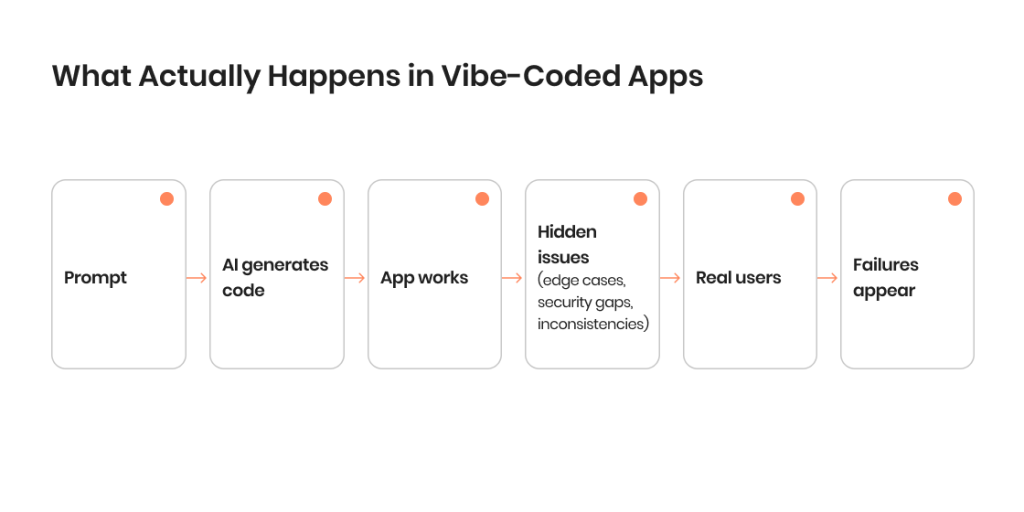
Vibe coding makes it easy to get an app to a working state. A few prompts, a couple of iterations, and you’ve got something that looks finished enough to move on, especially if the QA team is overstretched, as most of them are. The problem is that “working” usually means “nobody tested past the obvious stuff.”
That’s exactly where most of the quality problems hide. AI-generated code can pass through basic checks while carrying inconsistencies, edge case failures, and security risks that only surface once real conditions hit it. This is why, when a team tests a vibe-coded app, they’re doing more than just confirming that features work. Their job is to understand what the system actually does, and whether it can hold up when real people start using it.
Words by
Mykhailo Tomara, QA Lead
”In our experience, effective vibe code testing means focusing on the exploratory approach to testing and avoiding relying too much on initial requirements.”
Let’s take a close look at how to approach vibe testing, improve vibe coding security, and turn AI-generated code into something you can rely on.
Key Takeaways
Vibe-coded apps often behave differently under real usage than they do in controlled testing, especially when exposed to unpredictable inputs and user behavior.
The main difficulty is not just finding bugs, but understanding how different parts of the system interact and affect each other.
Early success during development can create a false sense of stability, while deeper issues remain hidden until later stages.
Starting with exploratory testing helps uncover unknown risks before investing time in structured test cases or automation.
Testing full user flows provides more insight than checking individual functions in isolation.
Edge cases should be treated as a primary focus area, not an optional addition to testing.
Prompts influence not only what is generated, but how the app behaves across different scenarios.
Vibe Testing: How to Approach AI-Generated Code
Vibe testing combines AI, QA, and software testing, so testing the code isn’t the only job of the QA team. They need to fully understand how AI-generated code actually behaves once real conditions hit it. Teams that lean on vibe coding usually write natural language prompts and let AI tools return code fast. Sure, that gives you speed, but you also end up with unpredictable logic, hidden dependencies, and growing issues with software quality.
Testing a vibe-coded app well means changing how you go in. Don’t assume the structure or the intent are automatically there. Instead, look at how the app behaves across real user scenarios, edge cases, and the moments where things fail. That matters even more with AI-generated code, since even a simple flow can behave one way today and another way tomorrow, depending on how the code got generated.
Why traditional testing is not the answer
Traditional testing works best when the codebase follows a clear structure and the development process is predictable. In most software development workflows, QA teams rely on defined requirements, stable architecture, and traceable logic to build test cases and test suites.
With vibe coding, those assumptions don’t always hold:
Code is often generated in fragments using AI coding tools
Logic may be duplicated or slightly altered across features
Prompts drive behavior, not consistent engineering patterns
Documentation is minimal or missing
This makes traditional testing methods less effective, especially when trying to test vibe-coded applications that were built quickly.
Engineers often mention that they “just run the app and see if it works,” relying on quick checks instead of structured QA. This leads to gaps that only appear later, when real users interact with the app.
Another challenge is that traditional test case design assumes predictability. In vibe coding testing, even small UI changes or prompt tweaks can affect multiple parts of the app:
A UI element behaves differently than expected
API responses change due to subtle code differences
Test scripts fail because flows are not stable
As a result, relying only on predefined test cases or rigid test execution creates blind spots. To properly test vibe-coded apps, teams need a more flexible approach that combines exploratory testing, targeted automation, and continuous validation of real behavior.
Aspect
Traditional development
Vibe coding
Code structure
Planned and consistent
Generated, often inconsistent
Developer understanding
High ownership and clarity
Partial or fragmented understanding
Testing approach
Based on requirements and design
Based on behavior and observation
Bug patterns
Predictable and traceable
Unpredictable and context-dependent
Change impact
Usually localized
Can affect unrelated features
Documentation
Typically available
Often minimal or missing
Security considerations
Built into the process
Often overlooked initially
From code trust to outcome validation
One of the biggest mindset shifts in vibe testing is moving away from trusting the code itself.
With AI-generated code, it’s not always clear:
Why a function works
How dependencies are connected
What assumptions were made during generation
Instead of focusing on the code, testers focus on outcomes:
Does the app handle real user input correctly?
Do flows work under different conditions?
Are edge cases handled safely?
This approach changes how QA teams design their work:
Test cases are based on real user behavior, not implementation
Exploratory testing becomes a key part of the workflow
Automated testing supports stability, not discovery
Developers sometimes report avoiding deep debugging altogether by focusing on whether the app behaves correctly rather than understanding every part of the code. While this speeds up delivery, it increases the need for stronger testing and validation.
In reality, this means treating vibe-coded apps as unverified systems until proven otherwise. Testing is no longer just a checkpoint — it becomes a core part of building confidence in the app’s behavior, security, and overall software quality.
This is also where vibe coding security starts to connect directly with testing. If outcomes are not consistently checked, vulnerabilities and logic flaws can remain hidden, even when the app appears to work.
The result is a more pragmatic approach:
Trust results, not assumptions
Test behavior, not just code
Build confidence through repeated validation, not initial success
Also, QA experts emphasize the importance of being flexible with test documentation at this stage: keep it brief and automate whenever possible — for example, by generating test cases and edge case scenarios with the help of LLMs.
Words by
Mykhailo Tomara, QA Lead
“If there is a need to keep up with a faster delivery process, QAs should implement tools to decrease time spent on basic tasks, such as writing test cases for well-known scenarios. An AI assistant could do that, though you need to choose one carefully and to prepare good prompts.”
Vibe Coding Security: Risks Hiding in Plain Sight
With vibe coding, security isn’t something you get to in the final stretch of the project. The risk shows up the second the code gets generated, long before anyone’s thinking about release. AI tools are good at producing features that work, but “works” and “is safe” aren’t the same thing — nothing about that generated code guarantees safe patterns, consistent logic, or that sensitive data gets handled the way it should.
And that’s where the trap with testing vibe-coded apps lies. Most of the team’s attention is spent on making sure the app does what it’s supposed to, not whether someone could break in. This is why the vulnerabilities just sit there, unnoticed, until a later stage or a real user stumbles into them. Here is how to ensure security for a vibe-coded app through testing.
Why AI apps introduce new security risks
AI-generated apps are built differently from traditional systems. Code is often created through prompts, iterations, and quick fixes rather than a structured development process.
Prompts focus on functionality, not security
AI may generate outdated or insecure patterns, it can also hallucinate
Logic is assembled in fragments, not designed holistically
Dependencies can be added without proper verification
This makes security harder to track across the app.
Developers often assume AI-generated code is “good enough” for early use, only to discover security gaps when the app is exposed to external users or APIs.
Another factor is speed. Vibe coding encourages rapid experimentation, which increases AI adoption but reduces time spent on quality checks and validation.
Common vulnerabilities in vibe-coded apps
Security issues in vibe-coded apps are rarely obvious at first glance. They tend to appear in how the app handles data, access, and unexpected input:
Missing or weak input validation
Broken authentication and session handling
Exposed API endpoints or tokens
Hardcoded credentials in generated code
Inconsistent permission logic across features
These issues often stem from how the code was generated rather than intentional design decisions.
Different parts of the app may follow different patterns
Fixes may introduce new vulnerabilities
Security is not applied consistently across flows
When does security testing need to start?
Security testing should start as soon as the first working version of the app exists — not after development is complete:
During initial testing of core flows
When writing test cases for critical features
Before integrating external APIs or services
Before exposing the app to real users
Waiting until later stages increases risk because vulnerabilities become harder to trace and fix.
Many teams only think about security after something breaks or is flagged externally, which often leads to reactive fixes instead of a structured approach.
A more effective approach is to treat security as part of vibe testing from the beginning:
Include negative test scenarios
Test how the app handles invalid or malicious input
Check access control across different user roles
This helps ensure that vibe coding security is not an afterthought, but part of how the app is tested and improved from the start.
We’ll ensure the reliability, consistency, and security of your AI-powered app
To test vibe-coded apps effectively, teams need a structured approach that works with — not against — how vibe coding produces code. Instead of relying only on traditional testing, combine targeted QA, exploratory testing, and gradual automation to uncover issues early and improve software quality. Here is how teams test vibe-coded applications.
1. Start with an audit of the AI-generated code
Before writing test cases, review what the AI actually generated.
Identify duplicated or conflicting logic
Spot unused or partially implemented features
Check how different parts of the app connect
Map the basic workflow of the system
This step helps testers understand what they are working with and prevents blind test execution.
Developers often admit they don’t fully understand their own AI-generated code, which makes an initial audit essential before deeper testing begins.
2. Focus on functional testing of critical flows
Start with the parts of the app that directly impact users:
Build test cases around real user actions instead of assumptions about how the code should work:
Simulate real user scenarios
Check full end-to-end flows
Confirm expected outcomes
This is where most issues surface when teams test vibe-coded applications.
3. Build test cases around real user behavior
Test case design should reflect how people actually use the app, not how the code was intended to work:
Cover common user journeys
Include negative and unexpected scenarios
Account for different user roles
Reflect real usage patterns
This improves coverage and makes testing more relevant to real-world conditions.
Here are a few examples of what this approach may look like.
Scenario
User action
Expected behavior
What to watch for
Login flow
User enters valid credentials
User logs in and is redirected correctly
Inconsistent redirects, session issues
Login with invalid data
User enters wrong password multiple times
Error message appears, access denied
Missing limits, unclear error handling
Form submission
User submits incomplete form
Validation prevents submission
Silent failures, partial data saving
Payment or critical action
User completes transaction
Action completes once, correctly recorded
Duplicate actions, incorrect state
Session timeout
User stays inactive, then returns
Session expires or restores safely
Unauthorized access, broken flows
Unexpected input
User enters unusual or invalid data
System handles input safely
Crashes, incorrect processing
4. Put extra effort into testing edge cases
Edge cases are a major risk area in vibe coding testing:
Empty or missing inputs
Unexpected formats
Large data volumes
Concurrent actions
AI-generated code often handles standard cases well but fails under less predictable conditions. Testing edge cases early reduces the number of late-stage surprises and improves overall stability.
Developers repeatedly point out that apps “work fine” until edge cases are introduced, at which point failures become obvious.
When automating testing of AI-powered applications, it’s best to start small and validate:
Basic UI flows
API checks
Critical regression paths
Avoid building a large test suite too early, especially if the codebase is still unstable.
Words by
Mykhailo Tomara, QA Lead
“Manual QAs should also automate (or semi-automate) their work when testing such apps. LLMs can be used to generate test coverage, find gaps, develop test scenarios for edge cases and generate reports. Of course, privacy and security of the project data must be considered so it is important to be careful with prompts and data fed to the AI.”
7. Check integrations and dependencies
AI tools can introduce integrations without full context:
External APIs
Third-party services
Libraries added during code generation
Apps that use retrieval-augmented generation (RAG) require extra attention, as data retrieval accuracy and response consistency can vary significantly depending on how the pipeline is configured.
Check:
Data flow between systems
Response handling
Failure scenarios
Issues here often affect the entire app, not just a single feature.
7. Add observability before scaling
Testing alone is not enough without visibility into how the app behaves. Among other things, the quality assurance teams might not get any insights about:
Logging for key actions
Monitoring for errors
Tracking performance metrics
Without observability:
Issues are harder to detect
Debugging becomes slower
Test results are incomplete
Adding observability ensures that testing continues beyond initial QA and supports ongoing improvements as the app grows.
Vibe testing inevitably gets harder the moment a vibe-coded application leaves the controlled environment it was built in. An application that behaved fine in early testing can fall apart fast once you put release it to real users, allow real traffic, and let actual unpredictable behavior into the mix.
At that point, vibe coding security and software quality come down to more than a yes-or-no on whether individual features work. What you need to watch for is how well the components hold together under pressure, and that’s exactly when the cracks in AI-generated code usually start showing.
Why apps break under real usage
In early stages, apps are typically tested in limited conditions — a few scenarios, predictable inputs, and stable environments. Real usage introduces variability that AI-generated code is often not prepared for.
Real user behavior is less predictable than test scenarios
Multiple users interact with the system at the same time
Data inputs vary widely in format and volume
Integrations behave differently outside test environments
Developers often report that their apps “worked perfectly” during initial testing but started failing once real users began interacting with them in unexpected ways.
This gap between controlled testing and real-world usage is one of the biggest challenges when teams test vibe-coded apps at scale.
Performance testing priorities
Performance testing becomes essential once usage grows. AI-generated apps are rarely optimized for efficiency, especially if performance was not part of the original prompt.
Focus areas typically include:
Response times under load
System behavior during peak usage
Data processing speed and consistency
Even simple workflows can degrade quickly when multiple requests are processed at once. Without performance testing, these issues remain hidden until they affect the user experience.
Stability and regression risks
As changes are made, maintaining stability becomes more difficult. In vibe-coded apps, fixes are often applied quickly, sometimes without full visibility into how different parts of the system interact.
This increases the risk of regression, where solving one issue introduces another.
Small changes can impact multiple features
Test coverage may not reflect actual system behavior
Dependencies between components are not always clear
To manage this, teams need to introduce more structured QA practices.
Maintain a focused regression test suite
Re-test critical flows after each change
Monitor behavior continuously in production
Testing vibe-coded applications at scale is less about adding more tests and more about building consistency in how the app is tested, observed, and improved over time.
Best Practices for Vibe Testing and AI Testing
Vibe testing becomes effective when it moves beyond ad hoc checks and turns into a consistent part of the development process. Because vibe coding relies on generative AI, AI-assisted workflows, and fast iteration, stability isn’t necessarily built into the code itself. It means that stability, security, and performance come down to how carefully the app is tested over time. Here are some industry-proven best practices to incorporate in your testing approach.
1. Treat AI-generated code as a starting point
AI-generated code should be treated as a draft rather than a finished product. It may work under ideal conditions, but that doesn’t mean it will behave reliably in real usage. Teams that test vibe-coded apps successfully tend to approach the code with caution, expecting inconsistencies, hidden dependencies, and gaps in logic from the start.
2. Focus on flows instead of isolated logic
Testing individual functions is not enough when working with vibe coding. What matters more is how the app behaves across complete user journeys. End-to-end flows, transitions between screens, and interactions between components often reveal issues that are not visible in isolated checks. This is especially important for user experience, where small breaks in flow can quickly affect usability.
3. Make edge cases part of the core testing effort
Edge cases should not be treated as an afterthought. AI-generated code often handles standard scenarios reasonably well, but breaks down when inputs become less predictable. By bringing edge case testing earlier into the process, teams can identify weak points before they spread across the app and become harder to fix.
4. Keep prompts and outputs visible
In vibe coding, prompts play a central role in how features are created. When these prompts are not tracked, it becomes difficult to understand why certain behaviors exist. Keeping prompts and their outputs visible helps both testers and developers trace issues back to their source, making debugging more efficient and reducing repeated mistakes.
5. Balance manual and automated testing
Manual QA remains essential for discovering unexpected behavior, especially in systems where logic is not fully transparent. At the same time, automated testing helps maintain consistency as the app changes. The key is to use automation to support stability rather than relying on it too early, when the app is still changing rapidly.
6. Introduce structure as the app grows
Vibe coding often starts without a clear framework, but that lack of structure becomes a problem over time. As the app develops, introducing consistent testing methods, clearer workflows, and repeatable processes helps reduce instability. Without this, testing becomes reactive and harder to manage.
7. Include security in everyday testing
Vibe coding security should be part of regular testing, not something added later. Security issues in AI-generated apps are often tied to how inputs are handled, how access is controlled, and how different parts of the app interact. Addressing these areas continuously helps prevent vulnerabilities from accumulating unnoticed.
8. Use AI tools carefully
AI-powered testing tools and AI-assisted testing can support test creation and automation, but they do not replace QA expertise. They can help generate test scripts or suggest scenarios, but those outputs still need to be reviewed and adapted. Relying too heavily on AI-driven testing without human oversight can lead to the same kinds of blind spots found in the code itself.
Cutting QA time by 80% with AI-powered testing: A new project by TestFort
What does the success of a vibe testing project really rely on? The right testing tool certainly helps, but even the most advanced tool is not going to fix the harder parts of vibe coding on its own. AI-generated code tends to be inconsistent, and a tool can’t magically correct that. This means that the tool stack should back up your testing, not run the show.
For teams testing vibe-coded apps, tools are what give you coverage, speed, and the ability to run the same thing again and again without fuss. They deliver their best work in the hands of someone with a clear QA approach who already knows how the app tends to behave. Here are the tools by categories worth considering for your project.
Top tools by category
There is a lot of overlap between tools used for traditional testing and tools used specifically for testing vibe-coded apps — mainly because while the apps were built differently, they still need to meet the same functional and non-functional requirements. Here are the tools widely used for testing AI-generated software.
UI and user experience testing
Tools like Playwright help simulate real user interactions and catch issues caused by UI changes or unstable flows.
Detect issues caused by UI changes
Interact with UI elements across flows
Support visual testing and UX checks
This is especially useful when testing apps built with vibe coding, where UI behavior may shift between iterations.
API and integration testing
API testing tools help verify how the app handles requests, responses, and data exchange.
Check API responses and error handling
Test data flow between services
Simulate failure scenarios
This becomes critical when AI-generated code introduces integrations without consistent handling of edge cases.
Code collaboration and review tools
Platforms like GitHub and tools such as GitHub Copilot help teams track and understand generated code.
Track changes across the codebase
Review AI-generated code more effectively
Improve collaboration between QA and developers
While not testing tools in the strict sense, they support visibility and traceability.
AI-powered testing tools
AI-powered tools and AI-assisted testing solutions can support test creation and automation.
Generate test cases and test scripts
Assist with test generation
Speed up parts of automated testing
Many developers note that AI-generated tests often miss real user behavior, especially when the underlying logic is unclear.
Monitoring and observability tools
These tools provide insight into how the app behaves in real environments.
Track errors and system behavior
Monitor performance under load
Support continuous testing in production
They are essential for testing vibe-coded applications beyond initial QA.
What tools can and cannot do
Testing tools are powerful, but their role is sometimes misunderstood in vibe coding environments.
Explain unpredictable behavior in AI-generated code
Replace exploratory testing and human judgment
Guarantee software quality on their own
A common takeaway from industry discussions is that relying on tools too early creates a false sense of confidence, while deeper issues remain unresolved.
When to Involve QA Teams on Vibe-Coded Projects
Vibe coding makes it easy to build software fast. But knowing how the app actually behaves over time is the harder part. At some point, testing outgrows what a developer can roughly assess on the side, and that’s where the project needs a real QA approach behind it.
The clearest sign you’ve hit that point is unpredictability. Imagine the all-too-common scenario: you run the same flow twice: it passes once, then fails the next time for no obvious reason. When teams testing vibe-coded apps keep seeing results like that, it’s usually a symptom of something deeper going wrong in the code or the workflow and a reason to at least consider getting some external QA help.
Signs it’s time to involve QA teams
There isn’t always a single breaking point, but several patterns tend to appear:
Bugs are hard to reproduce or explain
Fixes introduce new issues in other parts of the app
Test cases no longer reflect real behavior
Edge cases cause unexpected failures
Security concerns start to surface
The team no longer has full visibility into how the app works
Why QA teams make a difference
QA teams bring structure into a process that may have started without it. Instead of testing reactively, they introduce more consistent testing methods and clearer workflows:
Define realistic test scenarios based on real user behavior
Identify gaps in coverage and testing strategy
Improve test execution consistency
Introduce automation where it adds value
They also help connect testing with broader goals like software quality and vibe coding security, rather than treating it as a separate step.
How We Test Vibe-Coded Apps at TestFort
Vibe-coded apps rarely come with a clean structure, predictable behavior, or documentation you can rely on. By the time our QA team gets involved in a project, the app usually works — it just doesn’t work in a way anyone can fully trust or explain.
This is why we built our vibe testing approach around that reality instead of pretending otherwise. We don’t drop a standard QA process on top of a shaky system and hope it holds. We start by learning how the app actually behaves, then strengthen the structure at the points where it makes technical and business sense. Here is how we handle testing vibe-coded apps on real projects.
We don’t start with test cases — we start with what the app actually does
In vibe-coded projects, documentation is usually incomplete or misleading. This is why we make sure to always run the app and map behavior first.
We go through core flows, trigger different paths, and look for inconsistencies — same inputs producing different results, features behaving differently across screens, or logic that doesn’t fully connect. This step often reveals more than code review, especially when AI-generated code looks clean but behaves unpredictably.
We isolate unstable areas before expanding coverage
Not everything needs to be tested at once. In most vibe-coded apps, a few areas carry most of the risk. We focus first on:
Authentication and access logic
Data handling and state changes
Actions that affect other parts of the system
Once these are stable, it becomes much easier to expand testing without chasing changes in behavior.
We test flows the way users break them, not the way they were designed
Test cases based on expected behavior are not enough here. We actively try to break flows. Most importantly, we introduce:
Invalid and unexpected inputs
Rapid or repeated actions
Interruptions in the middle of flows
This approach helps expose weak points early, before they turn into production issues.
We delay automation until the behavior stabilizes
Automating unstable flows creates brittle tests that fail for the wrong reasons. We start with manual and exploratory testing to understand how the system behaves. Only after that do we introduce automation for:
Critical user journeys
Stable UI flows
Core API interactions
This keeps the test suite useful instead of constantly breaking.
We treat every integration as a risk point
AI tools often generate integrations without full context. These areas tend to fail silently or behave inconsistently. This is why we verify:
How APIs respond under different conditions
What happens when external services fail
Whether data stays consistent across systems
In many cases, issues here affect the entire app, not just a single feature.
We rely on logs and behavior, not assumptions
In vibe-coded apps, what the code “should do” is less important than what it actually does. We use logs, monitoring, and repeated test execution to confirm behavior over time. If results change between runs, that’s a signal that something deeper is wrong.
We bring structure without slowing things down
The goal is not to replace vibe coding, but to make it sustainable.
Stabilize core behavior
Reduce unpredictable outcomes
Make future changes safer
For startups, this often means turning a fast MVP into something usable in production. And for enterprise teams, it’s about regaining control over internal tools built quickly with AI.
We’ll make sure your app works in the real world, not just the lab.
Vibe coding makes it easier than it’s ever been to build a working app. It also makes it easy to confuse “working” with “reliable,” and those are categorically not the same thing. Once you’re building through prompts and iteration, speed stops being the most interesting question. What matters is how well you actually understand the thing you just built.
Vibe testing is where that understanding is developed. The more you trust AI with code generation, the more you have to question the results rather than take them at face value. In vibe-coded projects, the parts you never tested are almost always where the trouble was hiding.
FAQ
How do I know if my vibe-coded app is reliable enough to launch?
If your app works only under expected conditions but breaks with edge cases, real users, or higher load, it’s not ready. Reliability comes from consistent behavior across different scenarios, not just successful demos.
Do I need QA if I built my app using AI tools?
Yes. AI tools can generate code, but they don’t guarantee stability or security. QA helps uncover hidden issues, improve consistency, and ensure your app behaves correctly beyond basic functionality.
What’s the biggest risk in vibe-coded apps?
The biggest risk is false confidence. Apps may appear functional while hiding logic flaws, security gaps, or unstable behavior that only shows up under real usage or unexpected inputs.
Can I rely on automated testing for vibe-coded apps?
Automation helps, but it’s not enough on its own. If the underlying logic is inconsistent, automated tests may miss issues or produce unreliable results. Manual and exploratory testing are still essential.
Is vibe coding security really that different from regular app security?
The principles are the same, but the risks show up differently. AI-generated code can introduce inconsistent patterns, making vulnerabilities harder to spot and easier to overlook during development.
Share:
Jump to section
Hand over your project to the pros.
Let’s talk about how we can give your project the push it needs to succeed!
Inna is a content writer with close to 10 years of experience in creating content for various local and international companies. She is passionate about all things information technology and enjoys making complex concepts easy to understand regardless of the readers tech background. In her free time, Inna loves baking, knitting, and taking long walks.
Michael has more than 10 years of experience in software testing and a strong technical background in e-commerce, telecom, and customer support projects. He excels in creating, reviewing and maintaining project documentation from requirements and functionality descriptions to test plans and checklists.









 How do I know if my vibe-coded app is reliable enough to launch?
 How do I know if my vibe-coded app is reliable enough to launch?