Picture a scenario: a new build successfully passes unit and integration checks. Then, once it’s finally in front of the customers, the real end-to-end flow reveals significant issues that only surface when the financial and reputational cost of a failure becomes much higher.
More often than not, this outcome is a sign that the team skipped or underutilized system testing. As the last structured check before the product faces real users, system testing needs a permanent slot in any software testing strategy where performance, stability, business integrity, and user trust matter. Let’s take a look at where system testing stands in the modern development process, how to do it right, and what teams often get wrong about system level testing.
Key Takeaways
- Treat system testing as a business risk decision — the last structured checkpoint before customers judge the product.
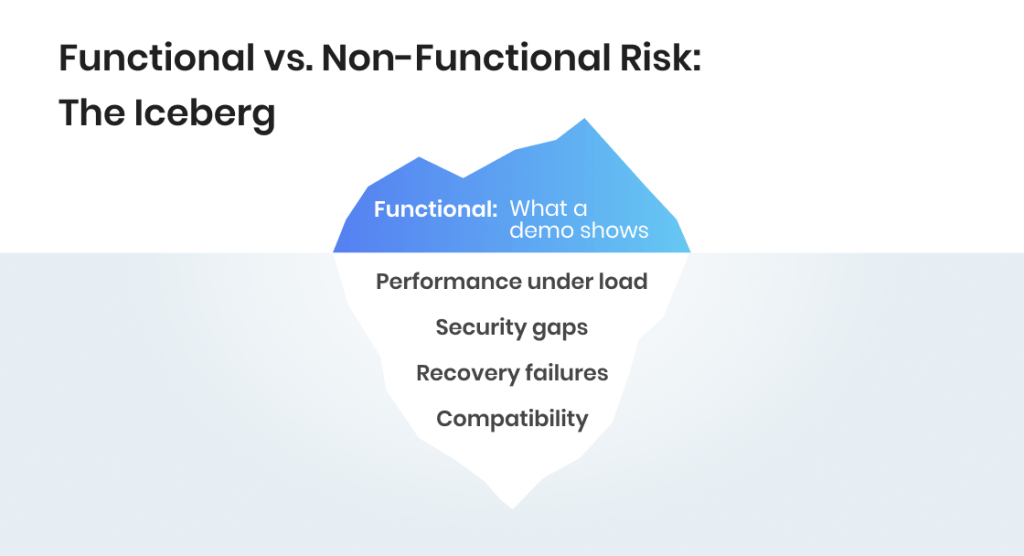
- Its real value is catching what feature demos miss: performance under load, security gaps, recovery failures.
- Independent QA has to own this stage; developers rarely catch failures their own assumptions created.
- A production-like environment is non-negotiable; a clean lab hides the defects customers actually hit.
- Combining techniques is better than relying on one — a smart mix helps locate more defects earlier.
What Is System Testing?
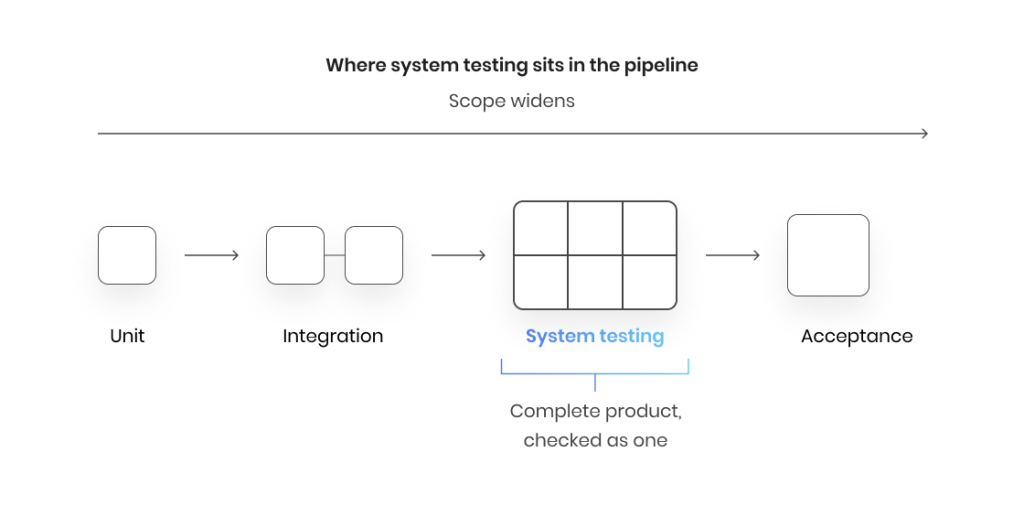
System testing is the QA phase where the team checks the complete, fully integrated software application as a whole against its requirements, before user acceptance testing. In the traditional testing pyramid, it is performed after integration testing. System testing is also usually black-box testing based on system requirements: knowing about the product’s inner mechanics won’t prevent the team from doing their job well, but the black-box approach allows testers to focus on what matters the most and adopt the end user perspective in the way they look at the product.
Where does system testing stand in the software development lifecycle?
Where system testing sits in the pipeline is what gives it weight. Unit and integration testing confirm that individual components and their connections work. System testing steps back and examines the integrated system as a whole, end-to-end, the way a customer actually moves through it, including the points where the software connects to external services and third-party APIs, a scope sometimes handled as system integration testing. That end-to-end view is why defects invisible at the component level tend to surface here.
It also carries a business responsibility that lower testing levels do not. System testing checks the software against both its functional and non-functional requirements, and against what the business committed to deliver. A feature can be technically correct and still fail the requirement it was built for. This is the phase where that gap gets caught, ideally long before it reaches users.
What system testing checks
System testing verifies that the system behaves correctly across a range of quality attributes that go beyond core features. A typical scope covers:
- Functional correctness — the software produces the expected result across real user scenarios and edge cases.
- Performance and load — response times and stability hold up under normal and peak loads.
- Security — sensitive data stays protected and access controls behave as intended.
- Reliability and recovery — the system keeps running under stress and returns to a stable state after a crash or outage.
- Usability — the user interface and overall user experience match how customers expect the product to work.
- Compatibility — behavior stays consistent across the devices, browsers, and operating systems the product supports.
The exact mix depends on the product. A regulated fintech platform weighs security and data integrity heavily, while a consumer app leans on performance and user experience.
Let’s make sure your software product is 100% release-ready.

Why System Testing Matters for the Business
While software testing is a technical discipline, system testing is directly tied to the business outcomes. It allows teams to release with confidence and avoid facing the cost of defects that surface in production. A software application not performing the way it’s expected to in lab conditions is completely acceptable; the application doing the same after being exposed to real users can have dire consequences, from financial loss to dedicating additional time and effort into fixing system-wide issues that were perfectly avoidable.
Why should you care?
The cost of skipping it, or doing it superficially, lands on the business rather than the QA team. A defect that reaches the production environment is far more expensive to fix than one caught before release, and the damage rarely stays inside engineering. A broken checkout flow or an hour of downtime erodes customer trust and pulls revenue down with it.
All of this allows us to reframe system testing as risk management. It is the last structured checkpoint where the business can confirm the software does what was promised, and that it holds up on performance and security, before the market forms its own opinion.
What Are the Types of System Testing?
The term “system testing” sounds like another type of testing, similarly to “performance testing” or “integration testing.” In reality, it’s more of an umbrella term that includes both functional and non-functional testing types. The exact set of activities that constitute system testing are chosen for each product individually. This is why the list below is not a mandatory checklist applicable to every single project. Think of it as a collection of common testing types used to evaluate a software system, but the exact setup can vary greatly.
- Functional testing — confirms features behave according to requirements across real user scenarios. Functional testing verifies the what: does the system do the job it was specified to do.
- Performance testing — measures speed, responsiveness, and stability, and is the umbrella for load and stress checks.
- Load testing — checks that response times and throughput hold under expected traffic, then stress testing pushes past normal limits to find the breaking point and how the system behaves there.
- Security testing — probes for vulnerabilities, weak access controls, and data-exposure risks before attackers or auditors do.
- Usability testing — assesses how easily real users move through the interface, including graphical user interface testing of layout and interaction.
- Compatibility testing — verifies consistent behavior across the browsers, devices, operating systems, and hardware the product supports.
- Regression testing — reruns existing checks after changes to confirm new work has not broken what already worked.
- Recovery testing — confirms the system returns to a stable state after a crash, outage, or forced failure.
- Scalability testing — establishes whether the system keeps performing as users, data, and transaction volume grow.
- Smoke testing — a quick first pass that confirms a build is stable enough for deeper testing, so effort is not wasted on a broken version.
- Localization testing and migration testing — the first checks language, currency, and regional formatting for target markets; the second confirms data and functionality survive a move to new infrastructure intact.
The practical takeaway for planning is that this is just a list of suggestions. A consumer mobile app weighs compatibility, performance, and usability; a healthcare platform in a regulated market pushes security and recovery to the top. Scoping the types to product risk is what keeps system testing thorough without becoming open-ended in cost.
The System Testing Process Step by Step
System testing can have a dramatic effect on the overall software quality, but only when it’s performed correctly. This isn’t a type of testing in software where you can just go as you feel, like you would do with ad hoc testing. Successful system quality assurance follows a specific sequence of steps, run in a production-like test environment, with all steps working together to deliver the expected results. Here is how system testing typically works on a real project.
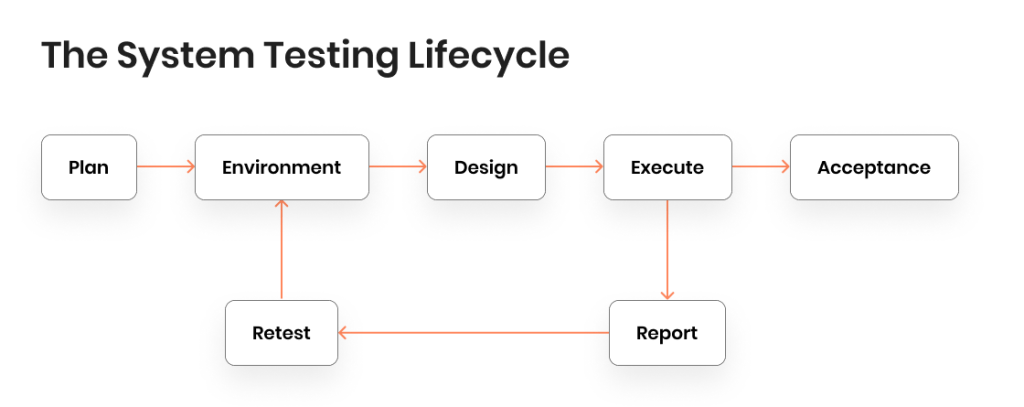
- Test planning and strategy. Analysis of the functional and non-functional requirements sets scope and priorities. The test strategy captures the approach, and the test plan turns it into a schedule, ownership, and exit criteria.
- Test environment setup. A test environment is built to mirror the production environment — same configuration, data shape, and integrations — so results reflect real conditions rather than lab ones.
- Test case and test data design. Teams create test cases and test scenarios covering expected paths and edge cases, backed by realistic test data that includes invalid inputs meant to break the system on purpose.
- Test execution. Tests are run to detect defects wherever actual behavior diverges from the expected result. For a web application, a single scenario might trace a user from sign-up through checkout.
- Defect reporting. Each defect is logged with steps to reproduce it and its business impact, then routed to developers for a fix.
- Regression and retesting. Once fixes land, regression testing confirms nothing else broke, and the cycle repeats until the build is stable — the final validation before the software moves to acceptance testing.
Manual, exploratory, and automated testing
System testing rarely relies on one approach. Manual testing and exploratory testing bring human judgment to usability and the unscripted edge cases that are hard to predict up front. Test automation handles the repetitive, high-volume work — regression suites and load runs — far faster than people can. Automated system testing wired into a CI/CD pipeline enables continuous testing, so quality signals arrive with every code change rather than once at the end.
What to automate is a business decision. Automating stable, frequently run checks pays back quickly; automating flows that change every sprint rarely does.
We combine manual, automation, and AI-powered testing to deliver the results you need, fast.
Common system testing tools
Tool choice follows the product’s stack and risk profile, rather than driving it. Typical system testing tools span a few categories: Selenium, Playwright, and Cypress for functional and UI automation; JMeter and k6 for performance and load; Postman for API testing; and Jira or TestRail to manage cases and defects. The right toolset depends on where the product’s risk concentrates.
What Teams Often Get Wrong About System Testing
System testing is often confused with other types of testing, including integration testing and end-to-end testing. But that’s only one of the common misconceptions people have about this activity. Here are the things teams frequently misunderstand about system testing and what the reality actually looks like.
It is the same as integration testing
Integration testing checks that modules connect and pass data correctly. System testing steps back to the complete product and checks its behavior against requirements. The gap between them is where production failures hide — components that pass every integration check can still break the end-to-end flow a customer actually follows.
It is the same as end-to-end testing
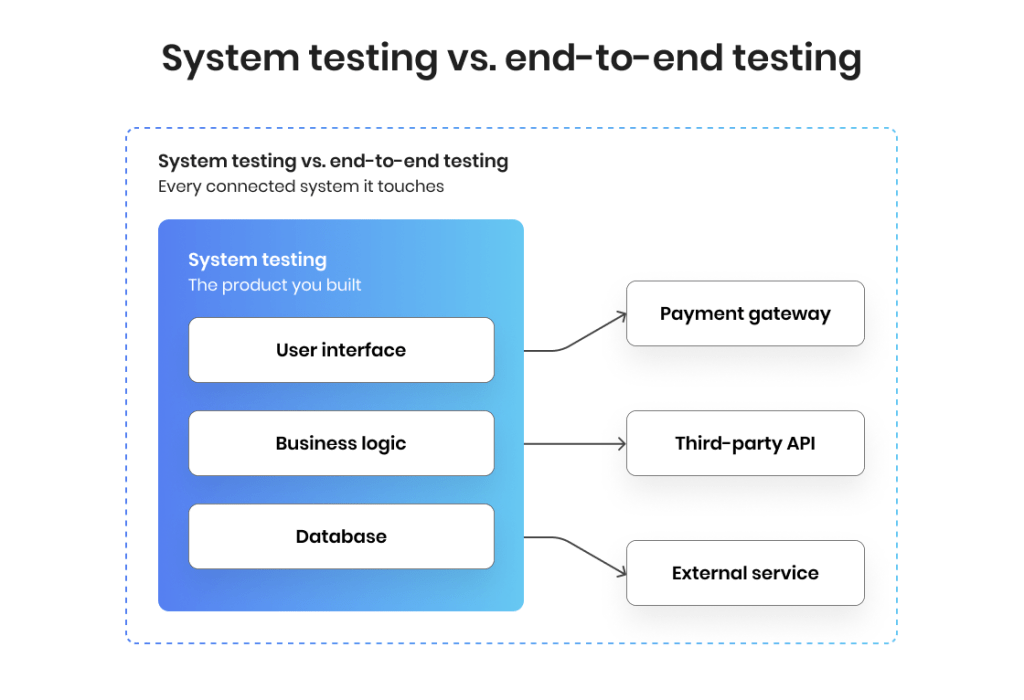
System testing and end-to-end testing get used interchangeably, but they are not the same thing. System testing checks the complete product against its own requirements, within the boundary of the software the team built. End-to-end testing follows a full user journey across every connected system it touches, including databases, networks, and third-party services. End-to-end flows are one technique applied within system testing; end-to-end testing as a discipline pushes that idea outward, into the wider ecosystem the product depends on.
It is only about features
Treating system testing as a functional check leaves the expensive risks uncovered. Much of what it catches is non-functional testing — performance under load, security gaps, recovery after a crash — the aspects that rarely surface in a feature demo yet bring live systems down.
Developers can clear their own end-to-end flows
People rarely catch the failures their own assumptions created. Independent QA testers approach the system the way a customer would, which is why the testing team owns this stage rather than the engineers who wrote the code.
More test types always means better coverage
Running every technique for its own sake inflates cost without lowering the risks that matter. Strong system testing scopes the mix to product risk, concentrating effort where a failure would hurt the business most.
Tried and Tested System Testing Best Practices
System testing reaches its maximum efficiency when it’s closely matched to business risk and when it’s run in a production-like test environment. However, that’s only the tip of the iceberg when it comes to performing system testing correctly. Here are some industry-approved system testing best practices to consider including in your strategy.
- Start from a risk-based test strategy. Map testing effort to where a failure would cost the business most, rather than spreading it evenly. A payment flow and a settings screen do not deserve the same coverage.
- Keep the test environment production-like. Results only mean something when the configuration, data, and integrations match what customers will actually hit. A pristine lab hides the defects that matter.
- Combine techniques instead of relying on one. No single technique catches everything. A survey of 252 software professionals found that teams tend to lean on a single testing technique, and that combining methods — the study in question paired smoke testing with regression testing — surfaces more defects earlier. In the industrial case the authors documented, that combination cut the number of defects reaching the customer.
- Give ownership to independent QA. A testing team that did not write the code brings the outside perspective that self-review cannot, and treats software quality assurance as a discipline rather than a final formality.
- Trace every test back to a requirement. Clear coverage mapping and exit criteria show what has been checked and what has not, so the decision to release rests on evidence.
Applied together, these turn system testing into a dependable quality gate that protects both the release schedule and the business behind it.
We’ll build a strategy that gives you release confidence without any overheads.
Get an action plan — book a 30-minute talk with our experts.
Make Your System the Focus of Your Test Strategy
System testing is the last point where the QA team can confirm the application as a whole is behaving as expected, before customers get the chance to form their own opinions. This is why the smartest approach to system testing is to treat it as a risk decision, meaning that the first thing the team needs to do is find where the risk sits and then build the strategy around it.
If you’re not sure where that risk hides or how to test your system behavior to make sure nothing unexpected derails your release, a QA audit might be exactly what you need. Our QA and delivery team will build coverage that addresses crucial gaps and design a plan that maps out the entire system testing project that meets every goal.
FAQ
 What is the difference between system testing and acceptance testing?
 What is the difference between system testing and acceptance testing?
System testing checks the software against its technical and functional requirements; user acceptance testing confirms it meets the customer’s real-world needs. System testing runs first, acceptance testing last.
Is system testing black-box or white-box testing?
Mainly a black box testing technique — testers judge the system by its inputs and outputs, not its internal code. TestFort breaks this down in its guide to black, white, and grey box testing.
What are the main types of system testing?
The most common are functional, performance, security, usability, compatibility, regression, and recovery testing. Few products need every type — mature teams adjust the mix to where the business risk sits.
What tools are used for system testing?
There is no single tool. Common system testing tools include Selenium, Playwright, and Cypress for UI automation, JMeter for performance and load, Postman for API testing, and Jira or TestRail for managing cases and defects.
When is system testing performed?
After integration testing and before user acceptance testing, near the end of the software development lifecycle — the software is complete and integrated, so the whole system is checked as one.
Jump to section
Give your product quality a boost with expert-level testing and QA