HR information systems sit at the core of how modern organizations manage people, data, and decisions. Yet, despite their critical role, HRIS platforms are often treated as “configured software” rather than complex systems that require rigorous testing. When issues surface, they tend to affect payroll accuracy, data integrity, compliance, or employee trust — areas where mistakes are costly and highly visible.
Today, we want to look at HRIS testing from a practical, technical perspective. We’ll try to go beyond surface-level definitions to examine how HR systems behave in real operating conditions, why testing them is uniquely challenging, and what it takes to maintain reliability as HR platforms grow, integrate, and change over time.
Key Takeaways
- HRIS platforms combine HR logic, data management, and technical integrations, which makes them more complex than typical internal systems.
- HRIS testing requires both technical testing skills and a practical understanding of how HR processes work in real organizations.
- Configuration changes in HR systems can introduce critical defects even when no new features are added.
- Payroll, employee data, and access control are high-risk areas that deserve deeper and repeated testing.
- HRIS defects tend to surface late unless realistic scenarios are tested early.
- Test environments should closely reflect production behavior to avoid false confidence.
- Automation is effective for regression and calculations, but can be limited for complex HR workflows.
- HRIS platforms require ongoing testing as policies, structures, and integrations change.
- Strong collaboration between HR teams and testers improves test coverage and relevance.
What Is an HRIS and How It’s Different From an HRMS
An HRIS (Human Resource Information System) is a centralized system designed to store, manage, and process human resource information across an organization. In practice, an HRIS system supports core HR activities such as maintaining employee records, handling payroll, supporting recruitment, and meeting compliance requirements.
Unlike standalone HR software, an HRIS is built as an integrated information system. It connects employee information, workflows, and reporting into a single structure, allowing HR teams to work with consistent data across multiple functions. This is especially important for organizations that need reliable data management, clear audit trails, and stable HR processes as they scale.
An HRMS (Human Resource Management System) typically represents a broader suite of HR capabilities. While it often includes standard HRIS functions, HRMS platforms usually extend into talent management, performance management, analytics, and employee engagement features. From a system and testing perspective, this difference directly affects complexity, configuration effort, and risk.
HRIS software vs. HRMS software
Although these two terms are often used interchangeably, HRIS software and HRMS software serve slightly different purposes. Understanding this distinction helps when selecting HRIS platforms, defining scope during HRIS implementation, and planning the testing process.
Here is a quick breakdown of the differences between HRIS and HRMS and where they both stand in the HR software segment.
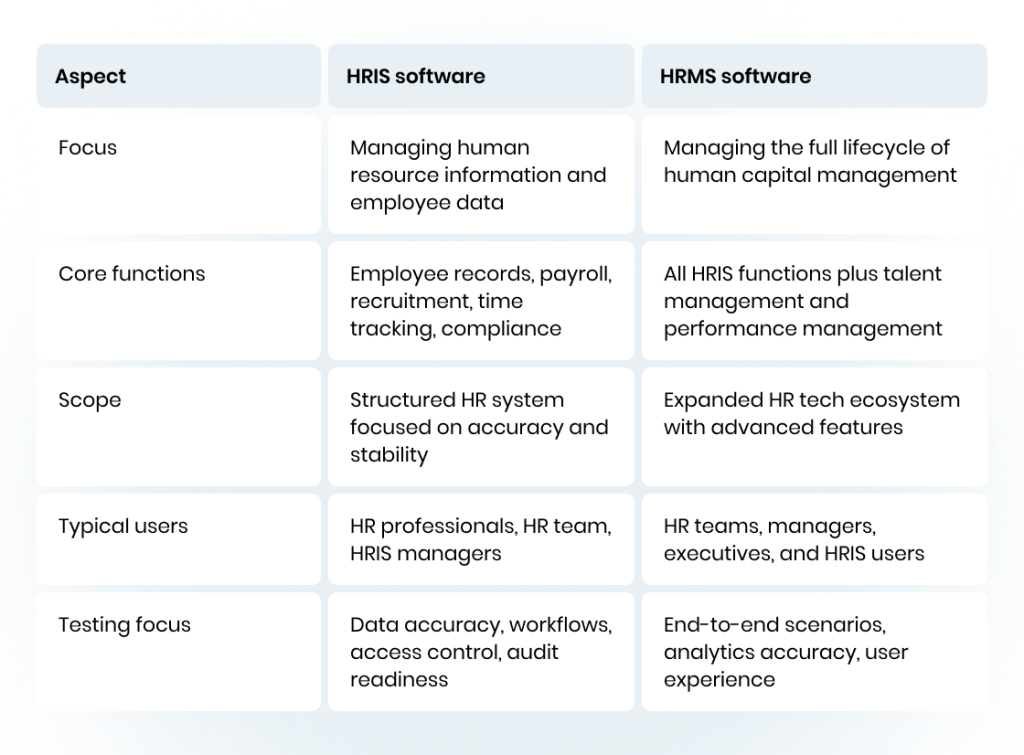
In practice, many organizations start with an HRIS and later extend it into an HRMS as needs grow. Both types of systems require careful testing, but HRMS software usually introduces more complex workflows, additional metrics, and stronger dependencies between modules, increasing the need for structured testing and ongoing validation.
Why Testing HRIS Platforms Matters: The Impact on Business and People
HRIS platforms sit at the intersection of HR operations, employee experience, and organizational risk. When an HRIS system fails, the impact reaches far beyond the system itself. Errors in payroll, access control, or reporting directly affect employees, HR teams, and business credibility. Testing helps confirm that the system supports people and processes, not just technical requirements.
Since HRIS platforms handle sensitive employee data and critical workflows, issues often surface only after real usage begins. Structured testing makes these risks visible earlier, when they are easier and less costly to fix.
HRIS management issues you can prevent with testing
Many problems in HRIS management are not caused by missing features, but by configuration gaps, overlooked edge cases, or assumptions about how HR processes work in real life. Testing exposes these issues before they disrupt HR operations or affect employees. Here are the most common management challenges you can solve with timely testing.
Payroll and calculation errors
Testing validates payroll rules, deductions, bonuses, and edge cases such as part-time work or unpaid leave. This helps prevent payment inaccuracies that affect employee satisfaction and create additional workload for the HR team.
Broken workflows and approvals
HRIS workflows often depend on multi-step approval logic. Testing helps uncover failures in recruitment processes, onboarding flows, and role-based approvals that can block or delay HR operations.
Access control and data exposure risks
Misconfigured permissions are common in HRIS platforms. Testing ensures the right users can access employee information while safeguarding sensitive data and supporting data security and compliance requirements.
Reporting and audit gaps
Testing confirms that reports reflect real HR data and logic. This reduces the risk of failed audits, incorrect metrics, and gaps in compliance documentation when the system is reviewed.
A decade of HR testing expertise, 20+ products tested — find out what we can do for you.

Key benefits of Human Resource Information System testing
Beyond defect detection, testing plays a direct role in improving how HR systems support both business goals and daily HR work. A well-tested system becomes more predictable, easier to manage, and more trusted by users.
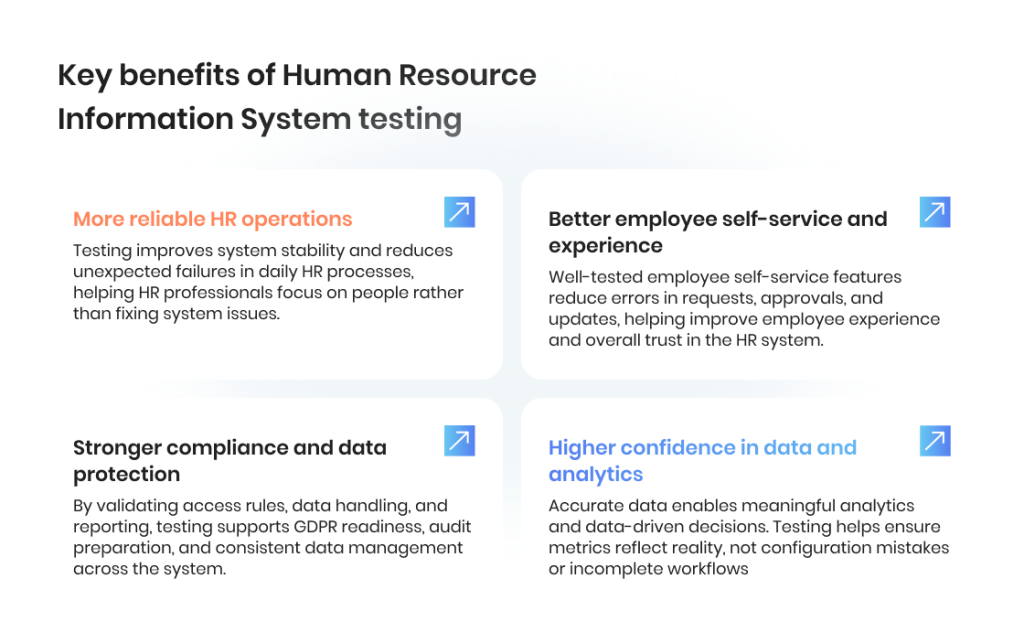
More reliable HR operations
Testing improves system stability and reduces unexpected failures in daily HR processes, helping HR professionals focus on people rather than fixing system issues.
Stronger compliance and data protection
By validating access rules, data handling, and reporting, testing supports GDPR readiness, audit preparation, and consistent data management across the system.
Better employee self-service and experience
Well-tested employee self-service features reduce errors in requests, approvals, and updates, helping improve employee experience and overall trust in the HR system.
Higher confidence in data and analytics
Accurate data enables meaningful analytics and data-driven decisions. Testing helps ensure metrics reflect reality, not configuration mistakes or incomplete workflows.
HRIS Functions That Require In-Depth Testing
Not all HRIS functions carry the same level of risk — similarly to what we learned from our LMS testing experience, different HRIS failures affect operations in different ways. Some features may work well in isolation but fail when real HR scenarios, policy changes, or organizational complexity are introduced. In-depth testing focuses on functions where small defects can create an outsized impact on people, trust, and compliance.
Rather than validating screens or single actions, this level of testing examines how the system behaves across time, roles, and changing data conditions.
Employee records and core data management
Employee records sit at the center of every HRIS system. Testing must verify how employee data is created, updated, archived, and reused across modules. This includes checking data consistency when employees change roles, locations, or contract types, and ensuring historical records remain intact.
Errors in this area often cascade into payroll, reporting, and compliance issues, making it one of the most critical HRIS functions to validate thoroughly.
Payroll and compensation logic
Payroll is highly sensitive to configuration accuracy and timing. In-depth testing covers calculation rules, pay cycles, adjustments, deductions, employee benefits, and exceptions such as unpaid leave or retroactive changes.
Because payroll issues directly affect employee satisfaction and trust, testing must reflect real-world scenarios rather than idealized cases. This is especially important when a new system replaces legacy HR software.
Recruitment and applicant tracking workflows
Recruitment workflows often span multiple roles and systems, including an applicant tracking system. Testing examines candidate status transitions, approvals, data handoff into employee records, and edge cases such as rehires or internal candidates.
Failures here can disrupt hiring timelines, create duplicate records, or break reporting on recruitment effectiveness.
Time tracking and absence management
Time tracking features interact closely with payroll and compliance rules. Testing validates accrual logic, approval workflows, overlapping absence types, and policy changes over time.
These functions are particularly vulnerable during organizational changes or when HR teams configure new rules, making them a frequent source of hidden defects.
Performance and talent-related features
Performance management and talent management functions rely on accurate historical data and consistent workflows. Testing ensures performance metrics, review cycles, and skills test results are stored correctly and remain accessible over time.
This is essential for organizations using HRIS platforms to support targeted training, promotions, and long-term workforce planning.
Don’t let software bugs stand in the way of HR efficiency — put us in charge of testing

HRIS System Testing Focus Areas: A Practical Checklist
While in-depth testing examines how critical HRIS functions behave over time, a practical checklist helps teams confirm that nothing essential is overlooked. This section focuses on concrete testing areas that support stable HRIS management, reliable data handling, and consistent system behavior across real HR scenarios.
You can use this checklist during initial rollout, major configuration changes, or when introducing a new HRIS.
Data accuracy and consistency
- Verify employee data is consistent across modules and reports
- Check that employee information updates propagate correctly
- Ensure accuracy of employee records after role, salary, or location changes
- Confirm historical data remains unchanged after updates
- Validate employee data imports and exports
Payroll and compensation rules
- Validate payroll calculations across pay cycles and exceptions
- Test deductions, bonuses, and employee benefits logic
- Confirm rounding rules and currency handling
- Check payroll behavior after policy or contract changes
- Ensure accuracy before and after system updates
Roles, permissions, and access control
- Verify access levels for HR professionals, managers, and employees
- Confirm HRIS manager permissions allow configuration but restrict sensitive actions
- Test role changes and their impact on data visibility
- Ensure employee self-service access is correctly limited
- Validate audit logs for permission changes
Workflow and approval logic
- Test multi-step approval workflow paths
- Validate conditional rules and fallback scenarios
- Confirm notifications trigger correctly
- Check workflow behavior during organizational changes
- Ensure approvals do not break after system configuration updates
Recruitment and onboarding flows
- Validate recruitment workflows from vacancy creation to hire
- Test applicant tracking system integration and data transfer
- Confirm onboarding data flows into employee records correctly
- Check handling of rehires and internal transfers
- Validate reporting on recruitment activity
Reporting, metrics, and analytics
- Validate performance metrics and HR reporting logic
- Confirm analytics reflect real employee data and timelines
- Test filters, exports, and scheduled reports
- Ensure data supports data-driven decisions
- Identify areas for improvement in report accuracy
Compliance and data protection
- Validate GDPR-related data handling and retention rules
- Confirm compliance-related reports are complete and accurate
- Test audit readiness for employee data changes
- Verify data security controls across the system
- Safeguard sensitive employee information in all environments
Integrations and system behavior
- Test integrations with payroll providers and external HR tech
- Validate data synchronization timing and error handling
- Confirm system stability under normal and peak usage
- Test behavior after updates to connected systems
- Verify optimal system performance across environments
This checklist helps HR teams and testers systematically review the most important aspects of HRIS platforms without relying on assumptions. When combined with a clear testing strategy, it supports stable operations, better employee experience, and long-term confidence in the chosen HRIS.
HRIS Testing Process: From HR Operations to Regression
Testing an HRIS takes nine steps, from mapping HR processes with the HR team to testing payroll, workflows, and access, then retesting after every configuration change. Most HR system defects come from configuration and cross-module logic rather than code, so the steps follow data and workflows instead of individual screens.
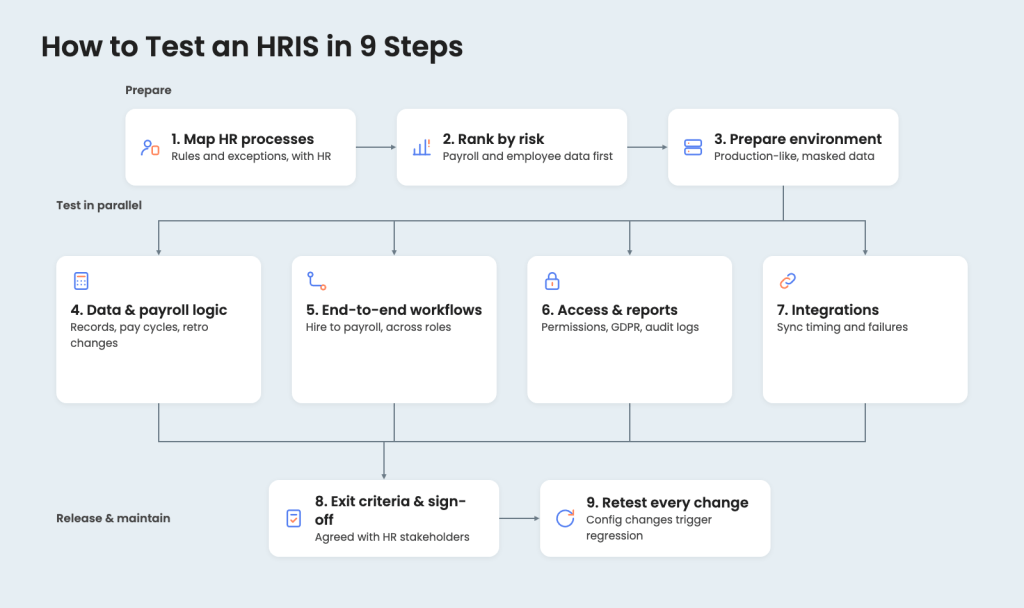
Step 1. Map HR processes with the HR team
HRIS testing starts with how HR work actually happens. HR professionals walk testers through payroll rules, approval chains, absence policies, and their exceptions, and testers turn them into test scenarios. Policies that differ by country, contract type, or employee group get documented separately.
Step 2. Rank HRIS functions by risk
Payroll, employee records, access control, compliance reporting, and workflows that span several roles carry the most risk, so they get the deepest coverage. Lower-risk features, such as cosmetic settings, get lighter checks.
Step 3. Build a production-like environment with masked data
The test environment mirrors production configuration, including roles, workflows, and integrations. Employee data is anonymized or masked to meet GDPR and data security requirements. Its structure and volume stay realistic, so payroll and reports behave as they would in production.
Step 4. Test employee data and payroll logic
Employee records get tested through their full lifecycle: creation, role and location changes, contract updates, and archiving, with history kept intact. Payroll tests cover pay cycles, deductions, bonuses, benefits, rounding, currency handling, and retroactive changes.
Scenario: An employee moves from full-time to part-time mid-cycle with unpaid leave pending. Pay is prorated correctly, and both contracts stay in the employee’s history.
Step 5. Test workflows end to end across roles
Many HRIS defects appear only when a workflow crosses modules or roles. Tests follow complete paths, including rehires and internal transfers:
- Vacancy to hire to employee record
- Time tracking to payroll
- Role change to access update
Scenario: A rejected candidate is rehired a year later. The system links the new record to the old application without creating a duplicate employee.
Step 6. Test permissions, compliance, and reports
Each user type, from employees and managers to HR professionals and administrators, gets tested for what it can see and change. Audit logs, GDPR retention rules, and compliance reports get checked against real data, along with filters, exports, and scheduled reports.
Scenario: A manager moves to another department. Their access to the old team’s salary data ends the same day.
Step 7. Test integrations with connected systems
HRIS platforms exchange data with payroll providers, applicant tracking systems, accounting software, and other HR tools. Tests cover synchronization timing, error handling when a connected system fails, and behavior after updates on either side.
Scenario: The payroll provider’s API is down on payroll day. The HRIS queues the export, alerts the HR team, and sends nothing twice when the connection returns.
Step 8. Set exit criteria and get sign-off
Each testing stage closes against agreed criteria:
- critical calculations confirmed
- workflows validated
- high-risk defects resolved
- sign-off from HR stakeholders
The test scope, risks, and results get documented for audits and future updates.
Step 9. Retest after every configuration change
Most HRIS issues come from configuration changes rather than new features, so any change to rules, workflows, or policies triggers targeted regression testing. Automation covers repeatable checks such as payroll calculations and data validation, while complex workflows and usability stay manual.
Scenario: A new overtime policy goes live. Existing absence accruals and approval routes still work exactly as before.
HR Information System Testing Challenges You Shouldn’t Underestimate
Testing an HR information system presents challenges that are easy to overlook, especially when teams assume HR platforms are simpler than other enterprise systems. In reality, HRIS platforms combine complex rules, sensitive employee information, and frequent organizational change, making testing more demanding than it appears.
Ignoring these challenges often leads to issues surfacing late, when they are harder to fix and more visible to employees and auditors. Here are the top HRIS testing challenges to plan for in your QA strategy.
Configuration complexity and hidden dependencies
HRIS platforms rely heavily on configuration rather than custom code. Rules for payroll, time tracking, benefits, and approvals are often interconnected, and a small configuration change can affect multiple HR processes.
Testing must account for these dependencies. Without it, teams may miss side effects that only appear after changes are applied across the system.
Managing sensitive employee data during testing
HR systems process highly sensitive data, including personal details, compensation, and employment history. Testing must safeguard sensitive employee information while still using realistic data structures.
Creating a secure test environment with masked data is often underestimated and, if done poorly, can introduce compliance and data security risks.
Frequent changes driven by HR and the business
HRIS platforms evolve constantly. Policy updates, organizational changes, and new regulatory requirements all lead to adjustments in configuration and workflows.
Without ongoing testing, these changes can gradually degrade system behavior, causing payroll errors, broken approvals, or outdated reports over time.
Multiple user roles and expectations
HRIS users include HR professionals, managers, employees, and administrators. Each group interacts with the system differently and has distinct expectations.
Testing must focus not only on functionality, but also on access rights, usability, and data visibility across roles. Overlooking any role often leads to access issues or workflow bottlenecks.
Reporting accuracy and audit readiness
Reports and metrics are often trusted without question once a system is live. However, incorrect logic, incomplete data, or configuration gaps can invalidate reports used for decision-making or audits.
Testing must verify that analytics, compliance reports, and audit trails reflect real HR data and rules, not assumptions.
Maintaining consistency across updates and integrations
HRIS platforms rarely operate in isolation. Integrations with payroll providers, accounting systems, or other HR tech introduce additional points of failure.
Testing after updates to either the HRIS or integrated systems is critical to maintaining consistent behavior and optimal system performance over time.
We turn even the biggest challenges into opportunities for growth

Best Practices for HRIS Testing
HRIS testing is most effective when it follows clear, repeatable best practices rooted in how HR systems are really used. This approach helps teams avoid reactive fixes, reduce long-term risk, and keep the system dependable as HR needs change. Rather than treating testing as a final step, these practices position it as part of everyday HRIS management.
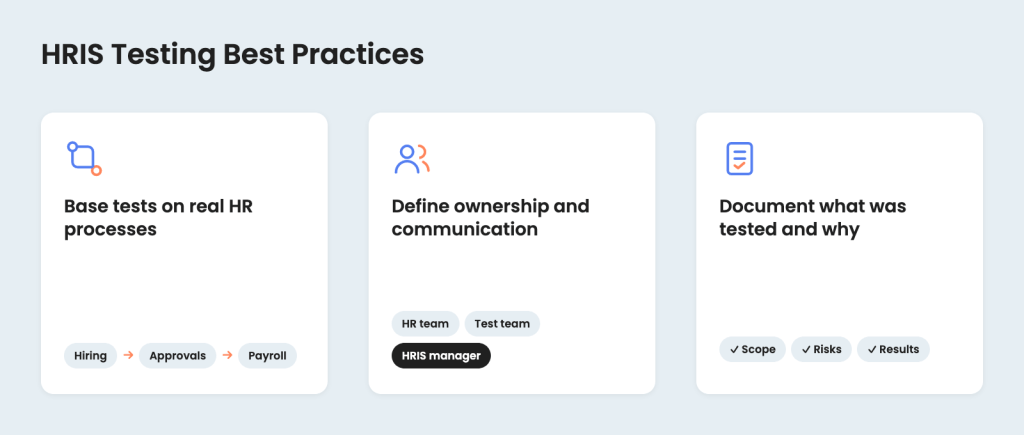
1. Base tests on real HR processes, not screens
Effective HRIS testing mirrors real HR workflows instead of isolated UI actions. Tests should reflect how employee information moves through the system, how approvals work in practice, and how changes affect downstream processes like payroll or reporting.
This reduces the risk of systems that “work” technically but fail in day-to-day HR use.
2. Define clear ownership and communication
HRIS testing works best when roles and responsibilities are clear. The HR team, HRIS manager, and test team should know who validates processes, who tests system behavior, and who approves readiness.
Clear communication with each stakeholder reduces delays and prevents assumptions about system readiness.
3. Document what was tested and why
Lightweight yet comprehensive documentation of test scope, risks, and outcomes supports future updates and onboarding. It also helps teams identify areas for improvement and avoid repeating the same mistakes after changes or personnel transitions.
Our Experience with Testing HRIS Applications
HRIS testing challenges rarely appear in isolation. They emerge over time, through system growth, integration complexity, changing HR requirements, and real usage at scale. The following examples reflect practical testing scenarios we have encountered while working with different HR systems, each highlighting distinct risks and lessons learned when testing HR platforms in real-world conditions.
1. Testing for an Odoo-based HR information system
This project showed how quickly an HRIS can evolve from a simple recruitment tool into a critical HR and finance system. As our internally built Odoo-based platform expanded to cover recruitment, HR, payroll, project tracking, and finance, testing challenges shifted from isolated defects to systemic risk. Cross-module data flow, role-based access, and environment-specific behavior became constant sources of issues, where a small logic error could affect payroll accuracy, invoices, or employee records used daily across the company.
What made the difference was applying HR system testing expertise that went beyond feature checks. We treated the platform as a living HRIS ecosystem, validating end-to-end employee and project workflows, tracing data across modules, and continuously rechecking financial and HR logic after changes. Over time, this approach stabilized integrations, reduced calculation errors, and exposed hidden permission and synchronization issues early. The key lesson was clear: in complex HRIS environments, continuous, scenario-driven testing is the only way to maintain trust in the system as it grows and changes.
2. Testing an all-in-one HR & recruitment application
This project highlighted the challenges of testing a modern, all-in-one HR and recruitment application designed to support hiring, onboarding, time tracking, and benefits management within a single system. The main risks were not individual features, but the way multiple modules interacted under tight release schedules. Frequent updates, third-party payroll integrations, and inconsistent user experience across devices made it difficult to maintain stability without a disciplined testing approach.
The thing that proved essential was combining HR domain knowledge with adaptive testing practices. We focused on end-to-end scenarios that reflected how HR teams actually use the system, while building a strong regression foundation to prevent old defects from resurfacing. By balancing manual testing for usability and workflow validation with targeted automation for repeatable checks, we helped stabilize releases, improve calculation accuracy, and create a smoother experience for users. The key lesson from this project was that HR software quality depends less on feature completeness and more on consistency across releases, integrations, and real-world HR workflows.
Onboarding time reduced by 33%, 98% calculation accuracy achieved: Testing an HR & recruitment application
3. QA automation for a virtual training and HR learning platform
This project demonstrated how HR-related platforms can evolve into highly complex, cloud-dependent systems that require a fundamentally different testing mindset. When we joined, the product had minimal test coverage, no formal testing strategy, and rapidly growing datasets tied to cloud usage, cost calculations, and localization. As the platform expanded across multiple cloud providers and languages, performance, integration accuracy, and data reliability became critical risks that could directly affect customer trust and operational costs.
Our key contribution was building a testing strategy from the ground up and scaling it over more than six years as the product matured. We focused on end-to-end automation to validate how users interacted with virtual training labs, how cloud usage time and costs were calculated, and how the system behaved under increasing load. One important lesson was recognizing performance and scalability as HR system concerns, not just technical ones, especially as user adoption grew. By continuously adapting the testing approach, expanding automation coverage, and integrating testing into CI/CD, we helped transform a fragile early-stage product into a stable, scalable platform trusted by enterprise customers.
37% fewer support tickets, 25% increase in user engagement: QA automation for an HR learning platform

Final Thoughts
HRIS testing sits at a level of technical depth that is easy to underestimate. Beneath familiar HR workflows are complex data relationships, rule-driven logic, integrations, and access controls that must remain consistent as the system evolves. Without deliberate testing, even mature HR platforms can gradually lose reliability, especially as configuration changes accumulate and business requirements shift.
Treating HRIS testing as an ongoing technical discipline, rather than a one-off validation step, allows organizations to preserve system integrity over time. It creates confidence that the HRIS will continue to support accurate decisions, stable operations, and dependable employee interactions, even as scale, complexity, and expectations increase.
FAQ
 What is HRIS and what does HRIS stand for?
 What is HRIS and what does HRIS stand for?
HRIS stands for human resource information system. In simple terms, it is HR software designed to manage employee information, payroll, recruitment, and other HR processes within a single system that supports both operational and strategic HR work.
When should you start testing during HRIS implementation?
Testing should begin as soon as the HRIS system is configured, well before launch. Early testing during HRIS implementation helps ensure accuracy in employee data, payroll logic, workflows, and compliance rules, reducing the risk of issues once the new system is used by the HR team.
What are the most common problems found in HRIS apps?
Common issues in HRIS apps include incorrect payroll calculations, broken recruitment workflows, misconfigured permissions, inaccurate analytics, and inconsistencies in employee information. Many of these problems only appear when real HR processes and edge cases are tested within the system.
Who should be involved in the process of HRIS testing?
HRIS testing should involve HR professionals, an HRIS manager, and a dedicated test team. HR users validate real workflows and HR processes, while testers focus on system behavior, data security, compliance, and ensuring the information system works reliably across roles.
How often should HRIS systems be tested?
HRIS systems should be tested regularly, especially after configuration changes, policy updates, integrations, or new releases. Ongoing testing helps maintain optimal system performance, safeguard sensitive employee information, and ensure the HRIS continues to support evolving organizational needs.
Jump to section
Hand over your project to the pros.
Let’s talk about how we can give your project the push it needs to succeed!