
Somewhere in your organization, there is a meeting happening right now where someone is defending the automation suite. It has 2,000 tests. It runs on every build. Pass rate is 94%. And yet a customer-facing bug shipped last Thursday, and the team is explaining why.
If that meeting sounds familiar, this guide is for you. Not for the engineer writing their first automated test script — for the engineering leader, QA head, or CTO who needs to make decisions about automation testing scripts as a business asset. What to build, what to outsource, how to measure ROI, and how to tell if the suite you already have is worth the maintenance cost it’s extracting every quarter.
This guide covers:
- The real economics of automation testing scripts — what they actually cost, where the savings come from, and why they rarely come from headcount.
- How to tell if your scripts are working — the metrics that matter vs. the ones that look good in reports.
- Build in-house, outsource, or hybrid — a framework for deciding, with real-world tradeoffs.
- Coverage strategy, tooling, and failure modes — what to automate, what to skip, and how programs actually break.
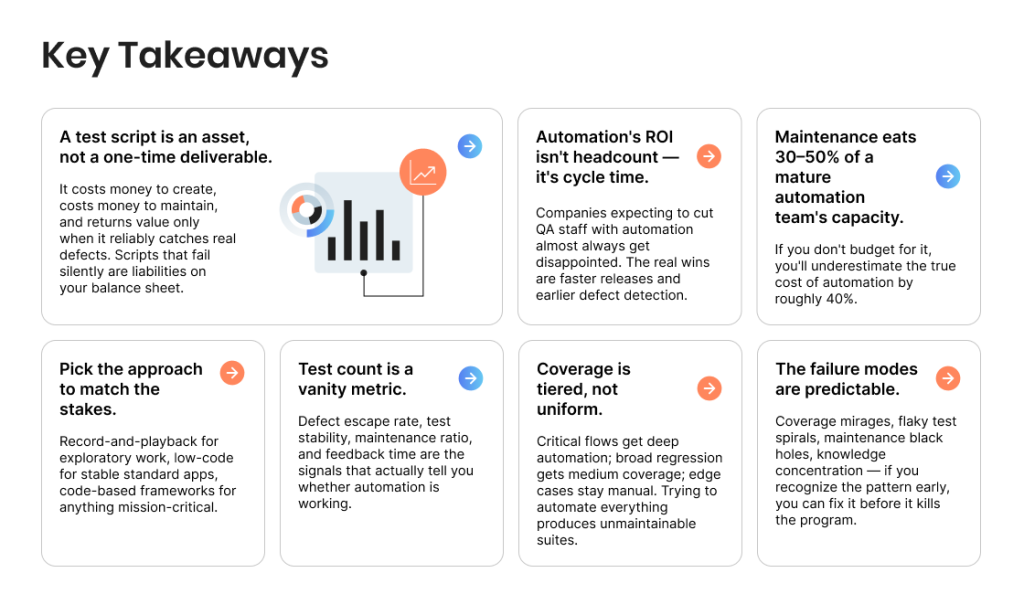
Key Takeaways
- A test script is an asset, not a one-time deliverable. It costs money to create, costs money to maintain, and returns value only when it reliably catches real defects. Scripts that fail silently are liabilities on your balance sheet.
- Automation’s ROI isn’t headcount — it’s cycle time. Companies expecting to cut QA staff with automation almost always get disappointed. The real wins are faster releases and earlier defect detection.
- Maintenance eats 30–50% of a mature automation team’s capacity. If you don’t budget for it, you’ll underestimate the true cost of automation by roughly 40%.
- Pick the approach to match the stakes. Record-and-playback for exploratory work, low-code for stable standard apps, code-based frameworks for anything mission-critical.
- Test count is a vanity metric. Defect escape rate, test stability, maintenance ratio, and feedback time are the signals that actually tell you whether automation is working.
- Coverage is tiered, not uniform. Critical flows get deep automation; broad regression gets medium coverage; edge cases stay manual. Trying to automate everything produces unmaintainable suites.
- The failure modes are predictable. Coverage mirages, flaky test spirals, maintenance black holes, knowledge concentration — if you recognize the pattern early, you can fix it before it kills the program.
Not sure if your automation is delivering the ROI it should?
Our QA architects can benchmark your current scripts against industry norms in two weeks.

What Automation Testing Scripts Are in 2026
An automation testing script is a set of coded instructions that executes a test case without human intervention — simulating user actions, validating outcomes, and reporting whether the software behaved as expected. That definition is in every guide on the internet.
What those guides rarely say is that a test script is also an asset on your balance sheet — whether you formally track it or not. Each script costs money to create, costs money to maintain, and returns value only when it reliably catches real defects before they reach users. Scripts that fail silently or cover the wrong test scenarios give your team false confidence, which is arguably worse than having no automation at all.
There’s also a useful distinction rarely made outside engineering teams: the difference between a test script and an automation script more broadly.
A test script validates software behavior — executing defined test cases against specific test data and asserting outcomes inside your test framework. An automation script is any piece of code that replaces a manual task, which could include test execution but also data setup, environment provisioning, CI/CD triggers, or report generation. Healthy QA programs use both.
Automated Software Testing as an Engineering Discipline
Automated software testing has matured into a proper engineering discipline over the past decade. It’s no longer a QA side-project — it sits alongside application code in the same repository, goes through the same review process, and gets measured against the same reliability standards. The teams that get the most value from automation treat test code as production code.
Best Practices for Treating Scripts Like Assets
A well-run automation program treats these scripts the way a product team treats code: with ownership, version control, code review, technical debt tracking, and retirement policies. These best practices aren’t optional — they’re what separates automation that delivers value from automation that becomes a drag on the testing process.
The goal isn’t just to create scripts — it’s to build scripts to improve release velocity, scripts to ensure critical flows stay covered over time, and scripts to make manual testers more effective, not redundant. Serious test maintenance starts here, not after the first complex test suite becomes unmanageable.
Test Scripts vs. Automation Scripts
| Aspect | Test script | Automation script |
| Primary purpose | Validate software behavior against expected outcomes | Replace any manual task with code |
| Scope | Software testing only | Testing, deployment, data ops, CI/CD, reporting |
| Output | Pass/fail with assertions | Varies — file written, task completed, notification sent |
| Owner | QA or automation engineers | QA, DevOps, SRE, or developers |
| Example | Verify login with valid credentials returns welcome screen | Rename 10,000 files in a directory to match a new schema |
| Fails when | The application misbehaves | The target system or data changes unexpectedly |
The Real Economics of Automation Testing Scripts
The business case for test automation is usually presented as a simple tradeoff: invest upfront, save on repetitive manual testing forever. That framing is wrong in three ways, and getting them right changes how you budget.
Automation scripts have ongoing cost, not just setup cost. Every script you write needs maintenance as the application changes. The industry benchmark is that mature automation teams spend 30–50% of their capacity on maintenance rather than new test creation. If you have a team of four automation engineers, that’s the equivalent of one-and-a-half engineers working full-time just to keep existing scripts running.
The savings don’t compound linearly. The first hundred automated test cases usually deliver massive ROI because they replace manual testing of critical paths — login, checkout, core workflows. The next hundred deliver less, because you’re automating less important flows.
By the time you’re at a thousand scripts, you’re hitting diminishing returns, and the cost of maintaining the tail often exceeds its value. Smart teams cap their suite size deliberately and rotate coverage rather than accumulating scripts indefinitely.
The real savings are in cycle time, not headcount. Companies expecting automation to reduce QA headcount almost always get disappointed. What automation actually delivers is faster release cycles and earlier defect detection.
A bug caught in CI/CD before it hits staging is roughly ten times cheaper to fix than the same bug caught in production. That’s where the money is — not in firing testers. Teams that want to test more, ship faster, and catch issues earlier use automated scripts to improve the entire pipeline — not to replace the humans in it.
Case Study Example: Print-on-Demand E-Commerce
One of our clients, a print-on-demand company serving over 26 million orders annually, came to us with a bottlenecked release cycle. Regression testing was eating days before every release, and a business looking to expand into new markets and acquired companies couldn’t ship fast enough to keep up.
What we built: progressive automation of their core flows (catalog management, order processing, payment validation, cross-device rendering), continuous automation pipelines with consolidated reporting across devices, and automatic video recordings of failed tests to isolate low-reproducibility issues.
Results:
- 92% reduction in regression test cycle time through automation of the core release path.
- 30+ iOS and Android devices covered in cross-platform testing, plus Windows and iOS desktops.
- Scaled QA workflow to cover three additional companies acquired by the client, with no proportional headcount increase.
- Headcount savings were minor; the shipping velocity gains were transformational — releases that used to take days now happened in hours.
The takeaway: the economics of automation are in release velocity and earlier defect detection, not in replacing testers. Teams that measure automation purely on test-count or head-count reduction miss the point.
Want an honest read on where your automation ROI is hiding?

The Three Approaches to Creating Automated Test Scripts
There are three broad ways to create automation testing scripts, and the choice between them has bigger business implications than most engineering leaders realize. Each approach produces scripts for automation of different scope — from simple recorded clickthroughs to complex code-based test frameworks that plug into CI/CD and run on every commit.
The decision also depends on the type of testing you need to automate: a smoke-test suite is a very different beast from a full regression pack, and record-and-playback might be enough for the first while you use code to create automated infrastructure for the second. Automatic test execution is only as valuable as the design discipline behind it.
1) Record-and-playback. A tester performs a workflow in the application, the tool records the interactions, and out comes a script. No coding required. Tools like Selenium IDE, Katalon Recorder, and older solutions like UFT have done this for decades.
The strategic reality: recorded scripts are notoriously fragile. Change a button’s CSS class, rename a form field, or reorganize a page, and the script breaks. Works fine for exploratory one-off automation or as a learning path, but rarely the foundation of a serious program at scale.
2) Low-code and codeless platforms. A newer generation of tools — Testim, Katalon Studio, TestCraft — combines record-and-playback accessibility with more robust element identification and AI-assisted self-healing. Scripts are authored by QA engineers without deep programming skills.
Good middle path for organizations with strong manual QA teams and limited automation engineering capacity. The tradeoff: platform lock-in, licensing costs that scale with usage, and ceiling effects when you need to automate something the platform doesn’t natively support.
3) Code-based automation frameworks. The industry standard for serious programs: a real programming language (Java, JavaScript, Python, C#), a framework like Selenium, Playwright, Cypress, or Appium, and scripts maintained like any other codebase with Git, CI integration, and code review.
Test code lives alongside production code, gets reviewed, refactored, and versioned. This approach delivers the lowest long-term maintenance cost, the highest flexibility, and the best integration with developer workflows. It supports everything from pure web automation to complex GUI test orchestration and API-first test automation frameworks.
Requires real engineering skills — either in-house automation engineers or a specialized partner.
Which Approach When
| Approach | Best for | Watch out for |
| Record-and-playback | One-off exploratory automation, training juniors, proof of concept | Maintenance overhead compounds on large suites |
| Low-code / codeless | Standard web/mobile apps, teams with strong manual QA but no AQA | Platform lock-in, licensing cost at scale, ceiling on complex cases |
| Code-based frameworks | Mission-critical, enterprise-grade, or architecturally complex systems | Requires real engineering skills in-house or from a partner |
Our automation practice at TestFort is built around Java, JavaScript, and C# with frameworks including Selenium, Playwright, and Appium — which covers the vast majority of modern testing needs across web, API, and desktop applications.
Case Study: Nova Backup
When we partnered with Nova Backup — a complex multi-product backup solution with a client console, management interface, and data center component — we used Selenium WebDriver alongside Coded UI, TestStack, and White to handle the desktop components.
What we delivered over three years:
- 10+ test suites of reusable, scalable scripts designed to speed up testing of updates and new features.
- CRUD operations integrity validation across every product module and workflow.
- Parallel testing across 10+ Windows-based operating systems for comprehensive bug discovery.
- End-user simulation at the UI layer to ensure real-world quality.
- 300+ bug reports produced, contributing to a Top Ten Reviews Gold Award for the product.
That level of depth simply isn’t achievable with record-and-playback or most low-code tools. It required real engineering — and delivered real results.
Evaluating which approach fits your stack?

How to Tell if Your Test Automation Scripts Are Working
Most organizations have no reliable way to answer a simple question: are our automation testing scripts delivering value? Teams report on test counts, pass rates, and execution times — but those metrics can all look healthy while the underlying program is quietly failing. Here are the metrics that actually matter.
- Defect escape rate. Of the bugs that reach production, how many should have been caught by existing automated tests? If your regression suite has 2,000 scripts and critical production bugs keep slipping through, your coverage is in the wrong places. The single most honest signal about whether automation is doing its job.
- Test stability. What percentage of your automated test failures are real defects versus flaky tests? A suite where half the red results are false alarms trains the team to ignore failures, defeating the entire purpose. Healthy suites run above 95% stability; anything below 85% needs intervention.
- Maintenance ratio. How much of your automation team’s time goes to maintaining existing scripts versus building new coverage? If maintenance is eating more than half the capacity, the suite has too much debt and needs pruning before adding more.
- Feedback time. How long between a developer pushing a commit and the automated tests telling them whether it broke something? Sub-30-minute feedback loops change developer behavior and enable real continuous delivery. Multi-hour loops push teams back toward batch releases and larger risk exposure.
- Coverage of high-risk areas. Where are your highest-stakes workflows — payments, authentication, data integrity, regulatory compliance — and how deeply are they covered? Matters far more than total script count. A hundred well-placed scripts on critical flows beats two thousand shallow scripts on peripheral features.
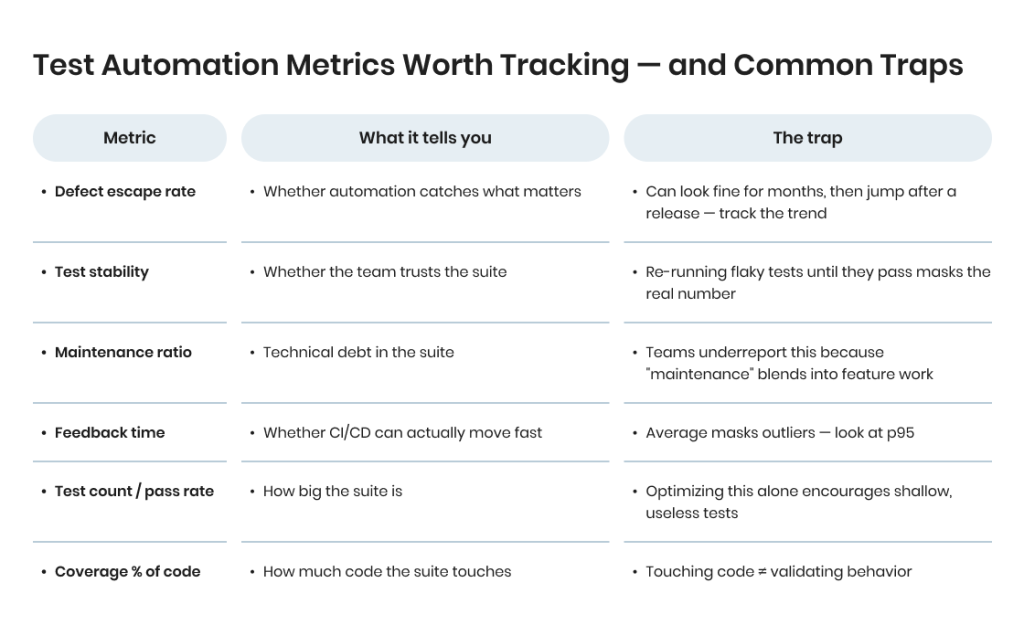
A pattern we see consistently when auditing existing automation for new clients: the team reports strong numbers on execution time and pass rate, but when we dig into defect escape rate and maintenance ratio, the picture is much less rosy. The scripts are running. They’re just not catching the right things.
Want an objective look at how your automation is actually performing?

Build In-House, Outsource, or Hybrid
This is the question that most often lands on an engineering leader’s desk, usually driven by a quality crisis or a budget review. There’s no universal right answer, but there is a clear framework.
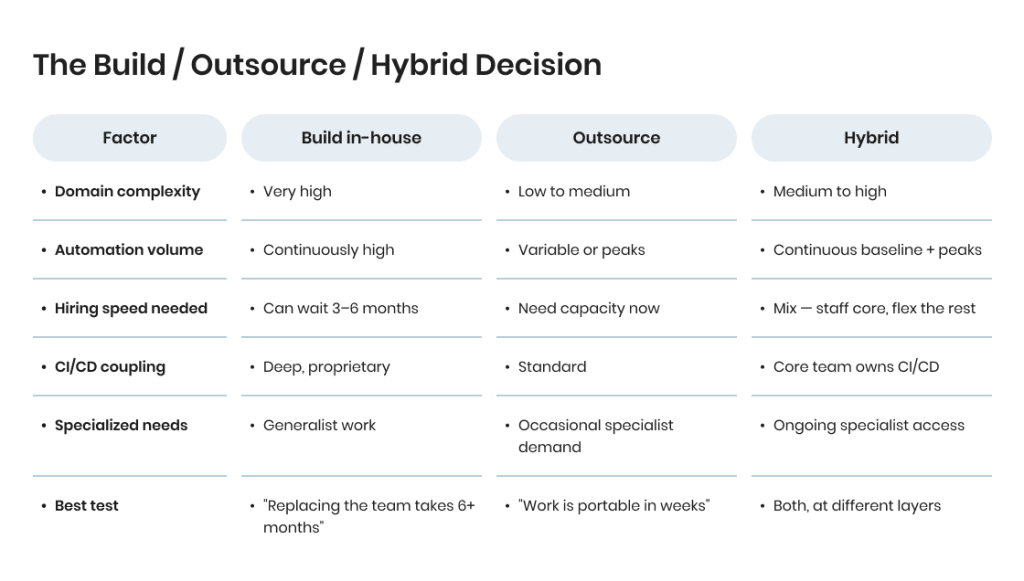
Build in-house when your application has deep domain complexity only embedded people can understand; your automation needs are tightly coupled to your internal CI/CD and infrastructure; or you have enough automation volume to keep two or more engineers productively busy full-time.
In-house teams build institutional knowledge that pays off over years, but they’re expensive and slow to staff — a senior automation engineer in North America or Western Europe typically runs $120K–$180K fully loaded, and good ones take 3–6 months to hire.
Outsource when you need to scale automation capacity up or down with release cycles; you want access to specialized skills (performance engineering, security automation, cross-platform mobile testing) without hiring for each; or you need automation expertise but your primary focus is building product, not building a QA function. A good QA partner brings experience from dozens of similar projects — faster time-to-value and fewer rookie mistakes.
Go hybrid when you’re a mid-sized or larger company (the most common pattern). Keep a small in-house team for pieces requiring deep product knowledge and CI/CD ownership; use an external partner for capacity, specialized work, and scale. The in-house team sets strategy and owns core frameworks; the external team executes volume and handles specialized automation types.
The Build / Outsource / Hybrid Decision
Case Study: Global Digital Asset Management
One of our longest-running engagements — a global digital asset management company whose software is used by entertainment media giants with multi-billion-dollar titles — illustrates the hybrid model at enterprise scale.
Team structure over 5+ years: 1 QA Lead, 1 Manual QA, 2 Automation QA, 2 Mobile Developers, and 1 TV Developer working alongside the client’s internal engineering team.
What we delivered:
- Integrated TestRail with Jira and Liquidplanner for better issue detection across tooling.
- Scaled testing strategy continuity from one environment to four environments without losing process integrity.
- Built a custom test-load tracker to define how many tests could run in parallel without triggering server errors under massive request load.
- Developed an advanced analysis tool that collected test results and grouped them by error hash, binding all errors from one root action.
That model only works when the external partner has the scale and continuity to function like an extension of the in-house team. If you go hybrid, make sure your partner can do both.
Figuring out your build vs. outsource mix?

Coverage Strategy: What to Automate, What to Skip
One of the most expensive mistakes in automation is trying to automate everything. The correct question isn’t what can we automate — it’s what should we automate, and what should stay manual?
Strong candidates for automation share a few characteristics. The test runs frequently — every build, every day, every release. Expected behavior is stable and well-defined. Manual execution is tedious, error-prone, or both. Feedback needs to be fast enough to block a bad build.
Login flows, core CRUD operations, API contract validation, testing web applications across browsers, and regression tests on high-traffic features all fit this profile cleanly. When you create test cases for these flows, automation compounds in value over time.
Poor candidates are the opposite. Tests where expected behavior is subjective or aesthetic. Tests that run rarely — once a quarter for compliance. Tests requiring complex human judgment about acceptability. Exploratory testing aimed at finding unknown unknowns. Usability testing. Early-stage testing of features still changing rapidly. Automating these costs more than it saves, and often fails to catch the real issues anyway.
The middle category that trips up a lot of teams: tests that could be automated but cost more to automate than they return. A test that runs once a month and takes a tester 20 minutes manually doesn’t justify eight hours of automation engineering. Do the math before you automate.
When to Use Automated Test Scripts vs. Manual Testing
The decision of when to use automated scripts comes down to frequency, stability, and stakes. Use automated scripts for flows that run on every build, have well-defined expected outcomes, and carry real business risk if they break. Keep manual testing for exploratory work, usability validation, and anything where human judgment matters more than repeatability. The goal isn’t to create automated coverage of everything — it’s to create automated coverage of the right things.
Coverage Tiers
A useful framework is to think in tiers:
- Tier 1 — Critical path automation. The handful of flows where a failure means real revenue loss or customer harm — payments, authentication, data integrity, core product functionality. Deepest and most reliable automation, run on every commit, immediate attention when broken.
- Tier 2 — Broad regression coverage. The larger set of flows that should keep working. Covered by automation, run on every build or daily, maintained at lower intensity.
- Tier 3 — Targeted scripts for known risk areas. Features with history of issues, integration points with third parties, edge cases uncovered by past incidents. Automated selectively based on evidence, not aspiration.
- Everything else — manual and exploratory testing. Not a failure of automation. It’s where humans add value machines can’t.
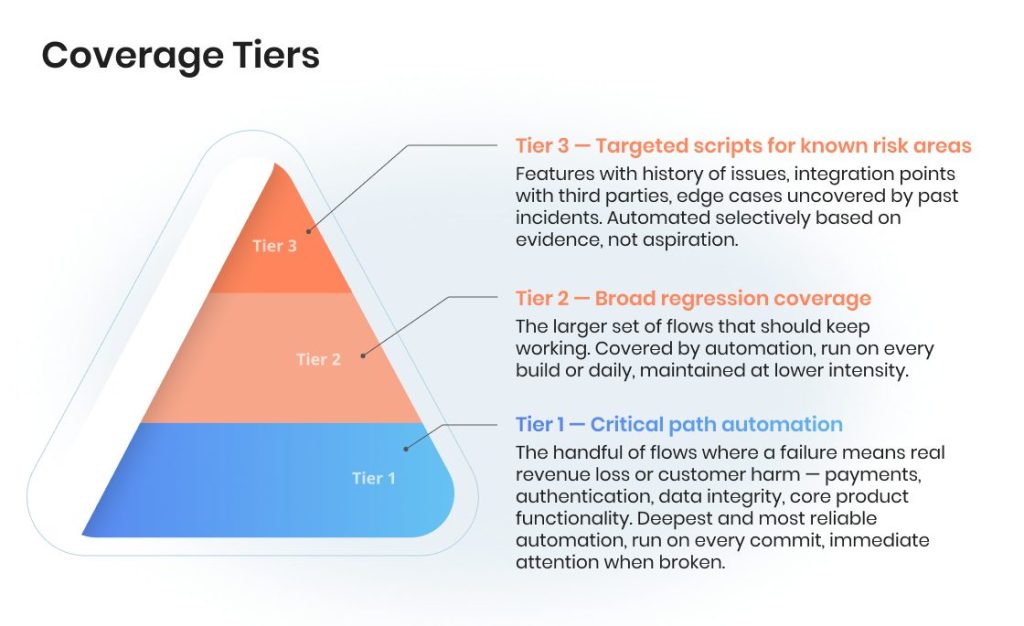
This tiered approach prevents the two most common automation pathologies: “automate everything” (unmaintainable suites) and “automate only the easy stuff” (highest-risk areas left uncovered because they’re hardest to automate).
Types of Automation Testing: How to Create Automated Coverage for Each Type of Testing
Different types of automation serve different goals, and a well-rounded suite usually combines several. The most common types of automation testing our clients run across multiple test cases and projects:
- Functional testing — verifying that features work the way the specification says they should.
- Regression testing — confirming that new changes haven’t broken existing behavior. The biggest single justification for automation in most organizations.
- Smoke testing — a thin layer of critical-path checks that runs on every build to catch catastrophic regressions fast.
- API testing — validating contracts, payloads, and error handling below the UI layer.
- GUI testing — end-to-end validation through the user interface, usually via Selenium, Playwright, or Cypress.
- Performance testing — load, stress, and scalability checks, often run separately from functional suites.
- Data-driven testing — the same test logic run against many input variations, useful for form validation, calculation engines, and edge-case coverage.
- Visual testing — pixel-level or perceptual comparison of UI against baselines, catching cosmetic regressions conventional scripts would miss.
- Acceptance testing — business-facing scenarios that prove the system meets user needs, often expressed in Gherkin/Cucumber.
- Continuous testing — the integration of automated test scripts run directly in CI/CD pipelines so that every commit gets validated automatically.
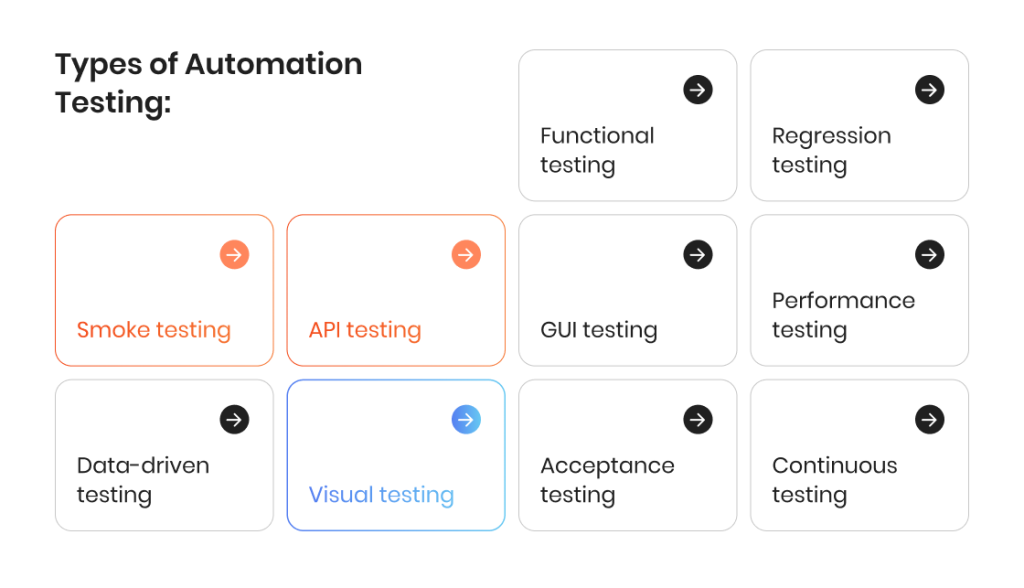
Which types need to be automated depends entirely on where your risk sits. A B2C e-commerce platform will weight visual and performance testing heavily; a B2B SaaS with complex business logic will weight functional, API, and data-driven tests.
Case Study: NetSuite Customization for a Wheel-End Manufacturer
Our client, a world-known manufacturer with operations from the USA to China and Canada to Australia, needed automated testing of their custom NetSuite application used for order management, payment processing, and supply-chain operations.
What we delivered over 1 year with a focused 2-person automation team:
- 500+ end-to-end test cases built around NetSuite peculiarities and industry-specific business logic.
- 100% automated test coverage of the core order-to-cash and payment workflows.
- Over 20% reduction in operational overheads through process optimization.
- 4 major releases ran smoothly after the automation suite was in place.
A tiered coverage strategy made this work. We didn’t try to automate everything — we automated the workflows where failures had the highest business cost, documented the rest, and left lower-risk flows to targeted manual testing.
Automation Testing Tools Landscape & How to Pick the Right One
The automation testing tools market is crowded and confusing, and vendor marketing doesn’t help. Every automation tool on the market claims to be faster, smarter, and easier than the last. At a strategic level, here’s what you actually need to know when choosing a test automation tool that fits your stack.
How to Choose a Software Testing Tool for Web Automation
For web application testing, the de facto standard is now Selenium (the longstanding veteran, supports every language, endless ecosystem, steepest learning curve) or Playwright (Microsoft’s modern framework, faster, better developer experience, excellent for JavaScript/TypeScript teams).
Cypress is also popular for front-end-heavy teams, though with architectural limitations for complex scenarios. Choice of software testing tool is usually driven by language preferences and application age more than any objective superiority.
Test Framework Choices: API, Mobile, and Beyond
For API testing, Postman has become ubiquitous for early-stage and exploratory work, while RestAssured (Java) and Playwright’s API testing capabilities dominate for teams keeping API tests in the same codebase as UI tests. Emerging best practice: push as much testing as possible down to the API layer — it’s faster, more stable, and less expensive to maintain than UI automation — with UI automation reserved for flows where the UI itself needs validation.
For mobile testing, Appium remains the cross-platform standard, with Espresso (Android) and XCUITest (iOS) as platform-native alternatives when you need deeper integration. Mobile automation is genuinely harder than web — higher environment complexity, lower stability, real device-coverage problem.
Performance Testing Tools
For performance and load testing, the tools are separate from functional automation. JMeter is the open-source mainstay, k6 is the modern developer-focused alternative, Gatling and NeoLoad serve enterprise. Performance testing is a specialized skill that rarely overlaps much with functional automation engineering.
Test Management and Reporting
For test management and reporting, TestRail, qTest, and Zephyr organize test cases, track execution, and report across the whole testing program. Not automation tools themselves — but the layer where automation meets the rest of the organization.
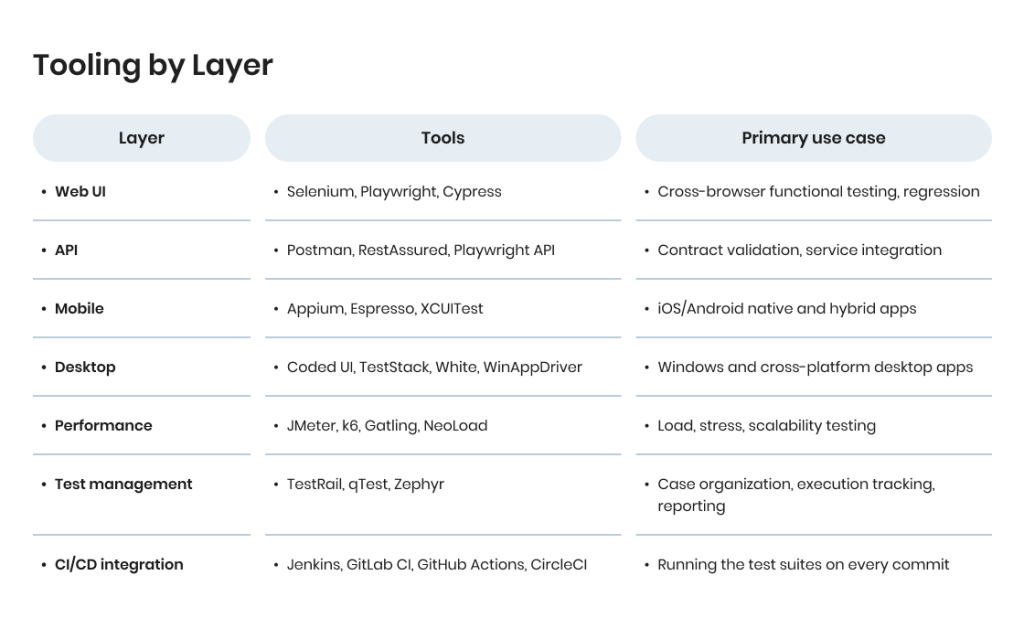
The practical advice: don’t over-invest in tool selection. The team using the tool matters far more than the tool itself. A strong automation team with Selenium will outperform a weak team on the latest AI-enhanced platform.
Pick a mainstream tool that fits your stack, invest in the people, and change tools only with a concrete reason. And whatever tool you pick, ensure that you test your own assumptions about it — run a proof-of-concept on a realistic slice of your product before committing, not a vendor demo on a clean test file.
Where Automation Programs Fail
Most organizations we talk to have automation in place. They still have quality problems. The gap between having automation and having effective automation comes down to a predictable set of failure modes.
The coverage mirage. The suite reports 80% code coverage, 95% pass rate, 2,000+ automated tests. Yet production bugs keep slipping through. Coverage is shallow — exercising code without validating important outcomes. Tests assert pages load, not that business logic is correct. Fix: rebuild assertions, don’t add more scripts.
The flaky test spiral. Tests fail intermittently for reasons unrelated to real bugs — timing, environment instability, order dependencies. The team re-runs failed tests reflexively, then ignores failures, then disables unstable tests. Eventually the suite is full of holes nobody can see. Preventable but rarely prevented, because fixing flakiness takes discipline most teams don’t enforce.
The maintenance black hole. The team spends so much time keeping existing tests running that no bandwidth remains to cover new features. The suite stops growing, then starts shrinking (implicitly) as coverage gets out of date. Eventually someone proposes scrapping and starting over — which usually fails too, because nobody learns from what went wrong the first time.
The tooling bet. The team switched to a new framework two years ago, spent a year migrating, hit the hard parts, and now runs two frameworks in parallel — the old one with real coverage, the new one that was supposed to replace it but hasn’t. Migration debt is one of the most common reasons automation programs stall.
The knowledge concentration risk. One senior automation engineer wrote most of the framework, knows where all the bodies are buried, and is the only person who can debug complex failures. When they leave, the program loses institutional memory and starts degrading. A frequent trigger for engaging us as a partner — clients realize the concentration risk and want redundancy.
The wrong layer problem. All the automation is UI-level, because that’s where the team started. UI tests are slow, fragile, and expensive. Better pattern is a pyramid: lots of unit tests (fast, stable, owned by developers), a middle layer of API tests (still fast, less fragile, owned jointly), and a smaller layer of UI tests for flows where UI is actually what matters. Skipping the API layer produces expensive, slow suites that don’t scale.
| Failure mode | Signal | Fix |
| Coverage mirage | High test count, production bugs still escaping | Rebuild assertions around business outcomes, not page loads |
| Flaky test spiral | Stability below 85%, team re-runs until green | Quarantine flaky tests, fix root causes before adding coverage |
| Maintenance black hole | 60%+ of team’s time on maintenance | Prune suite aggressively, modularize, improve abstractions |
| Tooling bet | Two frameworks running in parallel | Commit to one; accept the migration cost; don’t stall halfway |
| Knowledge concentration | One person knows the framework | Pair programming, documentation, bring in a partner for redundancy |
| Wrong layer | All tests UI-level | Move testing down: unit → API → UI pyramid |
Each has a fix, but the fix is rarely just “write better tests.” It’s almost always a combination of technical changes, process changes, and sometimes team restructuring.
Benefits of Automated Test Scripts and Challenges
Benefits of Automated Testing Done Well
- Faster release cycles. Mature automation programs ship weekly or daily instead of monthly or quarterly, because regression cost drops dramatically.
- Earlier defect detection. Bugs caught in CI/CD are an order of magnitude cheaper to fix than bugs caught in staging or production.
- Consistent, repeatable validation. Automated tests don’t get tired, skip steps, or interpret requirements differently on Monday versus Friday. The same single test produces the same result every time.
- Scalable coverage across environments. Running 500 tests in 20 minutes on every build — and repeating them for testing across different browsers, devices, and operating systems — isn’t something human testers can physically do.
- Elimination of repetitive testing tasks. Efficient test suites remove the manual grind of re-running the same validations release after release. Scripts improve release velocity in a way that no amount of additional headcount can match — you can’t hire your way to test coverage without automation.
- Enhanced test coverage. Automation lets teams enhance test coverage into edge cases, error paths, and negative scenarios that manual testing rarely reaches.
- Freed-up human attention. When routine regression is automated, testers focus on exploratory work, edge cases, and usability — where human judgment matters.
- Quantifiable quality signals. A healthy automation program produces metrics (pass-rate trends, defect escape rate, feedback time) that give leadership an objective view of quality.
Challenges that derail programs:
- High ongoing maintenance cost. Scripts break when applications change. No maintenance budget = guaranteed failure.
- Flaky tests erode trust. Unreliable tests train the team to ignore failures, eliminating automation’s value.
- Wrong coverage is worse than no coverage. Green checkmarks on shallow tests create false confidence — harder to recover from than honest gaps.
- Skill concentration. Strong automation requires real engineering. Weak automation is often worse than honest manual testing.
- Tool sprawl. Teams that accumulate overlapping tools create integration and maintenance burden without proportional value.
- Misaligned metrics. Reporting on test counts and pass rates instead of defect escape rate and feedback time leads to local optimization without system-level improvement.
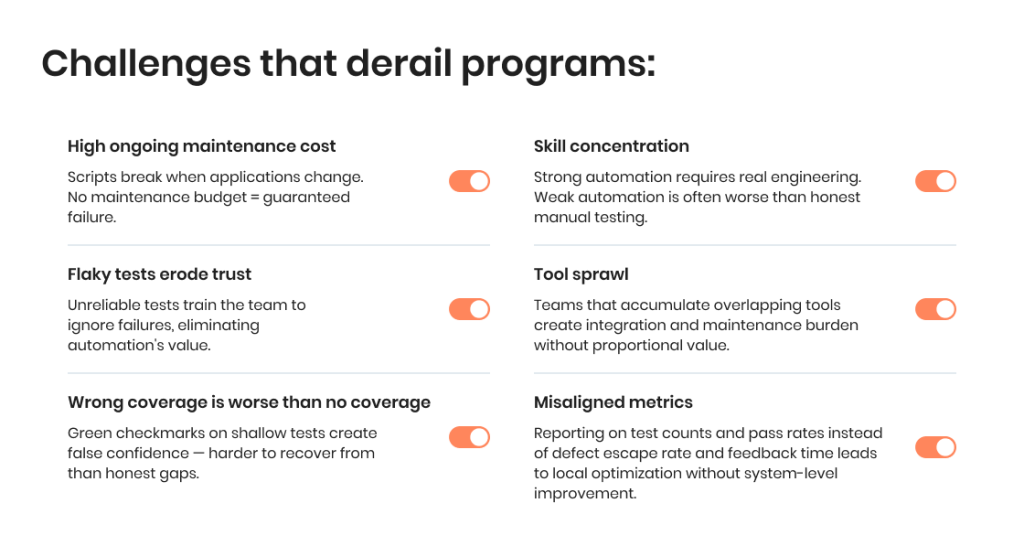
The companies that get the most out of automation aren’t the ones with the most scripts or the fanciest tools. They’re the ones that treat automation as a strategic capability, measure it honestly, and course-correct when metrics show problems.
Recognize any of these patterns in your own program?
When to Invest More in Automation, and When to Pause
One of the least-discussed aspects of automation strategy is knowing when not to invest more. Sometimes the right move is to consolidate what you have, fix what’s broken, and wait before expanding.
Before you expand the scope of testing, audit the current state: monitor test results for the last three releases, review how often you had to update scripts after each one, review whether different test types are carrying their weight, and ask whether your existing test automation frameworks are being integrated the way they should be.
Mature teams integrate automated tests directly into the CI/CD pipeline so that every commit triggers the right suite — not a manual afterthought.
Invest more when:
- Release cycles are getting longer because regression is the bottleneck.
- Defects escape to production that should clearly have been caught.
- Manual regression takes more than a day before each release.
- Developers ask for faster feedback on their commits and don’t get it.
- You’re planning major product expansion, new platforms, or increased release frequency.
- Existing automation has good stability and coverage — adding more will compound, not dilute.
Pause and fix first when:
- Test stability is below 85% — you have a flakiness problem before you have a coverage problem.
- Maintenance eats more than 60% of your automation team’s capacity.
- The team can’t tell you what percentage of critical flows are covered.
- Defect escape rate is high despite a large test suite (coverage is in the wrong places).
- Multiple overlapping tools or frameworks exist without clear ownership.
- Key automation knowledge is concentrated in one person.
Consider outsourcing or partnering when:
- An automation engineer role has been open for more than three months.
- You need specialized skills (performance, security, mobile, enterprise apps) occasionally but not continuously.
- Release cadence is highly variable and in-house capacity doesn’t match the peaks.
- Leadership wants QA to scale faster than hiring can support.
- You’re running a major migration, re-architecture, or quality remediation with a defined endpoint.
The worst thing you can do is expand a program already showing stress signals. More scripts on top of a flaky foundation just amplify the flakiness. Fix the foundation first, then scale.
Why Partner With TestFort for Automation Testing?
Since 2001, TestFort has delivered QA for enterprise and mid-market software. Our automation practice is built around Java, JavaScript, and C# with frameworks including Selenium, Playwright, Appium, Coded UI, TestStack, and White — covering web, API, mobile, and desktop applications across industries from e-commerce and fintech to enterprise ERP, media, healthcare, and regulated government systems.
What we bring:
- A business-first approach that starts with mapping quality risks and release cost before writing a single script.
- Maintenance-first engineering with reusable functions, clear naming conventions, version control discipline, and documentation of why each script exists.
- CMMI Level 3 process maturity and ISO 27001 security practices across every engagement.
- Honest metrics — defect escape rate, test stability, maintenance ratio, feedback time — not just test counts and pass rates.
- Handoff-ready frameworks designed so your team or another partner could pick them up if circumstances changed.
On specific engagements: 92% regression cycle reduction for a print-on-demand client serving 26M+ orders annually; 500+ test cases and 100% coverage for a global manufacturer’s custom NetSuite application; three years of scalable, reusable scripts for Nova Backup earning independent Gold Award recognition; five-year partnership with a global digital asset management company used by billion-dollar entertainment titles.
If you’re running automation and want an honest read — or you’re building it from scratch and want a partner who treats test scripts as engineering assets rather than vendor deliverables — we’re a call away.
Recognize any of these patterns in your own program?

FAQ
 What is an automation testing script?
 What is an automation testing script?
A set of coded instructions that runs a test case automatically — simulating user actions, validating outcomes, and reporting pass/fail. In a production context, it’s also a long-lived asset that requires ownership, maintenance, and retirement policies. Automated test scripts run every time you push code, every time you deploy, and every time you release — reliably, without human supervision.
How is an automation testing script different from a test case?
A test case describes what to test and the expected outcome in human-readable form. An automation testing script is the executable implementation of that test case — the code that performs the steps and checks the assertions against the application under test.
What are the main types of automation testing?
Most teams combine several:
Unit testing — fast, code-level, owned by developers.
Integration testing — verifying components work together.
Functional testing and GUI testing — end-user flows through the interface.
API testing — contracts between services.
Regression testing — nothing broke since last release.
Performance testing — load, stress, scalability.
Acceptance testing — business sign-off.
Visual testing — UI rendering.
Risk-based testing — prioritizing by business impact.
Different types of automation serve different risk profiles — the right mix depends on where failures hurt most.
What’s the ROI timeline for automation?
For most teams: 3–6 months for critical-path automation to pay for itself through faster regression and fewer production incidents. Full maturity and compounding ROI typically takes 12–18 months. Organizations expecting ROI in the first month almost always give up before automation becomes valuable.
How much does it cost to maintain an automation suite?
Industry benchmarks put test maintenance at 30–50% of a mature automation team’s capacity. Teams that don’t budget for this end up underestimating true automated software testing cost by roughly 40%. The fix is not to skip maintenance — it’s to build scripts that are maintainable in the first place (reusable functions, clear naming, modular structure) and to prune the suite regularly.
Should developers write test scripts, or QA?
Unit tests are owned by developers. API and integration tests are often a shared responsibility. UI automation is typically owned by QA or specialized automation engineers. The worst pattern is a clean wall between developers and testing — shared ownership catches issues faster and builds better products.
Which automation testing tool is best?
The team using the tool matters far more than the tool itself. For web automation and GUI testing, Selenium or Playwright cover most cases. For API, Postman or RestAssured. For mobile, Appium. No single software testing tool dominates across every context — pick a mainstream test automation tool that fits your stack and invest in the people.
Do you need separate test environments for automation?
Yes — automated test scripts should run against a dedicated test environment that mirrors production as closely as possible without touching real user data. Running automation against production or against a development environment that’s constantly changing creates false positives and undermines trust in the suite. A stable test environment is foundational infrastructure, not a nice-to-have.
How often should you run the test suite?
For critical-path tests, run the test on every commit — that’s the point of CI/CD integration. Broader regression suites typically run nightly or on every merge to main. Performance and load tests run less frequently, often weekly or before major releases. The exact cadence depends on your release frequency, but the principle is constant: the faster the feedback, the cheaper the fix.
Can AI replace automation engineers?
Not yet, and probably not entirely even in the medium term. AI genuinely improves script generation, self-healing, and flaky test diagnosis — reducing maintenance and increasing productivity. But automation strategy, architecture, coverage decisions, and complex failure debugging still require human engineering judgment. Realistic near-term pattern: AI-augmented automation engineers who are 2–3x more productive, not elimination of the role.
How do we know our current automation partner is doing a good job?
Look at defect escape rate, not test count. Look at feedback time, not execution time. Look at maintenance ratio, not script authoring velocity. Ask for metrics on all four. If they can’t produce them, that’s the answer.
Jump to section
Get strategy-first automation