Test Environment in Software Testing: Importance, Types, Best Practices
What is a test environment in software testing and why does it matter? Our guide to QA environments will help you test software with maximum efficiency.
Test environment is a concept that doesn’t necessarily jump to mind when thinking about software testing, but only if you’re not the one doing the testing. Professional testers, on the other hand, quickly learn not to underestimate the importance of the right test environment for the success of the whole project.
A test environment can be as simple as a QA environment for functional tests or as complex as a setup that closely mimics production, with cloud infrastructure, integrations, test data, devices, monitoring, and automation tools. But a test environment is not there to catch defects. The real benefit of the right environment is the clarity and stability that it provides, helping teams avoid unnecessary activities and keeping tests from becoming flaky.
This is especially valuable as Bitrise’s Mobile Insights report found that the share of teams experiencing test flakiness grew from 10% to 26% between 2022 and 2025. This makes it even more integral for teams to find the right test environment setup for each project. In this guide, we will explore how teams can protect release confidence, test automation ROI, and user experience by using the right environment in testing.
Key Takeaways
Test environment quality directly affects how much teams can trust release decisions.
The best test environments are designed around release risk, not internal habit.
Poor environment ownership quickly turns testing into blocker investigation.
Too few environments create bottlenecks, while too many increase cost and confusion.
The strongest setup is the smallest one that still supports reliable testing and confident releases.
What Is a Test Environment in Software Testing?
A test environment is a controlled setup where teams check software before release. It includes the application build, infrastructure, databases, network settings, integrations, test data, devices, browsers, permissions, and software tools needed to run reliable tests.
In most cases, it’s where test cases actually become useful. A payment flow needs a payment sandbox, user roles, transaction data, and expected order states. A mobile app needs the right device, OS, network, and backend conditions. A SaaS platform needs connected services, APIs, permissions, and realistic data states. This means that there isn’t a single best environment for every task, and the best environment for your project is the one that fits its specific needs.
Here are the key components of a test environment and why teams can’t do without them.
Component
Why it matters
Application built
Shows which version of the software is being tested.
Infrastructure
Defines where and how the software runs.
Test data
Makes test cases realistic, repeatable, and safe.
Integrations
Helps check APIs, payment flows, identity tools, and external services.
Devices and browsers
Supports compatibility across real devices and browsers.
Permissions
Lets teams test user roles, access rules, and admin workflows.
Testing tools
Support test management, automation, CI/CD, reporting, and debugging.
Logs and monitoring
Help teams understand whether a failure comes from the product or the setup.
A QA environment is often the main testing environment for functional, regression, integration, and exploratory tests. Larger products may also need staging, UAT, performance, security, automation, sandbox, or production-like environments. The goal is not to create more environments by default, but to give each type of testing the conditions it needs to produce trustworthy results.
A test environment is the broader place where testing happens. It may include servers, databases, APIs, integrations, browsers, devices, access rights, monitoring, test automation tools, and test data.
A test bed is a more specific configuration prepared for particular test cases. It uses the environment, but adds the exact data, settings, and conditions needed for a certain test run.
For example, an eCommerce QA environment may include the application, database, admin panel, payment sandbox, shipping API, and browser/device coverage. It becomes a test bed for checkout testing when the team prepares specific user accounts, discount codes, product stock levels, payment scenarios, and expected order states.
Here is a quick breakdown of where both test environment and test bed stand in the testing process.
Term
Meaning
Example
Test environment
The broader setup where testing happens.
QA environment with app build, database, integrations, and devices.
Test bed
A specific configuration for selected test cases.
Checkout test bed with user accounts, payment data, discounts, and order states.
Ownership and responsibility
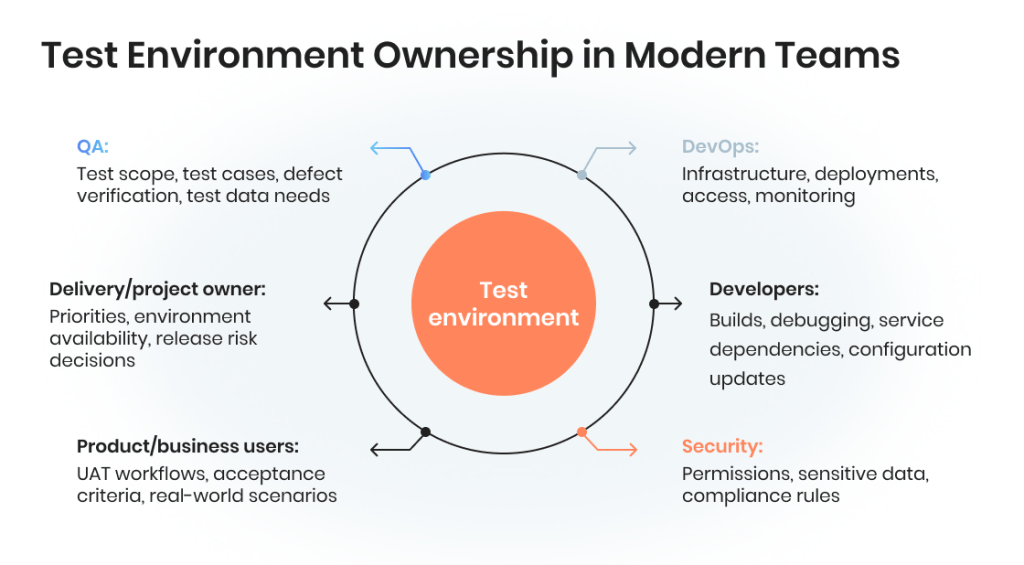
Dividing ownership and control over the test environment between the QA team and the development team is a common practice, though the situation may vary in each specific case. Sometimes QA teams set up their own independent infrastructure and receive test builds from developers as downloadable files. Sometimes the developers have full control over the infrastructure — but then QAs, if they have some concerns or requests for updates, often have to go the extra mile in order to get what they need.
Words by
Michael Tomara, QA Lead, TestFort
“Shared ownership is useful for both sides if properly organized. First, it is convenient for developers who can instantly deploy updates to the test environment, so that the waiting time is minimized. Second, QAs are free to request code freeze during testing sessions so that the testing process does not get disrupted.”
Why test environments still matter if bugs can still reach production
A test environment will never catch every bug. Production has real users, real traffic, real devices, real integrations, and behavior patterns that no controlled setup can fully reproduce. However, that does not make test environments optional. It means their purpose is risk reduction, not perfection.
A reliable testing environment helps teams catch problems that are too costly or disruptive to discover after release:
Broken core workflows
Failed integrations
Incorrect permissions
Unstable test data
Configuration issues
Browser, device, and OS compatibility problems
Automation failures caused by poor environment conditions
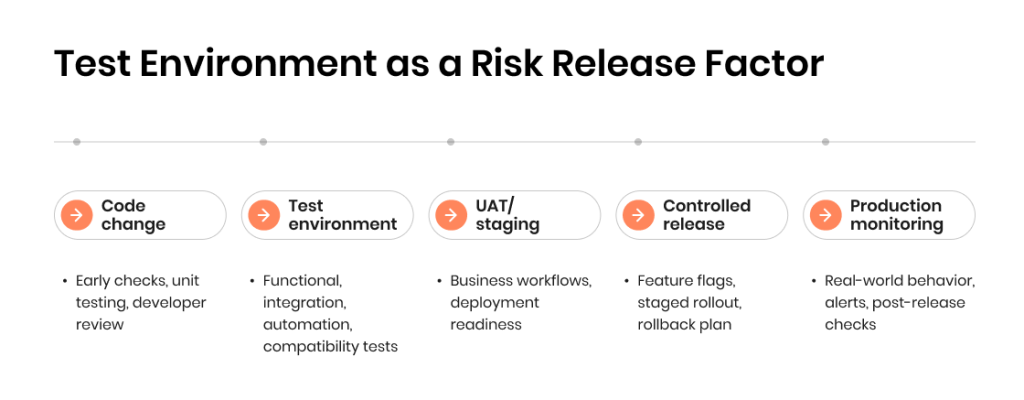
Some risks still need production-side controls: feature flags, staged rollouts, monitoring, rollback plans, and post-release checks. But those controls work better when the product has already passed through a stable, well-managed test environment.
Why Test Environment Quality Affects Release Confidence
At the end of the day, release confidence depends on whether test results can be trusted. When the test environment is stable, properly configured, and close enough to real conditions, teams can separate product defects from setup issues faster.
When the environment is weak, testing becomes noisy:
Automated tests fail because data changed
Integrations are unavailable or outdated
QA tests a build that differs from the release version
UAT blockers appear too late.
Teams spend hours proving whether the bug is real
Here is how test environment problems can impact release quality and confidence.
Environment issue
What happens next
Unstable test data
Teams waste time investigating false failures.
Missing integrations
End-to-end workflows remain untested.
Configuration drift
QA results no longer reflect production risk.
Shared environment conflicts
Teams block or overwrite each other’s work.
Weak logs and monitoring
Defect analysis takes longer than needed.
Unclear ownership
Environment blockers delay releases.
Flaky test setup
Automated tests lose trust and slow decisions.
A good testing environment does not completely remove risk from the release process. It gives teams a clear idea of what is ready, what is blocked, and which risks need additional management, such as feature flags, monitoring, staged rollout, or rollback planning.
Types of Test Environments in Software Testing
Most products need more than one testing environment, but not every product needs the full set. The right choice depends on release frequency, architecture, integrations, compliance needs, test automation maturity, and the cost of defects reaching production.
These are the key testing environments in modern QA and where they are typically used.
Type of environment
Main purpose
Usually needed when
Development environment
Early coding, debugging, and unit testing.
Developers need fast local feedback.
QA environment
Functional, regression, and defect checks.
The product needs repeatable manual and automated testing.
Integration environment
Checks software components and external dependencies.
The product relies on APIs, databases, queues, or third-party tools.
Automation environment
Runs automated checks through CI/CD.
Teams automate smoke, regression, or compatibility tests.
UAT environment
Supports user acceptance testing.
Business users need to check real workflows.
Staging environment
Final production-like release checks.
The team needs confidence before deployment.
Performance environment
Speed, stability, load testing, and scalability checks.
Traffic volume or response time affects user experience.
Security environment
Security testing and access control checks.
The product handles sensitive data or regulated workflows.
Sandbox environment
Safe experiments, demos, and integrations.
Teams need isolation without disrupting QA or staging.
Ephemeral environment
Temporary branch or feature testing.
Parallel work creates conflicts in shared environments.
Now let’s take a closer look at each environment.
Development environment
Used by developers to build, debug, and run early checks before code moves into shared testing flows. It is usually fast and flexible, but not stable enough for release decisions.
QA environment
The main environment for functional testing, regression testing, exploratory testing, and defect verification. A QA environment should be stable enough for repeatable tests, but flexible enough to support frequent builds.
Integration test environment
Used to check how modules, APIs, databases, queues, and third-party services work together. This environment is especially important for SaaS platforms, fintech products, healthcare systems, marketplaces, and other integration-heavy software.
Automation test environment
Used for automated test execution through CI/CD pipelines, scheduled regression suites, smoke tests, or cross-browser checks. Its value depends on stable data, predictable configurations, and clear failure diagnostics.
Performance test environment
Used for user acceptance testing, stakeholder review, business workflow checks, demos, and pre-release approval. It should be understandable for non-technical users and protected from constant technical changes.
Security test environment
A production-like environment used for final release checks. It helps teams test deployment behavior, configuration, permissions, critical workflows, and release readiness before changes go live.
UAT environment
Used to check speed, stability, throughput, and system behavior under load. It usually needs production-like infrastructure and realistic data volumes to produce useful results.
Staging or pre-production environment
Used for access control checks, vulnerability testing, permission testing, and data protection scenarios without risking production systems or real user data.
Sandbox environment
An isolated environment for experiments, third-party integrations, training, demos, or safe investigation. Sandboxes are useful when teams need freedom to test without disrupting QA, UAT, or staging.
Local and ephemeral environments
Local environments help developers test changes quickly before pushing code. Ephemeral environments are temporary setups created for branches, pull requests, or isolated feature testing. They can reduce conflicts in shared QA environments, but require stronger automation and infrastructure management.
What Should a Test Environment Include?
The short version is: a strong test environment should include everything needed to run meaningful tests under controlled conditions. The exact setup depends on the product, but most environments share the same components: application, infrastructure, data, tools, access, and connected systems.
Core components usually include:
Application build: The exact version of the software being tested.
Infrastructure: Servers, cloud resources, containers, databases, storage, and network settings.
Test data: Realistic, safe, and reusable data for functional, regression, integration, automation, and UAT scenarios.
Integrations: APIs, third-party services, payment gateways, messaging tools, identity providers, or their sandboxes/mocks.
Devices and browsers: The operating systems, screen sizes, browsers, and devices needed to reflect real user coverage.
Testing tools: Test management systems, automation frameworks, CI/CD tools, bug trackers, monitoring, and reporting tools.
Access rights: User roles, permissions, admin accounts, and security rules needed to test different workflows.
Logs and monitoring: Enough visibility to understand whether a failure comes from the product, data, integration, or environment itself.
Words by
Mykhailo Tomara, QA Lead
“Hosting a test environment on a cheap, underperforming domain could backfire. If it cannot normally support some user scenarios because of hardware or networking limitations, false alarms are inevitable. The results may include wrong decisions, extra discussions involving all project stakeholders, urgent meetings called to understand whether a build is broken or it is just the test backend that keeps failing under a slightly-higher-than-normal workload. All that consumes a lot of precious time.
The important part is not having a “complete” environment on paper. The more important thing is having a setup that supports the test cases, release risks, and business workflows that actually matter for the product.
Not 100% happy with your testing process?
Get an honest assessment and a clear improvement roadmap with a QA audit.
Test Environment Setup: What Needs to Be Decided Before Testing Starts
Some testers view the choice of a test environment as a purely technical choice. However, a good test environment setup starts with decisions, while technical details come later. Before testing begins, teams need to know what the environment must help achieve, who owns it, and which risks it should address. Here are the key decisions a team needs to make during the planning phase:
Testing scope and release risk: What needs to be checked before release: core workflows, integrations, regression, performance, security, UAT, or a narrow feature update?
Production parity requirements: Which parts must mirror production closely: architecture, data model, permissions, integrations, configuration, browsers, devices, or deployment flow?
Test data strategy: Will the team use synthetic data, masked production data, seeded datasets, or separate data for automation, manual testing, and UAT?
Environment ownership: Who controls deployments, access, data refreshes, configuration changes, blocked tests, and environment downtime?
Tooling and automation readiness: Which software tools are needed for test automation, CI/CD, test management, bug tracking, monitoring, and reporting?
Access, security, and compliance: How will the team protect sensitive data, limit permissions, separate production from testing, and prevent unsafe third-party calls?
Here is a quick checklist to help you make sure everything is ready:
✅ Scope: What risks should this environment reduce?
✅ Production parity: Which parts must mimic the production environment?
✅ Test data: What data is realistic, safe, and reusable?
✅ Ownership: Who controls deployments, access, and fixes?
✅ Tooling: Which testing tools and automation workflows are required?
✅ Security: How will sensitive data and permissions be protected?
✅ Maintenance: How often will the setup be reviewed or refreshed?
Test Environment Management: How to Keep Environments Reliable After Setup
Choosing and setting up a test environment is not a one-and-done activity. In order to continue delivering value, even the strongest test environment needs ongoing care after setup. Builds change, data gets obsolete, integrations break, permissions shift, and unused environments quietly turn into cost and security risks. This is what test environment management is there to prevent.
Test environment management helps keep testing stable through:
Environment inventory: What environments exist, what they are used for, and who owns them.
Configuration control: Which build, database version, feature flags, APIs, and settings are active.
Data refresh rules: How often test data is updated, reset, masked, or recreated.
Access management: Who can deploy, edit settings, view data, or approve changes.
Health monitoring: Whether the environment, integrations, and automated tests are available and working.
Usage and cleanup: Which environments are still needed, which can be paused, and which should be removed.
Here is a quick look at who does what with different environments and what kind of negative outcomes they help avoid.
Task
Typical owner
Risk it prevents
Environment inventory
QA Lead/DevOps
Unknown, duplicated, or unused test environments.
Build and configuration control
DevOps/Development team
Testing the wrong software version.
Test data refresh
QA/Data owner
Outdated, broken, or unsafe test data.
Access control
DevOps/Security team
Unauthorized changes and data exposure.
Integration monitoring
DevOps/QA
Blocked integration testing.
Automated health checks
Automation team
Flaky automation and unclear failures.
Cleanup and decommissioning
DevOps/Delivery owner
Rising costs and maintenance overhead.
Without this control, even a well-planned testing environment becomes unreliable. Teams start questioning every failure, automation loses value, and release decisions become harder to trust.
Common Test Environment Challenges and How to Solve Them
There are several potential challenges that complicate the use of test environments, but most of them have to do with them becoming unreliable. In turn, test environments may become unreliable when data, ownership, integrations, or configuration are not properly controlled. These issues risk interrupting the testing process, creating false failures, and making it harder to understand whether a defect belongs to the application under test or the environment itself. Here are the software test environment issues the team frequently encounters and how to fix them.
Environment drift
The QA, UAT, or staging environment no longer reflects the production environment, so test results become less reliable.
Tests fail because records are missing, changed, duplicated, outdated, or too different from real-world data patterns.
Fix: Use realistic test data, reset rules, synthetic datasets, or masked production data.
Shared environment conflicts
Several teams overwrite builds, settings, test data, or software components in the same environment for testing.
Fix: Add ownership, booking rules, isolated test beds, or temporary environments for high-conflict work.
Unavailable integrations
Payment sandboxes, APIs, identity services, or third-party tools block integration testing and end-to-end checks.
Fix: Use mocks, service virtualization, fallback flows, and dependency monitoring.
Flaky automation
Automated tests fail because of environment issues, not real product defects.
Fix: Stabilize test data, control dependencies, improve logs, and separate test script failures from setup failures.
Weak access control
Too many people can change deployments, data, permissions, or configurations across different test environments.
Fix: Limit access, document roles, and keep production and testing permissions separate.
Too many environments
Costs grow while teams lose track of what each testing environment is for.
Fix: Keep an inventory, review usage, pause idle environments, and remove outdated setups.
Testing Environments Best Practices From Industry Experts
In addition to the proven standards that are mandatory for building a strong test environment, there are also best practices that are technically optional but in reality can dramatically improve the efficiency and stability of the environment. Most best practices to set up and manage test environments are, in some way, about control. The golden rule is to build enough structure to keep testing reliable without making it too rigid — otherwise, every release becomes slow.
Define the purpose of each test environment
Every test environment needs a clear role: QA, UAT, staging, performance testing, security testing, sandbox, or automation testing. When different environments have different requirements, teams should document what each one is for, who owns it, and which testing activities it supports.
Keep production-like where it matters
Not every environment must mimic the production environment fully. Still, the staging environment, UAT, and performance test setup should reflect production-critical architecture, permissions, integrations, operating systems, and data flows.
This helps teams simulate real-world conditions without exposing real users or production data.
Treat test data as part of the setup
Reliable test data is essential for repeatable manual and automated tests. Teams should decide early whether they will use synthetic data, masked production data, seeded records, or separate datasets for specific test cases.
Poor data turns even a strong software test environment into an unreliable test process.
Automate setup where it removes blockers
Teams can automate environment provisioning, data resets, smoke checks, and test automation triggers. This is especially useful when several teams use shared testing environments or when CI/CD pipelines depend on fast feedback.
The goal is not to automate everything. It is to remove repetitive setup work that slows the testing process down.
Monitor the environment itself
A testing environment can fail even when the software application works correctly. Logs, uptime checks, dependency status, build versions, and automation reports help test engineers and DevOps teams find the real cause faster.
Keep access controlled
Access should match responsibility. Developers, testers, business users, and admins may need different rights across different test environments. This reduces accidental configuration changes, data exposure, and unsafe deployment activity.
Review environments regularly
Test environments should not stay forever by default. Teams need to review which environments are active, which are idle, which cost too much, and which no longer support current testing needs.
Test Environment and Test Automation: Why The Setup Can Make or Break Automation
At the end of the day, the success of test automation depends on whether it’s repeatable enough. If the test environment is unstable, automated checks may fail because of missing data, unavailable APIs, changed permissions, or a misunderstanding configurations, not because of a real defect, which means the team will now have to invest effort into correcting something that was completely preventable.
Currently, a reliable automation testing setup should provide:
Stable builds and clear version control
Controlled test data and reset rules
Known feature flag states
Available APIs, mocks, or service virtualization
Consistent browsers, devices, and operating systems
Logs, screenshots, and reports for failure analysis
CI/CD integration for smoke, regression, and compatibility checks
This matters because unreliable test results make teams trust automation less. Instead of speeding up release decisions, automated tests become another source of investigation. A strong testing environment helps teams automate with fewer false failures, faster debugging, and clearer evidence when the software is released.
How Many Environments Does a Team Actually Need?
We’ll start by saying that there is no universal number. The right set of test environments depends on product complexity, release frequency, team size, compliance needs, integrations, and how risky a bug in production would be.
For a smaller software application, a development environment, QA environment, staging environment, and production environment may be enough. For complex or regulated products, the setup may also include UAT, performance testing, security testing, sandbox, and dedicated automation environments.
A practical rule: add or expand an environment only when it solves a real testing or release problem. Too few environments create bottlenecks. Too many environments increase cost, maintenance, access risks, and overall confusion. Ultimately, the best setup is the leanest possible environment structure that still supports reliable testing, safe deployment, and confident releases.
Here are the most common delivery situations and environment setup options that work best for them.
Product situation
Practical environment setup
Small product with low release risk
Development, QA, staging, production
Product with frequent releases
QA, automation, staging, production
Integration-heavy product
QA, integration, sandbox, staging, production
Regulated or data-sensitive product
QA, UAT, security, staging, production
High-traffic product
QA, performance, staging, production
Large team or microservices product
QA, integration, automation, ephemeral, staging, production
Product with external stakeholders
QA, UAT, demo/sandbox, staging, production
When Test Environments Are Not Enough
Even strong test environments cannot realistically reproduce every production scenario. Real users bring unpredictable behavior, unexpected increases in traffic, old or rare devices, slow networks, third-party failures, and edge cases that are difficult to simulate before software is released.
This is why testing is far more effective when test environments are paired with production-side controls:
Feature flags for safer releases
Staged rollouts for limited exposure
Monitoring for real-time visibility
Rollback plans for fast recovery
Post-release smoke tests
Incident review after major failures
Another interesting technique is chaos testing environments, which can help teams find out how the product behaves under controlled failure conditions. Chaos testing is designed to test the resilience of software components, infrastructure, and dependencies before similar failures happen in production.
A test environment is an important component of the testing process, but it should not be viewed as the only safety layer that the whole QA operation relies on. The best release strategy combines pre-production testing, controlled deployment, and real-world monitoring, covering all bases and giving the team full confidence in the outcomes.
Final Test Environment Checklist
Before software is released, teams should be able to answer these questions:
Is each test environment clearly named and owned?
Does every testing environment have a defined purpose?
Is the setup close enough to production where it matters?
Are build versions, feature flags, and configurations tracked?
Is test data realistic, safe, and easy to reset?
Are integrations, mocks, or sandboxes available for testing?
Can teams run manual and automated checks without constant blockers?
Do testing tools provide enough logs, reports, and failure details?
Are access rights separated for developers, QA, UAT users, and admins?
Can the team debug environment issues without delaying the release?
Are unused test environments paused, removed, or reviewed regularly?
Does the overall setup support the release risk, not just internal habit?
Test on a Reliable Foundation With TestFort
A test environment is more than a place to run test cases. It shapes how much teams can trust their QA results, automation, UAT feedback, and final release decisions.
At TestFort, we help teams build and improve test environments that support real-world testing needs with stable test data, clear environment ownership, practical automation, integration testing, compatibility coverage, performance checks, and release-ready reporting.
Whether you need to set up test environment processes from scratch, improve an unreliable test setup, or prepare a product for faster releases, our QA team can help you turn testing environments into a stronger part of your delivery process.
FAQ
What is a test environment vs. production environment?
A test environment is used before release. The production environment is where real users access the software. Some test environments mimic production, but without real users or unsafe data exposure.
What is a QA environment vs. UAT environment?
A QA environment is used by testers for functional, regression, and integration testing. A UAT environment is used for user acceptance testing, where business users check real workflows.
Why do bugs still reach production?
No testing environment can simulate every real-world condition. Test environments reduce risk, but teams still need monitoring, staged releases, feature flags, and rollback plans.
What are the main types of test environments?
Common types include development, QA, integration, automation, UAT, staging, performance, security, sandbox, and local environments.
Share:
Jump to section
Let’s give your product the quality boost it deserves
Inna is a content writer with close to 10 years of experience in creating content for various local and international companies. She is passionate about all things information technology and enjoys making complex concepts easy to understand regardless of the readers tech background. In her free time, Inna loves baking, knitting, and taking long walks.
Michael has more than 10 years of experience in software testing and a strong technical background in e-commerce, telecom, and customer support projects. He excels in creating, reviewing and maintaining project documentation from requirements and functionality descriptions to test plans and checklists.







 What is a test environment vs. production environment?
 What is a test environment vs. production environment?
 What is a QA environment vs. UAT environment?