Enterprise Software Testing: Test Strategy, Methods, and How to Choose a Vendor
A complete guide to enterprise software testing strategy covering testing types, risk-based prioritization, metrics, and how to build QA that scales with your business
Most guides treat enterprise software testing as regular testing, just bigger. But that misses the point entirely: the systems aren’t the same, and neither are the stakes. When you’re testing at enterprise scale, the whole thing becomes different — how testing fits your development process, how it fits release cycles, and what it means for the business when something breaks. This is what makes enterprise testing so challenging, but also indispensable for product quality.
That’s exactly what we’ll get into in this article: what enterprise application testing really involves, which testing types matter most and when, how to build a testing strategy that holds up even as the product transforms, and why the teams getting the best results usually bring in a dedicated testing partner.
And if you’re a growing enterprise with a lean team rather than a Fortune 100 giant with a 200-person QA department, getting testing right becomes even more critical. You can’t throw bodies at the problem. You need a strategy that’s smart, efficient, and built around your actual risk.
This article covers what enterprise application testing really involves, which testing types matter most and when, how to build a testing strategy that works beyond paper, and why the companies getting the best results usually work with a dedicated testing partner.
Key Takeaways
The best enterprise testing produces more than good coverage metrics. It builds a quality system that scales with the product and the business behind it.
Enterprise software testing goes far beyond finding bugs. It protects revenue, compliance, and the user trust that keeps your business running.
Enterprise applications rarely operate in isolation. Testing must account for complex integrations, multiple user roles, legacy dependencies, and regulatory requirements.
A solid enterprise testing strategy starts with clear business objectives, not a tool purchase. The right tools come after you know what you’re solving for.
Different testing types serve different purposes: functional and regression testing validate logic, performance, and security testing validate resilience, and exploratory testing catches what scripts miss.
Test automation is essential for enterprise scale, but it works best as part of a strategic mix with manual testing, not as a replacement for human judgment.
Risk-based testing helps teams focus their testing efforts where failures would hurt the most, instead of trying to test everything equally.
Test data management and realistic testing environments are among the most underestimated challenges in enterprise software testing, and among the most expensive to get wrong.
As enterprise software evolves through continuous updates, testing must keep pace, embedded in the development lifecycle, not bolted on at the end.
Working with an experienced testing partner gives enterprises access to proven frameworks, domain expertise, and flexible capacity without the overhead of building everything in-house.
Is your testing strategy keeping pace with your enterprise development velocity?
Our QA Audit identifies opportunities and gaps in your current approach.
If you’re reading this, you already know that testing means verifying that software works as expected. The same statement is true for enterprise testing. However, the fact that the software in question is an enterprise system changes everything dramatically: thousands of transactions daily, dozens of third-party integrations, and users with completely different roles and permissions are not something you will necessarily encounter in different types of software.
Enterprise software testing is the discipline of ensuring that large-scale, business-critical applications perform reliably, securely, and correctly across every environment and scenario they’ll encounter in production.
That includes the obvious: does the feature work? And the less obvious: does it still work when three other systems push data into it simultaneously? Does it hold up under five times the daily average load? Does it comply with the regulations your industry demands?
The short answer to “why is this a different game” is complexity. But let’s get more specific.
Enterprise applications rarely play by simple rules
Think about what separates enterprise software from a typical SaaS product or consumer app.
A standard application usually has one database, one user type, and a relatively predictable set of interactions. An enterprise application, whether it’s an ERP system, a custom CRM, a healthcare management platform, or a financial processing tool, lives in a different reality:
Multiple interconnected systems. Enterprise resource planning software connects to accounting systems, HR platforms, supply chain tools, customer databases, and often a mix of legacy and modern infrastructure. A change in one module can cascade across the entire enterprise environment.
Diverse user roles and permissions. An administrator, a regional manager, and a frontline employee all interact with the same system differently. Each role has different access levels, workflows, and data visibility. Each needs to work flawlessly.
Regulatory and compliance requirements. Depending on the industry, enterprise software must meet standards like GDPR, HIPAA, PCI DSS, or SOC 2. Compliance shapes how every component is built and tested.
High transaction volumes and uptime expectations. Enterprise systems often run 24/7 and handle data volumes that would break most consumer applications. Testing must verify that performance holds under normal conditions, peak load, and edge-case scenarios alike.
Legacy integrations. Many enterprises run software systems built years or decades ago. New features and modern interfaces still need to communicate with these older components. That’s where some of the nastiest bugs hide.
This is why enterprise application testing depends on much more than a solid test suite. It requires understanding the full architecture, the business processes the software supports, and the real-world conditions it operates in.
What’s at stake when enterprise software fails
When a consumer app crashes, a user gets annoyed and maybe leaves a bad review. When enterprise software fails, the consequences look very different:
For smaller enterprise companies, the margin for error is even thinner. A large corporation can absorb a compliance fine or a week of degraded performance. A mid-sized enterprise running lean? That same failure can mean lost contracts, delayed growth, or a scramble to rebuild trust with key clients.
This is exactly why testing is crucial at the enterprise level. Not as a checkbox exercise, but as an operational discipline that ensures the software meets the demands of the business, its users, and its regulators.
Words by
Oleg Sivograkov, CEO, TestFort
“Enterprise testing isn’t something companies invest in because they have budget to spare. They invest in it because the cost of not testing properly, whether it’s a compliance miss, a system outage during peak season, or a data breach, is always higher. For growing enterprises especially, quality is how you earn the right to scale.”
Types of Enterprise Software Testing You Need in 2026
Every enterprise testing guide hands you a laundry list of testing types: functional, regression, performance, security, integration, acceptance, exploratory, and so on. Unfortunately, a list like that won’t tell you when each type earns its place, or why you’d do one before another.
This is why we are not going to do a basic catalog of testing types there. Instead, let’s group these by what they focus on. Enterprise application testing really comes down to covering three things: what the software does, how it holds up under pressure, and whether it plays nicely with the ecosystem around it. Here are the types of testing that help teams do just that.
Validating what the software does: Functional and regression testing
Functional testing confirms that every feature and business rule works as specified.
Does the order submission flow complete correctly for every user role?
Does the tax calculation adjust based on region, currency, and customer type?
Do approval workflows trigger the right notifications and status changes?
In enterprise applications, the number of user roles, data conditions, and workflow branches multiplies with every module — which makes each test case more complex and more important than in a standard product.
Regression testing answers a different question: did the thing that worked yesterday still work after today’s update?
Has the latest release broken anything in connected modules?
Do existing workflows still produce correct outputs with new data formats?
Are third-party integrations still stable after an API version change?
A single code change in one module can break functionality in another that seems completely unrelated. The more interconnected your enterprise system, the more regression testing you need — and the more expensive it gets if done manually.
Together, functional and regression testing form the baseline. They validate the logic layer. Without them, you’re shipping features on faith.
Validating how the software performs: Performance, load, and security testing
Performance testing measures application responsiveness under realistic conditions.
How fast do critical transactions process during business hours?
Where are the bottlenecks — database queries, API calls, front-end rendering?
Can the system maintain acceptable response times with 500 concurrent users? With 5,000?
For enterprise apps, even a 2-second delay in a critical workflow compounds into hours of lost productivity across the organization.
Load testing pushes further, simulating peak traffic to find the breaking point before your users do.
What happens during month-end reporting in your ERP?
Can your eCommerce platform handle a product launch spike?
Does the HR system survive open enrollment with every employee logging in at once?
Performance and load testing together give you a realistic picture of how your software behaves when it matters most.
Security testing validates data protection, access controls, and resistance to common attack vectors.
Are sensitive data fields encrypted in transit and at rest?
Do role-based permissions actually restrict what they should?
Can the system withstand common vulnerabilities — SQL injection, XSS, broken authentication?
For enterprise environments handling financial data, healthcare records, or PII, security testing ensures the software complies with regulatory standards and protects against breaches that could cost millions.
These three testing types share a common trait: they catch problems that functional testing alone will never find. Your checkout flow can pass every functional test case and still collapse under 10,000 simultaneous users — or expose customer data through an unprotected API endpoint.
Streamlined QA processes, integrated automation, and a scalable team — starting from a full audit
Validating that the software fits: Integration, acceptance, and exploratory testing
Integration testing verifies that data flows correctly between modules and external systems.
Does your CRM sync accurately with the billing platform?
Does the ERP pull the right inventory data from the warehouse management system?
Do data formats, timestamps, and currency conversions survive the handoff between systems?
In enterprise environments with dozens of integration points, this type of testing catches some of the most costly and hard-to-diagnose bugs.
User acceptance testing (UAT) puts software in front of the people who will rely on it daily.
Does this feature actually solve the business problem it was built for?
Are there workflow gaps that technical specs missed?
Do real users navigate the interface the way developers assumed they would?
UAT answers questions no automated test can. It often surfaces confusing workflows, missing edge cases, or features that technically work but don’t match how people actually operate.
Exploratory testing is the one that doesn’t follow a script. Skilled testers interact with the application freely, looking for the unexpected.
What happens when a user does something the spec didn’t anticipate?
Are there usability issues that only surface through real interaction?
Which edge cases fall between the cracks of scripted test coverage?
In enterprise application testing, exploratory testing is especially valuable after major releases or when testing across new environments. It mimics the unpredictable ways real users interact with complex software.
The role of automation in enterprise testing
At enterprise scale, manual testing alone can’t keep up. The volume of test cases, the frequency of releases, and the breadth of regression coverage required make test automation a necessity.
Where automation delivers the highest ROI:
Regression suites that run every sprint
Smoke tests triggered on every build
Data validation checks across large datasets
API verification for dozens of integration points
Where you still need humans:
Exploratory testing that requires creativity and judgment
Usability evaluation and UX assessment
Complex scenario-based testing with business context
Edge cases that require domain expertise to even imagine
The most effective enterprise testing teams build a strategic mix. Automation handles the volume and speed. Humans handle the nuance and discovery. Enterprise test automation accelerates the testing process for predictable scenarios while freeing testing teams to focus where human insight adds the most value.
One more thing worth noting: automation testing requires ongoing investment. Test scripts need maintenance as the application changes. Automation tools need to integrate cleanly with your CI/CD pipeline and testing environments. Treating automation as a “set and forget” solution is one of the most common — and most expensive — mistakes in enterprise testing.
Not sure which testing types your product actually needs?
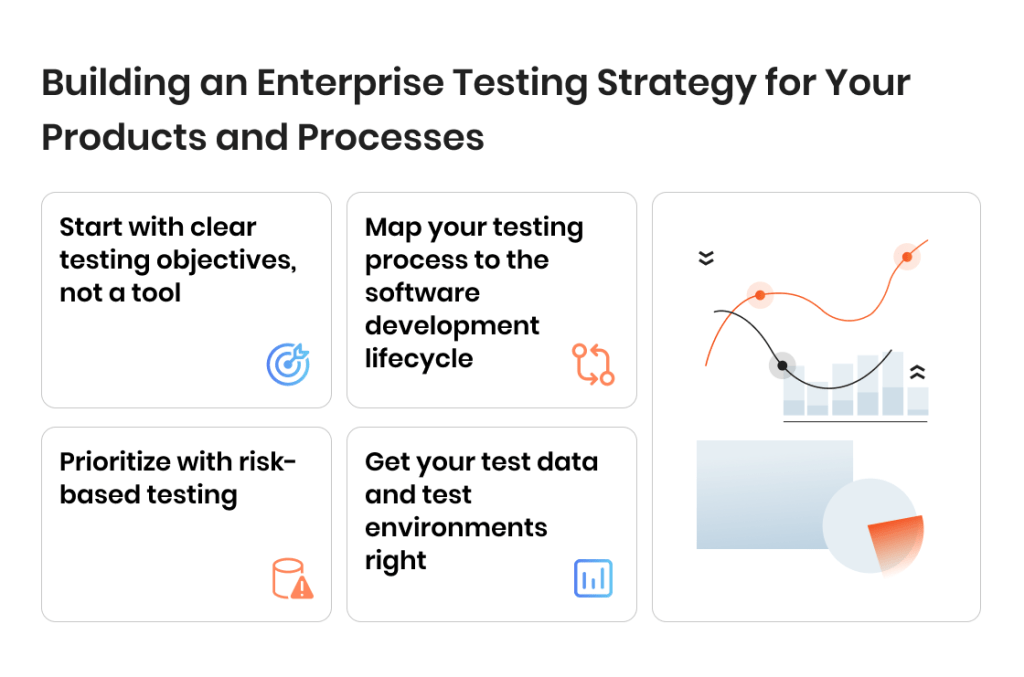
Building an Enterprise Testing Strategy for Your Products and Processes
A lot of enterprise companies have a test strategy document somewhere. It lives in Confluence or SharePoint, it was written when the project kicked off, and it does not necessarily reflect what testing actually looks like today. The gap between “strategy on paper” and “strategy in practice” is where quality problems appear.
A real enterprise testing strategy is a living framework that connects testing decisions to business outcomes. It answers the hard questions: what do we test first, what do we skip, how do we know we’ve tested enough, and how does testing keep pace as the product changes? Here are the most effective principles for building a testing strategy that fits your project.
Start with clear testing objectives, not a tool
One of the most common missteps in enterprise testing is starting with a tool purchase. A team buys a shiny automation platform, builds scripts, and six months later realizes the scripts test the wrong things — or the right things in the wrong order.
Testing objectives should come from the business, not from the QA backlog. Before selecting a single tool or writing a single test case, define what “quality” means in your specific context:
Which failures would cause the most damage — financial, regulatory, reputational?
Which user workflows are most critical to revenue and retention?
What compliance standards does the software need to meet, and how will you prove it?
Where has the application failed before, and what patterns do those failures reveal?
These questions shape your entire testing approach. They determine which testing types get priority, where automation makes sense, and what your testing requirements actually are. Everything else — tools, frameworks, team structure — follows from here.
Map your testing process to the software development lifecycle
Testing that happens only at the end of a sprint — or worse, only before a major release — catches problems too late. By then, fixing a bug costs 10 to 30 times more than it would have during development. And in enterprise environments where a single release touches multiple modules, late-stage testing creates bottlenecks that delay the entire delivery pipeline.
The most effective enterprise testing teams embed testing throughout the software development lifecycle:
During requirements: Review specs for testability, ambiguity, and missing acceptance criteria.
During development: Run unit tests and static analysis continuously. Developers catch their own bugs before they ever reach QA.
During integration: Trigger automated integration and API tests with every merge to the main branch.
During staging: Execute full regression, performance, and security test cycles against production-like environments.
Post-release: Monitor production behavior and feed findings back into the next testing cycle.
This approach — often called shift-left testing, or simply continuous testing in an agile testing context — means fewer surprises at release time. It also means your testing cycles get shorter and more focused over time, because you’re catching issues closer to where they were introduced.
Words by
Igor Kovalenko, QA Lead, TestFort
“The best enterprise testing engagements we run are the ones where the client’s team and ours become indistinguishable. Same goals, same context, and the same definition of done.”
Prioritize with risk-based testing
You can’t test everything equally. Not with infinite time, and certainly not with the budgets and timelines most enterprise teams operate under. Trying to achieve 100% test coverage across every module, every scenario, and every environment leads to slow testing cycles, exhausted teams, and — ironically — missed critical bugs, because effort gets spread too thin.
Risk-based testing solves this by directing testing efforts toward the areas where failure would hurt the most:
Critical business workflows — the paths that directly affect revenue, compliance, or user safety.
Recently changed code — new features and bug fixes that haven’t been battle-tested yet.
Integration points — the connections between systems where data can get lost, corrupted, or misformatted.
Historically unstable modules — the parts of the application that have a track record of producing defects.
This doesn’t mean ignoring low-risk areas entirely. It means allocating testing efforts proportionally. Your payment processing module gets comprehensive testing every release. Your internal admin settings page gets a lighter touch. The result is better test coverage where it counts, without burning through your entire testing budget on areas that rarely break.
Get your test data and test environments right
Ask any experienced QA lead what slows down enterprise testing the most, and you’ll often hear the same two answers: test data and test environments.
Test data management is one of those challenges that sounds simple until you’re dealing with enterprise-scale complexity. You need data that’s realistic enough to surface real bugs, diverse enough to cover edge cases, and compliant enough to meet privacy regulations. Production data is ideal for realism but often can’t be used directly due to GDPR, HIPAA, or internal security policies. Synthetic data solves the compliance problem but can miss the messiness of real-world inputs.
Effective test data management means having a strategy for:
Generating and maintaining datasets that reflect actual production patterns
Masking or anonymizing sensitive data for use in lower environments
Refreshing test data regularly so it doesn’t go stale and produce misleading results
Managing data dependencies across interconnected modules and systems
Testing environments present a similar challenge. Enterprise applications often behave differently depending on infrastructure configuration, network conditions, and the specific combination of integrated systems. If your testing environment doesn’t closely mirror production, you’re essentially testing a different application. Bugs that pass QA in staging but explode in production are almost always an environment gap, not a testing gap.
Getting both right requires investment — in tooling, in process, in discipline. But it pays off dramatically. Bad test data and unrealistic environments are behind a huge share of “we tested this and it passed” production incidents.
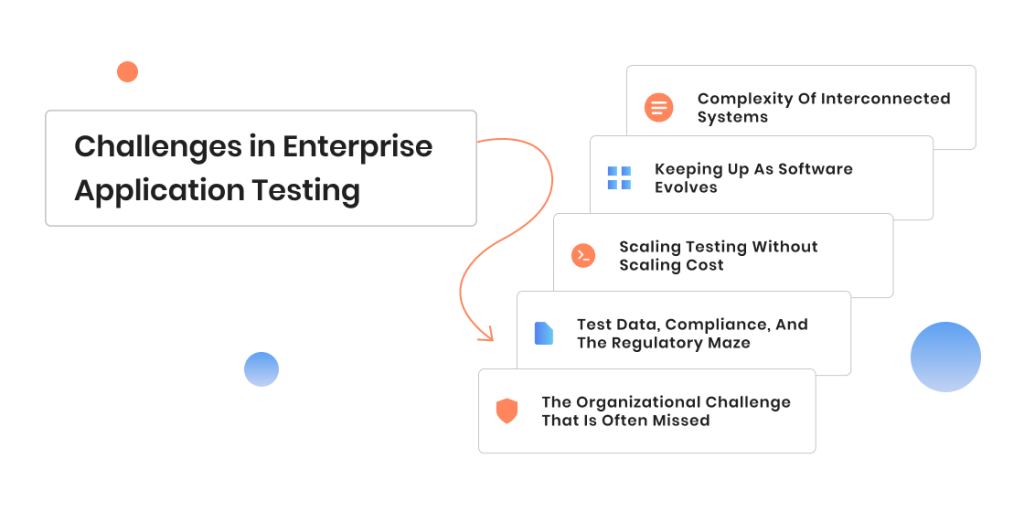
Challenges in Enterprise Application Testing
Eventually, every enterprise testing team encounters the same challenges. The specifics of those challenges can vary by industry, tech stack, and team size, but the underlying problems are remarkably consistent. The good news is that since you are not the first team to experience them, there are now working solutions tried and tested by other teams. Understanding these challenges is half the battle — the other half is knowing which ones to tackle first and how. Here are the most common challenges in enterprise application testing.
Complexity of interconnected systems
Enterprise software rarely exists as a single, self-contained application. More often, it’s a web of modules, microservices, third-party integrations, and legacy components that all need to work together. Testing any single piece in isolation tells you very little about how the whole system behaves.
The challenge compounds when different parts of the system are owned by different teams — or different vendors. A change in one team’s API can break another team’s workflow, and without cross-system testing, nobody catches it until production.
Shared test environments where teams can validate cross-system behavior before merging
Clear contracts and versioning for internal and external APIs
Keeping up as software evolves
Enterprise applications are never “done.” New features ship continuously. Regulatory requirements change. Third-party vendors update their APIs. Every change introduces the possibility of new defects — and in enterprise environments, even small defects can cascade.
The testing challenge here is keeping your test coverage, test data, and automation scripts aligned with a product that’s constantly moving. Teams that don’t invest in maintaining their test assets end up with a growing pile of outdated tests that either produce false positives or miss real issues entirely.
What helps:
Continuous testing integrated into CI/CD pipelines so every change gets validated automatically
Self-maintaining automation frameworks that flag broken scripts early
Regular test suite reviews to retire obsolete tests and add coverage for new functionality
Scaling testing without scaling cost
More features mean more testing. More platforms, more user roles, more integrations — the testing surface grows with every release. The instinctive response is to hire more testers, but that approach hits diminishing returns fast, especially for mid-sized enterprises watching their budgets.
The real question is how to increase test coverage and testing speed without proportionally increasing headcount.
Scaling approach
Pros
Cons
Best for
Expand in-house QA team
Deep product knowledge, full control
Slow to hire, expensive to maintain, limited flexibility
Core product testing, long-term strategy
Invest in test automation
Fast execution, high repeatability, scales well for regression
Fast ramp-up, flexible capacity, domain expertise from day one
Requires good communication, onboarding period
Scaling for releases, filling expertise gaps, specialized testing
Combine automation + partner
Best of both — speed, coverage, and human insight
Needs coordination and clear ownership
Enterprise teams that need comprehensive testing without unlimited budget
Most enterprise teams that test effectively use a combination. Automation handles the predictable volume. An external testing partner provides the flexibility and specialized skills. The internal team focuses on strategy, priorities, and product knowledge that only comes from being close to the business.
Test data, compliance, and the regulatory maze
For enterprises in regulated industries — fintech, healthcare, insurance, government — compliance testing can’t be an afterthought. It has to be woven into every testing cycle from the start.
The challenge is twofold. First, the regulations themselves are complex and constantly updating. GDPR, HIPAA, PCI DSS, SOC 2, industry-specific frameworks — each comes with its own requirements for how data is stored, accessed, processed, and tested. Second, the test data needed to validate compliance often conflicts with the compliance rules themselves. You need realistic data to test properly, but you can’t use real customer data in test environments without violating the very regulations you’re trying to meet.
What helps:
Data masking and synthetic data generation tools that produce realistic datasets without exposing PII
Compliance-specific test cases built into your regression suite, not run as a separate exercise before audits
Clear documentation of test coverage mapped to specific regulatory requirements — auditors want evidence, not assurances
The organizational challenge that is often missed
Technical problems get all the attention, but the most persistent challenges in enterprise software testing are often organizational. Testing teams that sit in a silo — disconnected from development, product, and operations — end up reactive instead of strategic. They find bugs, but too late. They write reports, but nobody reads them. They maintain test suites that cover yesterday’s priorities instead of tomorrow’s risks.
Getting testing right at the enterprise level means getting the organizational model right. Testing needs a seat at the planning table, not just the release gate. Testing teams need visibility into roadmaps, architecture decisions, and business priorities. And testing results need to flow back into development as fast as possible — not in a weekly report, but in real-time feedback loops.
Words by
Nora Layevska, Director of Partnerships & Growth, TestFort
“The biggest challenge we see with enterprise is structural. Testing teams that operate in isolation will always be playing catch-up, no matter how good their tools are. The companies that get the best results are the ones where QA has a voice in planning, not just in validation.”
Best Practices in Enterprise Software Testing and Automation
You’ve read “shift left” and “automate early” in every testing article published since 2018. These aren’t wrong or irrelevant in 2026 — they just don’t paint the complete picture. The practices that actually separate high-performing enterprise testing teams from everyone else tend to be more specific, more uncomfortable, and less likely to show up on a conference slide.
Here are five that we’ve seen make a real difference across enterprise clients of different sizes and industries.
Practice #1: Kill your darling test cases
What it means. Audit your test suite regularly and retire tests that no longer earn their place — duplicates, tests for deprecated features, tests that haven’t caught a bug in over a year.
What you gain. Faster testing cycles, less maintenance overhead, cleaner signal from test results. Your team spends time on tests that actually protect the product.
Where it gets tricky. Nobody wants to delete tests. There’s always a “but what if” argument. You need clear criteria — if a test hasn’t failed in 12 months and covers stable, unchanged code, it’s a candidate.
Practice #2: Treat test automation as a product, not a project
What it means. Give your automation framework a backlog, regular refactoring cycles, code reviews, and dedicated ownership — the same way you’d maintain a customer-facing product.
What you gain. Automation that actually lasts. Scripts stay reliable as the application changes. The framework grows with the product instead of falling behind it.
Where it gets tricky. It requires ongoing investment that’s hard to justify in sprint planning, because “refactor automation scripts” doesn’t ship a feature. Leadership buy-in matters here.
Practice #3: Make testing environments a first-class concern
What it means. Treat environment setup with the same rigor as production infrastructure. Automate provisioning, monitor config drift, assign clear ownership.
What you gain. Fewer “works in staging, breaks in production” incidents. Faster test cycles because teams aren’t waiting for environments or debugging environment-specific failures.
Where it gets tricky. Environments are expensive, and in many organizations they’re shared across multiple teams with competing schedules. Environment-as-code helps, but it needs infrastructure support.
Practice #4: Build feedback loops, not handoff points
What it means. Replace the “dev throws code to QA, QA throws bugs back” model with tight, fast loops — automated results in pull requests, shared dashboards, joint triage sessions.
What you gain. Developers learn about failures within hours instead of days. Bugs get fixed while context is still fresh. Testing becomes a conversation, not a bottleneck.
Where it gets tricky. It requires cultural change, not just tooling. Dev and QA teams need to be comfortable working in the same space, reviewing the same data, and sometimes disagreeing in real time.
Practice #5: Stop measuring coverage. Start measuring confidence
Test coverage percentage is the metric everyone tracks and nobody trusts. A team can report 85% code coverage and still ship a release that breaks in production, because coverage tells you what code was executed during testing — not whether the tests actually validated anything meaningful.
Below are the metrics that tell you more, along with industry benchmarks to help you evaluate where you stand.
A few things worth noting about these numbers. They’re directional, not universal. A fintech processing regulated transactions should target tighter thresholds than a B2B SaaS in early growth. The most useful approach is to establish your own baseline first, then track improvement over time. Comparing against your own trajectory matters more than comparing against someone else’s dashboard.
Metric
What it tells you
Needs attention
Solid
Strong
Defect escape rate
% of bugs that reach production despite testing
>15% — testing gaps are costing you
5–10% — typical for mature enterprise teams
<5% — strong QA process; critical systems like payments should aim here
Mean time to feedback
How quickly a developer learns their change broke something
>24 hours — fixes happen out of context, costs multiply
1–4 hours — reasonable for most enterprise setups
<1 hour — CI/CD integrated, tests run on every commit
Regression suite execution time
How long a full regression cycle takes
>4 hours — teams start skipping runs under deadline pressure
30 min–2 hours — runnable per deployment with parallelization
<30 min — enables continuous regression as part of natural workflow
Flaky test rate
% of tests that pass/fail inconsistently on the same code
>10% — actively eroding trust in your test suite and slowing releases
3–5% — manageable with regular triage
<3% — healthy; Google’s internal research shows even 4.56% causes measurable developer time loss
Automation ROI
Manual hours saved vs. automation maintenance cost
Negative or unclear — you’re spending more maintaining scripts than they save
2–3x return — automation is paying for itself
5x+ return — typical for mature regression suites running daily
These metrics work best as a set. A low defect escape rate combined with a 6-hour regression suite might mean your testing is thorough but too slow for your release cadence. A fast suite with a high flaky rate gives you speed but no confidence. The combination tells the real story.
These metrics won’t look as clean on a dashboard as a single coverage number. But they’ll tell you whether your software testing process is actually making the product better — or just producing reports.
Want to see how AI-powered testing can accelerate your enterprise QA?
How to read your metrics together for advanced testing decisions
Individual metrics are easy to game and easy to misread. The real diagnostic value comes from looking at combinations. Here are the patterns we see most often across enterprise testing teams — and what they actually signal.
Low defect escape rate + long regression suite execution time. Your testing is thorough, but too slow for your release cadence. You’re catching bugs, yes — but you’re also creating a bottleneck. Teams in this situation tend to batch releases into bigger, less frequent deployments, which ironically increases risk per release. The fix is usually parallelization and smarter test selection, not cutting tests.
Fast regression suite + high flaky test rate. Speed without confidence. Your pipeline finishes quickly, but nobody trusts the results. Developers start ignoring failures (“it’s probably just a flaky test”), and real bugs slip through disguised as noise. This combination often leads to a creeping defect escape rate that doesn’t show up until it’s already a pattern.
Low flaky rate + high defect escape rate. Your tests are stable and reliable — they’re just testing the wrong things. This usually means the suite was built around implementation details or outdated user flows rather than current critical paths. The suite needs a strategic review, not a technical one.
High automation ROI + rising defect escape rate. A tricky one. Your automation is saving hours and running efficiently, but the bugs reaching production are the ones automation doesn’t cover — edge cases, integration points, scenarios that need exploratory or manual testing. The automation is doing its job; the gap is in what’s not automated and not being tested manually either.
Short mean time to feedback + high defect escape rate. Developers get fast results, but the tests they’re running aren’t catching what matters. This often happens when CI pipelines only run unit tests and smoke checks, while integration, security, and performance tests run separately on a slower schedule — or not at all before release.
Long mean time to feedback + low defect escape rate. Quality is high, but velocity is suffering. Developers wait hours for results, lose context, and slow down. This is the classic “we have great QA but our releases are always late” pattern. The testing process works, but it’s not optimized for the pace the business needs.
High flaky rate + long execution time. The worst combination. Slow suite, unreliable results. Teams rerun failures “just to be sure,” which doubles an already long cycle. Developer trust in testing drops, manual workarounds multiply, and the whole QA process starts losing credibility. This is usually the trigger for an enterprise to rethink their testing infrastructure entirely — or bring in an external partner to audit and rebuild.
Improving defect escape rate + stable automation ROI. The healthy signal. Your automation investment is holding steady, and fewer bugs are reaching production over time. This usually means the team is making smart incremental improvements — better test case selection, regular suite maintenance, tighter feedback loops — rather than throwing money at new tools.
The point is: no single metric tells you whether your testing is working. But two or three metrics read together will almost always point you toward what needs to change — and what’s already working that you shouldn’t touch.
Benefits of Enterprise Testing with the Right Partner
There’s a moment most growing enterprise teams hit. The product is getting more complex. Releases are more frequent. The QA backlog keeps growing. The team is good, but starting to get stretched beyond its limits, which can impact everything from job satisfaction to product quality. Hiring new people takes months and can put additional strain on the QA budget. Onboarding takes even more months. And every sprint, the gap between what needs testing and what actually gets tested widens a little more.
This is where working with a testing partner changes the math.
The expertise gap is real
Building an enterprise-grade QA operation in-house takes time — years, in most cases. You need people who understand performance testing under real load, security testing beyond basic scans, automation architecture that scales, and compliance validation for your specific industry. Finding all of that in one team, in one hiring cycle, is rare.
A dedicated QA partner brings that expertise from day one. Not as a theoretical capability on a website, but as frameworks already built, processes already tested across similar enterprise environments, and engineers who’ve seen the specific types of bugs your system is most likely to produce.
Enterprise application testing depends on depth of experience as much as it depends on tools. A partner who’s tested ERP integrations, payment processing pipelines, or healthcare data flows before will spot risks faster than a team encountering those challenges for the first time.
Flexibility without fixed headcount
Enterprise testing needs aren’t constant. You need more capacity before a major release, during a migration, or when launching in a new market. You need less between sprints or during a feature design phase.
A testing partner gives you that flexibility without the overhead of hiring, onboarding, and managing additional full-time staff. Scale up for a critical release. Scale back when the pressure drops. Add specialized skills — security testing, load testing, accessibility audits — only when you need them.
For mid-sized enterprises watching their budgets, this model often makes the difference between having comprehensive testing and having testing that covers whatever the current team has bandwidth for.
Fresh perspective on your blind spots
Internal teams develop familiarity with the product. That’s a strength — they understand the business context better than anyone. But familiarity also creates blind spots. The workflow that “everyone knows works this way” stops getting questioned. The edge case that seems unlikely gets deprioritized sprint after sprint. The test environment that’s “close enough” to production never gets fixed.
An external testing partner sees the product with fresh eyes. They question assumptions, test paths that internal teams skip, and flag risks that have become invisible through repetition. This outside perspective often finds the bugs that have been hiding in plain sight — the ones your team stopped looking for because they’d been there so long they became part of the landscape.
Words by
Mykhaylo Tomara, QA Lead, TestFort
“We often find the most impactful bugs in the first two weeks of engagement — not because the internal team is doing something wrong, but because they’ve been looking at the same system every day. Fresh eyes see different things. That’s not a failure of the in-house team. That’s just how human attention works.”
How TestFort Approaches Testing Enterprise Software
We’ve spent the last sections talking about strategy, practices, and what makes enterprise testing hard. Here’s how we actually do it — the approach we’ve refined over 15+ years of working with enterprise clients across fintech, healthcare, eCommerce, SaaS, and ERP systems.
We start with an audit, not with a one-fit-all testing solution
Most enterprise clients come to us with an existing QA process — sometimes solid, sometimes held together with duct tape and good intentions. Either way, we don’t start by writing test cases.
We start with a QA audit. We assess what’s being tested, what’s being missed, how the testing process connects to development workflows, and where the biggest risks live. That audit produces a clear picture: what’s working, what’s not, and what to fix first.
This matters because enterprise testing without a strategy is just activity. A lot of teams are busy testing — running hundreds of test cases every sprint — without actually reducing risk where it counts. The audit tells us whether the testing efforts match the real priorities of the business.
We build the strategy around your risk, not our template
Every enterprise environment is different. A fintech client with PCI DSS requirements and real-time transaction processing needs a fundamentally different testing approach than a B2B SaaS platform with complex role-based permissions and a long sales cycle.
Our enterprise testing strategy for each client is built around three questions:
Where would a failure cause the most damage — financial, regulatory, operational, reputational?
What’s changing fastest in the product, and where is regression risk highest?
What does the current team cover well, and where are the gaps we need to fill?
From there, we define the testing types, the automation approach, the environments, and the metrics that matter for that specific engagement. The strategy drives the execution — not the other way around.
We work as an extension of your team, not a separate silo
One of the patterns we see with failed outsourcing engagements is the “throw it over the wall” model. The client sends builds, the vendor sends bug reports, and nobody talks in between. That doesn’t work for enterprise testing, where context matters as much as execution.
Our teams integrate into your workflows — same tools, same standups, same Jira boards, same Slack channels. We participate in sprint planning so we understand what’s coming, not just what’s already built. When we find a bug, we don’t just file a ticket — we provide the context a developer needs to fix it quickly: reproduction steps, environment details, severity assessment, and where it fits in the bigger risk picture.
What we bring to the table as enterprise application testing partners
Full testing coverage. Functional, regression, performance and load testing, security, integration, API, and exploratory testing — across web, mobile, and enterprise apps.
Automation that lasts. We build automation frameworks designed for maintainability, not just initial speed. Our enterprise test automation integrates with your CI/CD pipeline and scales as the product grows.
AI-powered testing capabilities. From test case generation to intelligent test prioritization, we apply AI testing where it adds real value — not as a buzzword, but as a practical accelerator.
Domain expertise. Fintech, healthcare, eCommerce, logistics, SaaS, ERP systems — we’ve tested enterprise software across regulated and high-complexity industries, and we bring that pattern recognition to every new engagement.
Flexible engagement models. Dedicated QA team, staff augmentation, or project-based engagement — structured around what your testing needs actually require.
FAQ
What is enterprise software testing?
Enterprise software testing is the process of validating large-scale, business-critical applications for functionality, performance, security, and compliance. Unlike testing for standard software products, enterprise application testing accounts for: – Complex integrations between multiple systems and third-party services – Diverse user roles, permissions, and data access levels – High transaction volumes and strict uptime expectations – Regulatory and compliance requirements specific to the industry – Legacy infrastructure that modern features still need to communicate with Testing is essential for enterprise systems because the cost of failure — financial, regulatory, reputational — is significantly higher than for standard applications. The goal is to ensure your software operates reliably across every environment it encounters in production and delivers the quality software your users and stakeholders expect.
How is enterprise testing different from regular software testing?
Scale, complexity, and consequences. A standard application might have one user type, one database, and a straightforward workflow. Enterprise applications — ERP systems, custom CRMs, financial platforms, healthcare management tools — involve interconnected modules, dozens of integration points, strict compliance standards, and thousands of concurrent users.
Enterprise software testing requires broader test coverage, more sophisticated test data management, realistic testing environments that mirror production, and a testing strategy built around cross-system dependencies. It also requires advanced testing capabilities that smaller products rarely need: performance and load testing at scale, security validation against regulatory frameworks, and test management practices that keep thousands of test cases organized and maintainable.
The bottom line: when enterprise software fails, it affects operations, revenue, and trust across the entire organization. That changes how testing efforts are prioritized and how quality is defined.
What types of testing are essential for enterprise applications?
Enterprise application testing depends on the product, the industry, and the risk profile, so there’s no universal checklist. That said, most enterprise systems need a combination of different types of testing:
Functional testing — validates that business logic, workflows, and features work as specified.
Regression testing — catches breakage introduced by updates, patches, or new features.
Performance and load testing — verifies system behavior under real-world and peak traffic conditions.
Integration testing — confirms data flows correctly across modules, APIs, and third-party systems.
User acceptance testing — ensures the software that meets business needs as defined by actual stakeholders.
Exploratory testing — catches issues that scripted tests miss by simulating unpredictable real-user behavior.
The right mix depends on where your highest risks are. Robust enterprise testing covers all of these layers proportionally — not equally, but strategically, based on what matters most to your business.
What testing tools do enterprise teams need?
There’s no single tool that helps every enterprise. The right tools for enterprise testing depend on your tech stack, team structure, and testing approach. Most mature enterprise testing setups include:
Test management platforms (TestRail, Zephyr, PractiTest) — to organize test cases, track execution, and report results across teams.
Automation frameworks (Selenium, Playwright, Cypress) — for regression, smoke, and API testing at scale.
Performance testing tools (JMeter, Gatling, k6) — for load and stress testing under realistic conditions.
CI/CD integration (Jenkins, GitHub Actions, GitLab CI) — to trigger tests automatically on every build.
Security scanning tools (OWASP ZAP, Burp Suite) — for vulnerability detection and compliance validation. The key principle: testing tools should serve your strategy, not define it. Teams that choose tools before defining their testing objectives often end up with powerful platforms that test the wrong things. Start with what you need to validate, then select tools that fit.
How do you build an effective enterprise testing strategy?
Start with clear testing objectives tied to business outcomes:
– Which failures would cause the most damage — financial, regulatory, operational? – Which user workflows are most critical to revenue and retention? – Which compliance standards apply, and how will you prove adherence? – Where has the application failed before, and what patterns emerge?
From there, map your testing process to the software development lifecycle so testing is continuous, not a last-minute gate. Use risk-based testing to optimize testing efforts where they matter most. Invest in realistic test environments and solid test data management. Choose automation tools that fit your architecture and commit to maintaining them.
And measure results with metrics that reflect actual confidence — defect escape rate, mean time to feedback, flaky test rate — rather than relying on coverage percentages alone. Testing helps ensure software quality only when it’s connected to real business risk, not just technical checkboxes.
Why should an enterprise work with an external testing partner?
Three reasons come up most often:
Expertise without the ramp-up. Building full-spectrum enterprise QA in-house takes years. A testing partner brings proven frameworks, domain knowledge, and specialized skills from day one — enterprise testing solutions that are already battle-tested across similar environments.
Flexibility without fixed headcount. Enterprise testing needs fluctuate with release cycles. A partner lets you scale capacity up or down without the overhead of permanent hires, adding specialized capabilities like security or performance testing only when you need them.
Fresh perspective on blind spots. Internal teams develop familiarity that becomes invisible risk. An outside partner tests with fresh eyes, questioning assumptions and finding bugs that repetition has hidden. Testing helps ensure quality precisely because it comes from someone who hasn’t stopped seeing the product clearly. For mid-sized enterprises in particular, a testing partner often makes the difference between comprehensive testing and testing that only covers what the current team has bandwidth for.
What does a QA audit include?
A QA audit evaluates your current testing process end to end. At TestFort, a typical audit covers:
Test coverage analysis — mapped against critical business workflows to identify what’s tested and what’s exposed.
Automation maturity assessment — how effective your current automation is and where it can be improved.
Test environment and test data readiness — whether your environments and data reflect production reality.
Team structure and process efficiency — how testing connects to development workflows and where bottlenecks exist.
Gap analysis — the highest-impact improvements ranked by business risk and effort
The output is a prioritized action plan tied to your product, your risk profile, and your goals — not a generic checklist. Most clients use the audit to restructure their testing approach and optimize testing investments, whether they continue working with us or not.
Share:
s of Enterprise Software Testing You Need in 202
Hand over your project to the pros.
Let’s talk about how we can give your project the push it needs to succeed!
A commercial writer with 13+ years of experience. Focuses on content for IT, IoT, robotics, AI and neuroscience-related companies. Open for various tech-savvy writing challenges. Speaks four languages, joins running races, plays tennis, reads sci-fi novels.












 What is enterprise software testing?
 What is enterprise software testing?