LLM Testing Guide for 2026: Methods, Automation, and Best Practices
Which LLM testing strategy is the best choice for your LLM application and how does testing LLMs differ from LLM evaluation and traditional testing? Find out now!
Shipping an LLM feature that looks flawless in a demo and still having no idea how it behaves in real use conditions happens more often than you think. The first real users don’t behave in the way the testers expect them to, and the system does not follow the most obvious breaking path. Complex flows, combined inputs, unexpected edge cases, and exposed gaps create uncertainty for the testers and a mismatch between what users expect and what they get. This is exactly why LLM testing is no longer optional.
The goal here is not just to prove that the model can generate a good response — that would be too simplistic. The goal is to verify that the entire system — inputs, prompts, integrations, and outputs — behaves consistently under real conditions. In this article, that’s exactly what we’ll focus on: how to test LLMs as part of a working application, how to build repeatable test suites, which LLM testing best practices to follow, and how teams keep these systems stable even as they change.
Key Takeaways
LLM testing is the process of verifying how an LLM application behaves across workflows, not just checking individual outputs.
A reliable testing strategy depends on repeatable test cases and a stable dataset, not one-off checks.
Testing LLMS requires balancing deterministic checks with flexible methods for handling variable outputs.
Observability is essential for debugging because many LLM failures are not visible in basic test results.
System-level metrics such as latency, error rate, and success rate are more useful for testing than output quality scores.
Test data based on real user input is far more effective than synthetic examples for detecting issues.
Separating testing from evaluation makes both processes clearer and easier to scale.
What Testing LLM Applications Actually Covers
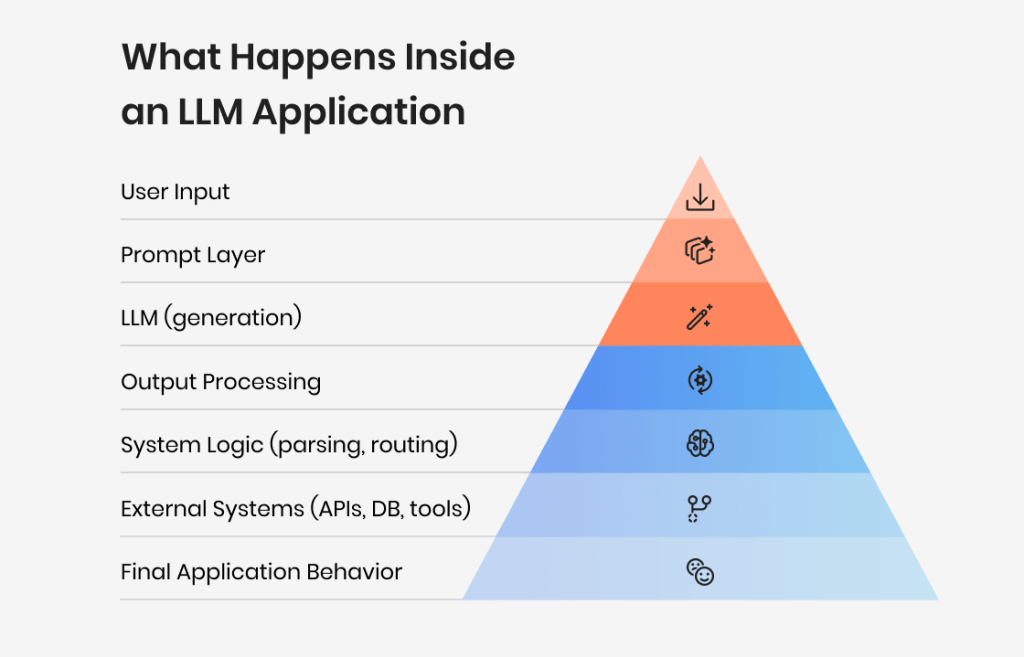
LLM testing focuses on how an LLM application behaves as a system, not just what it says in response to a prompt. The goal is to make sure the application as a whole works reliably across workflows, integrations, and real usage conditions, even when the LLM itself is unpredictable.
In reality, this means testing how inputs move through the system, how the LLM handles them, and what happens before and after the response is generated. It includes stability, error handling, integration with APIs or tools, and how the application reacts when something goes wrong.
This distinction often comes up in discussions, where LLM testing is confused with evaluating output quality, even though the two require different methods and testing processes.
This is where functional testing becomes central. You are checking whether the application behaves correctly, not whether the answer is perfect.
What belongs to LLM evaluation instead
Some aspects are often confused with testing but belong to LLM evaluation:
Assessing answer quality or correctness
Measuring relevance, tone, or completeness
Scoring outputs using metrics or LLM-as-a-judge
These are covered in a separate LLM evaluation process because they require different methods and criteria.
Why is there a distinction?
Without a clear boundary, testing becomes unfocused. Teams end up mixing system checks with output assessment, which makes it harder to build reliable test suites or automate anything.
Keeping testing focused on system behavior makes it easier to:
Build repeatable test data
Automate workflows
Track failures consistently
In addition to that, it ensures that LLM testing remains a practical part of engineering, not a subjective review of outputs.
From performance to output quality — we’ll make sure your AI app is ready for the real world
LLM applications introduce uncertainty into parts of the system that used to be predictable. In a traditional application, the same input produces the same output. With LLMs, even small variations can lead to different results, which makes test outcomes less stable.
This does not make testing impossible, but it changes how you approach it. Instead of relying on strict assertions everywhere, you need to decide where precision matters and where variation is acceptable.
Where the complexity comes from
Several factors make LLM testing more challenging at the system level:
Multi-step workflows and state across interactions
Token limits, truncation, and latency constraints
Each of these introduces new failure modes that don’t exist in standard applications.
Hidden failure modes
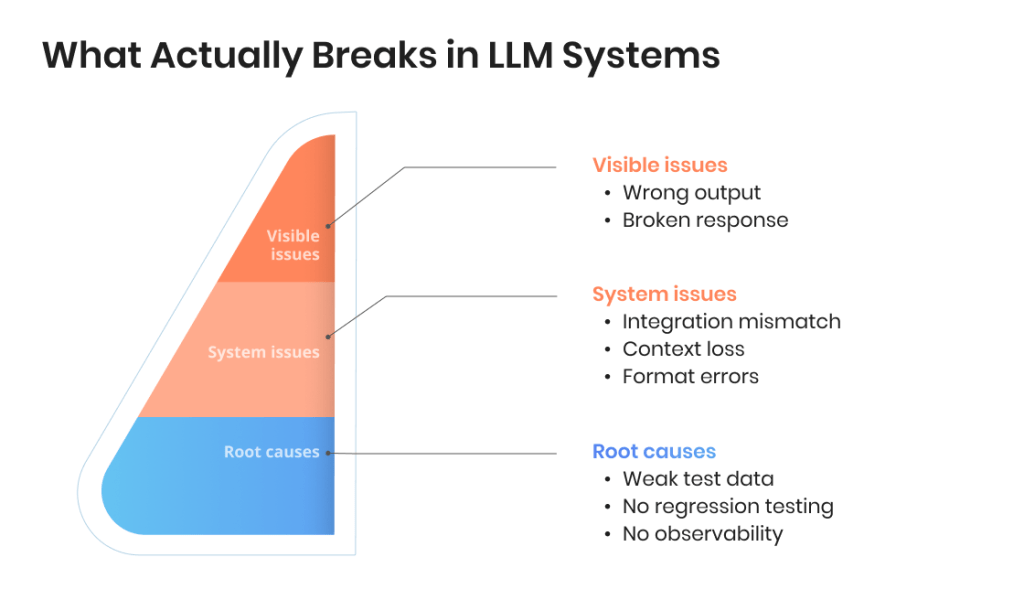
LLM systems often fail in ways that are harder to detect:
Responses get cut off due to token limits
API calls fail silently or retry incorrectly
Context is partially ignored in multi-turn flows
Outputs break downstream parsing or formatting
These issues don’t always surface during simple testing, but they affect real usage.
Why standard testing approaches fall short
Traditional testing still applies to parts of the system — APIs, data flow, UI — but it doesn’t fully cover how the LLM behaves within the workflow.
Effective LLM testing requires a mix of:
Deterministic checks for system components
Flexible testing methods for LLM-driven behavior
That combination is what allows you to test the application reliably without overcomplicating the process.
Key LLM Testing Methods
LLM testing methods focus on how the system behaves end to end, not just individual responses. Each method targets a different part of the application, which is why they are usually combined into a single test suite.
Functional testing
Functional testing checks whether the LLM application performs the intended task.
This includes:
User input → LLM processing → output → system action
Expected behavior across typical workflows
Correct handling of valid and invalid inputs
The focus is on whether the application works as expected, not on evaluating output quality in detail.
Integration testing
LLM applications rarely operate in isolation. Integration testing ensures that all components work together correctly.
A significant part of failures in LLM systems happens here, especially when data formats or assumptions don’t match.
Words by
Igor Kovalenko, QA Lead, TestFort
“Most integration failures in LLM systems aren’t crashes — they’re silent misfires where the system logs “success” while returning a fallback nobody tested. If a component hasn’t been exercised under real latency and partial failure conditions, it’s not tested.”
Regression testing
LLM behavior can change after updates to prompts, models, or surrounding logic. Regression testing helps detect these changes early.
In practice, this means:
Running the same test data repeatedly
Comparing system behavior across versions
Tracking failures over time
This is where a stable test suite becomes essential.
A common question in online discussions is how to run regression testing when outputs vary. Teams typically solve this by running the same test cases repeatedly and checking whether outputs stay within acceptable bounds rather than expecting exact matches. Some also combine this with semantic similarity or scoring to detect meaningful changes instead of surface differences.
Prompt and interaction testing
Prompts are part of the system logic, so they need to be tested like any other component. This includes:
Testing prompt templates
Checking multi-turn interactions
Handling ambiguous or edge-case inputs
Small prompt changes can affect system behavior, which makes this a critical part of LLM testing.
Words by
Igor Kovalenko, QA Lead, TestFort
“Prompt changes are the most underestimated regression trigger — teams label them “low risk” and skip the run. A single added sentence, however, can shift output length enough to break every downstream parser without producing a single wrong answer.”
Failure and fallback testing
LLM applications need to handle failure gracefully. This involves testing:
API timeouts or errors
Empty or malformed responses
Fallback logic and retries
These scenarios are easy to overlook but have a direct impact on reliability in production.
Words by
Igor Kovalenko, QA Lead, TestFort
“The gap here is usually in what teams use as test input for failure scenarios — clean null values and textbook timeouts, not the whitespace-only strings and near-valid JSON that LLMs actually produce at the edge. Test your fallback against real LLM garbage, not synthetic errors.”
Let’s take a look at which testing method is best suited for catching different types of failures.
Testing method
What it primarily tests
Typical failure it detects
When to use it
Functional testing
End-to-end workflows
Broken task completion, incorrect system behavior
Core user flows
Integration testing
Component interaction
API mismatches, RAG failures, tool errors
Multi-component systems
Regression testing
Changes over time
Behavior drift after updates
After prompt/model changes
Prompt testing
Prompt logic
Edge-case handling issues, unexpected outputs
Prompt-heavy systems
Failure testing
Error handling
Timeouts, empty outputs, fallback failures
Production readiness
Let’s give your AI app the quality boost it deserves
LLM testing is often considered to be a purely manual QA activity, which is understandable at first glance. However, automation definitely has a place in the LLM testing workflow, but only when it’s applied the right way and when expectations around it are reasonable. Automation testing is what helps teams approach testing LLMs at a larger scale. Without it, even a small LLM application becomes difficult to test consistently, especially when workflows, prompts, and integrations change frequently.
At the same time, not every part of testing LLMS can or should be automated. The goal is to automate what is repeatable and leave space for flexible verification where needed. Here is an honest look at where automated LLM testing works and where is may fail to meet expectations.
What can be automated
Automation works best for predictable system behavior and repeatable test cases.
You can automate:
Execution of test cases across a dataset
Regression testing to compare test results over time
Format and schema checks to verify output matches the expected structure
API responses, retries, and failure handling
Automated regression tests are especially useful when prompts or a different model is introduced. Running the same test data against a new version helps verify that the LLM application still behaves correctly.
This is where automated testing becomes essential. It allows teams to test LLMs continuously instead of relying on manual checks.
What cannot be fully automated
Some aspects of testing LLM applications resist strict automation. This includes:
Correctness in complex or open-ended tasks
Factual accuracy in generated content
Usefulness of responses in a specific use case
For example, checking whether a summarization output is helpful or whether a hallucination affects meaning often requires human judgment or flexible evaluation methods.
Even when using techniques like LLM-as-a-judge or semantic similarity (such as BERTScore), results should be interpreted carefully. These methods can support testing, but they don’t fully replace human testers.
Here is a quick look at what you can and cannot automate in LLM testing.
Component
Can be automated
Needs human validation
Example
API behavior
Yes
No
Response status, retries
Output format
Yes
No
JSON validation
Workflow execution
Yes
Partially
Task completion checks
Output correctness
Partially
Yes
Factual accuracy
Tone & usefullness
No
Yes
Content quality
Edge-case handling
Partially
Yes
Ambiguous prompts
Building an LLM test suite
A strong test suite brings structure to the testing process and makes LLM testing repeatable. At a minimum, it should include:
Representative test data based on real user input and workflows
Clearly defined test cases covering core functionality and edge cases
Automated execution to run tests consistently
A way to track regression and compare test results
As testing matures, you’ll want to expand the dataset and feed new failure cases back into your test suite. This helps improve test coverage and keeps the suite relevant as the LLM application develops.
A well-designed test suite is the foundation of any LLM testing strategy. It connects automation, regression, and evaluation into a single workflow that supports reliable software testing for LLM-based applications.
In reality, teams rarely rely on a single approach. A typical LLM testing strategy combines automated regression tests, prompt-level checks, and integration testing, often supported by a growing dataset built from real usage. This layered setup is what makes testing LLM applications sustainable as they scale.
Observability and Debugging in Testing LLMs
Testing LLM applications largely consists of running test cases, but it doesn’t stop there. Many issues only appear under real conditions, which makes observability a core part of LLM testing.
Unlike traditional software testing, where failures are often explicit, LLM systems can fail quietly — through degraded output, partial responses, or unexpected behavior inside a workflow. Without proper observability, these issues are difficult to detect and even harder to debug.
Why observability matters
Observability provides visibility into how an LLM application behaves beyond test execution. It helps you:
Trace how user input is processed
Understand how the language model generates output
Identify where failures occur in a workflow
Connect test results with real system behavior
This is especially important for AI applications and AI agents, where multiple components interact and failures are not always obvious. LLM observability is what allows you to move from “something is wrong” to “this is exactly where and why it breaks.”
What to track
To test LLMS effectively, you need more than pass/fail signals; you also need context. Key data points include:
User input and prompt variations
Model output and formatting
Latency and response times
Token usage and truncation
API errors and retry behavior
Workflow steps across the LLM application
Tracking these allows you to verify system behavior, detect regression patterns, and evaluate how the LLM handles edge cases in real conditions.
Key tools to use
Several tools support observability and debugging in LLM testing. Common options include:
LangSmith — tracing, debugging, and evaluation workflows
Langfuse — open-source observability and analytics
Arize Phoenix — monitoring and evaluation for LLM systems
These tools integrate with testing frameworks and help collect structured data from test runs and production usage. You can also combine them with general software development tools (for example, logging pipelines or GitHub-based workflows) to build a more complete testing process.
Here is a more detailed look at common LLM testing tool options available today.
Tool
Best for
Key capability
Typical use in testing
LangSmith
Debugging + evaluation
Prompt tracing, workflow visibility
Debugging failures
Langfuse
Observability
Logs, analytics, monitoring
Tracking system behavior
Arize Phoenix
Monitoring
Performance + drift tracking
Production analysis
Custom logging
Flexibility
Full system control
Internal pipelines
Metrics Used in LLM Testing
LLM testing focuses on system behavior rather than purely LLM responses, which is why the metrics are different from LLM evaluation metrics. Specifically, instead of measuring output quality in detail, teams need to track whether the LLM application works reliably under real use conditions.
LLM testing metrics help you verify stability, detect regression, and understand how the system performs in different workflows. They are especially useful when combined with automated testing and observability.
Here are the key metrics used in LLM testing and why tracking them is important.
Metric
What it measures
Typical signal
Why it matters
Latency
Response time
Slow or inconsistent output
User experience
Error rate
Failed requests
API failures, timeouts
Stability
Success rate
Completed workflows
Partial or failed tasks
System reliability
Retry rate
Retry frequency
Frequent retries
Hidden instability
Output validity
Format correctness
Broken structure
Downstream failures
Token usage
Input/output size
Shortened output
Hidden errors
Regression signals
Changes over time
Performance drop
Change tracking
These metrics act as a bridge between testing and observability. They help you evaluate whether the system works as expected, even when the underlying LLM responses vary. Moreover, tracking these metrics over time makes regression easier to detect. Instead of relying on individual test runs, you can see how the LLM application performs across changes and identify patterns that indicate instability.
AI & ML Testing Guide: Tools, Metrics, Best Practices
How to Test LLM-Based Applications and What You Need to Get Started
Testing LLM-based applications typically has very little clarity at the beginning, even for experienced teams. Because there is no single starting point, many teams try to test everything at once — prompts, outputs, integrations, workflows. That quickly becomes unmanageable, and the results don’t make it worthwhile either.
A more practical approach is to treat testing as a gradual process. You start with a small set of test cases that reflect your core workflow, then expand as the LLM application grows. The goal is to build a testing process you can repeat and expand when needed, not to achieve maximum coverage on day one.
1. Start with a single workflow
The easiest way to begin is to test one specific use case end to end. Take a real user input, run it through the system, and verify:
How the input is processed
How the LLM handles the prompt
How the output is used by the application
This gives you a baseline for how the system behaves and helps identify the first issues.
2. Define simple test cases
At this stage, test cases do not need to be complex. A small dataset of representative inputs is enough. Focus on:
Typical user scenarios
A few edge cases
Expected system behavior
This allows you to test LLMs in a structured way without overcomplicating the process.
3. Add repeatability
Once you have test cases, the next step is to make them repeatable. Run the same tests multiple times and track:
Whether the system behaves consistently
How outputs change across runs
Whether failures appear under variation
This is the foundation for regression testing.
4. Introduce automation gradually
Automation should come after the basics are in place. Start by automating:
Test execution
Simple checks (format, API behavior)
Regression testing
You don’t need a full testing framework at this stage. Even simple scripts can help automate repetitive tasks.
5. Expand with observability and feedback
As the system grows, testing needs more context. Use observability to:
Track input and output across workflows
Identify failures in production
Collect user feedback
This helps improve test data and makes the testing process more realistic over time.
Here is how to choose the right testing approach for your project.
Situation
Primary focus
Recommended testing approach
Early-stage prototype
Basic functionality
Functional testing + manual checks
Growing application
Stability
Regression testing + test suite
Multi-component system
Integrations
Integration testing + observability
Frequent updates
Change tracking
Automated regression tests
Production system
Reliability
Full testing + observability
Common Challenges in LLM QA
Compared to traditional software testing, LLM deals with a different set of features and requirements, and therefore carries a different set of potential challenges. Testing the system isn’t always the hard part: the hard part is to decide what to test, how to measure it, and how to keep results consistent as the LLM application changes with time and becomes bigger. These are the challenges teams often encounter when testing LLMs.
Non-deterministic behavior
Unlike traditional software, where the same input produces the same output, LLMs can generate different responses for identical test cases. This makes it harder to verify correctness and requires a shift from exact matching to range-based expectations.
Unclear pass/fail criteria
In many scenarios, it is difficult to determine whether an output is correct. A response can be partially accurate, incomplete, or acceptable depending on context, which complicates the testing process and makes results harder to interpret.
Words by
Igor Kovalenko, QA Lead, TestFort
“The practical fix is to stop asking “Did this test pass?” and start asking “Across 10 runs, how often does this scenario produce an acceptable outcome?” — threshold-based acceptance changes the whole reporting conversation with stakeholders.”
Test data design
Creating effective test data is not straightforward. A small dataset may miss important edge cases, while a large one becomes difficult to maintain. The challenge is building a dataset that reflects real user input without becoming unmanageable.
Hidden system failures
LLM applications can fail without obvious errors. Issues like truncated responses, silent API failures, or broken formatting often go unnoticed in simple test runs but affect real workflows.
Integration complexity
Most LLM applications depend on multiple components, including APIs, retrieval systems, and external tools. Testing these integrations reliably is more complex than testing isolated features.
Maintaining consistency over time
As prompts, models, or configurations change, system behavior can shift. Without a structured approach to regression testing, it becomes difficult to track whether the LLM performs better or worse after updates.
Best Practices for Testing LLMs
One of the most valuable ideas we have carried from our experience of testing various LLM solutions is that LLM testing works best when it is treated as part of the engineering process instead of an afterthought. This requires a thoughtful, well-planned approach that starts with a clear testing strategy, supported by the right test data and automation, making it possible to test LLMs consistently even as the system changes. Here are some more industry-proven practices for making the most of your LLM testing process.
1. Design test data around real workflows
Test data should reflect how the LLM application is actually used. Instead of isolated prompts, build test cases around full workflows and real user input. This makes it easier to verify behavior and improves test coverage in areas that matter.
2. Build repeatable test suites
A reliable test suite is the foundation of LLM QA. It allows you to run the same test cases across versions, compare test results, and detect regression early. As new issues appear, they should be added back into your test suite to keep it relevant.
3. Combine testing methods
Different testing methods cover different risks. Functional testing ensures the application works, integration testing checks system connections, and regression testing tracks changes over time. Combining these approaches makes testing more complete without adding unnecessary complexity.
4. Automate what is stable
Automation should focus on repeatable checks such as workflows, API behavior, and output structure. Automated testing helps maintain consistency and reduces manual effort, especially when running regression testing on large datasets.
5. Separate testing from evaluation
Testing LLM applications and LLM evaluation serve different purposes. Testing focuses on system behavior, while evaluation focuses on output quality. Keeping them separate makes both processes easier to manage and more effective.
6. Use observability to support testing
Observability adds context to test results. By tracking input, output, and system behavior, you can better understand failures and verify how the LLM application performs under real conditions.
7. Plan for change
LLM systems change frequently — prompts, models, and integrations are updated over time. A good testing process accounts for this by tracking regression, updating test data, and continuously testing the application as it evolves.
Our Experience With LLM Testing
In theory, LLM testing happens at a respectable pace, giving the team enough time to plan and execute every step. In real projects, LLM testing quickly moves beyond prompts and right into system behavior. But that doesn’t mean the QA project is destined to fail. What matters the most is how the LLM application performs across workflows, integrations, and repeated runs, not isolated replies. This is how we at TestFort approach testing LLMs on different projects.
Testing an AI assistant for developer workflows
We worked with an LLM-based application designed to support developers with CI/CD tasks. Early testing showed that while individual LLM responses looked reasonable, system behavior was inconsistent across workflows and user scenarios.
Key challenges:
Inconsistent output across identical test cases
Weak context handling in multi-step workflows
Limited adaptability across frameworks and user profiles
Lack of structured regression testing
Our approach:
We focused on testing real developer workflows rather than isolated prompts. Test cases were built around common tasks and executed repeatedly to verify consistency, integration behavior, and response stability. The testing process combined functional testing, regression testing, and automation to ensure repeatable results and reliable test coverage across scenarios.
Outcomes:
Improved consistency across repeated runs
More stable output structure and formatting
Better handling of multi-step workflows and context
Increased reliability of the LLM application under real usage
AI Assistant Testing for a CI/CD Platform: Full Case Study
In this case, the LLM application was used to generate sales emails. The main issue was not just variability in output, but the lack of a repeatable testing process to track how the system behaved after updates.
Key challenges:
Unpredictable behavior after prompt and model changes
No clear regression tracking
Limited test data based on real use cases
Our approach:
The first step was focusing on introducing structure into testing. We created test data from real scenarios, built repeatable test cases, and implemented automated regression testing. This made it possible to see how the system responded to the same inputs over time and detect changes in behavior early.
Outcomes:
More predictable system behavior across updates
Faster detection of regression issues
Improved stability of outputs within application workflows
LLM Testing for a B2B Sales Copilot: Full Case Study
The emergence of LLM application testing changed the way we think about software reliability. You are no longer working with a system that simply returns correct or incorrect results — you are working with one that behaves within a range, but defining the range is also a part of the job. That makes testing less about proving correctness and more about setting boundaries and observing how consistently the system stays within them.
Over time, the teams that succeed are the ones that treat testing as an ongoing signal instead of a checkpoint that signals completion. The goal of LLM testing is not to get rid of variability — that is both impossible and unnecessary. Understanding it well enough to control its impact is what defines a skilled LLM tester. This perspective changes how you design test cases, how you use automation, and how you interpret results — and ultimately determines whether your LLM application remains stable, trustworthy, and usable.
FAQ
What is the difference between LLM testing and LLM evaluation?
LLM testing focuses on system behavior, stability, and integration, while LLM evaluation focuses on output quality, correctness, and usefulness. Both are part of a complete testing strategy but require different methods.
How do you test LLM-based applications in practice?
Start with a core workflow, build test cases around real user input, and run them repeatedly. A basic testing process includes functional testing, regression testing, and integration checks, supported by a small but representative dataset.
How do you regression test LLM outputs if they are not deterministic?
Instead of exact matching, teams test whether the output stays within acceptable bounds. This can include repeated runs, comparing test results over time, or using evaluators like semantic similarity or LLM-as-a-judge.
What should be included in an LLM test suite?
A test suite should cover key workflows, integration points, and edge cases. It typically includes test data, defined test cases, and automated regression tests to track how the LLM application behaves across updates.
Can LLM testing be fully automated?
No. Automated testing works well for workflows, structure, and integration, but complex outputs still require evaluation methods or human review. Most teams combine automation with targeted evaluation to test LLMS effectively.
How do you test prompts in an LLM application?
Prompts are treated as part of the system logic. Teams create test cases with different inputs, run them across a dataset, and verify how the LLM handles variation, edge cases, and multi-step interactions.
Share:
Jump to section
We know exactly what your AI app needs to shine — let’s talk strategy
Inna is a content writer with close to 10 years of experience in creating content for various local and international companies. She is passionate about all things information technology and enjoys making complex concepts easy to understand regardless of the readers tech background. In her free time, Inna loves baking, knitting, and taking long walks.
An experienced QA engineer with deep knowledge and broad technical background in the financial and banking sector. Igor started as a software tester, but his professionalism, dedication to personal growth, and great people skills quickly led him to become one of the best QA Team Leads in the company. In his free time, Igor enjoys reading psychological books, swimming, and ballroom dancing.











 What is the difference between LLM testing and LLM evaluation?
 What is the difference between LLM testing and LLM evaluation?