
The current state of the mobile app market is what turns testing from “nice to have” to a crucial step on the way to releasing a successful application. Apps are released and updated more often, device specifics and operating systems change faster, and users are prepared to tolerate fewer and fewer mistakes. A single unstable release can reverse months of work done by the whole team, and this kind of failure often comes down to insufficient testing.
That’s where automation comes to the rescue. Manual testing is repetitive, time-consuming, and does not scale, so automation seems like the most obvious solution. At the same time, automation done without structure quickly becomes fragile and expensive to maintain.
In this article, we are looking at mobile automation testing from a practical angle: how automated mobile app testing works, where it delivers real value, how Android and iOS automation differ, and how teams approach tools, AI, and cost tradeoffs without turning automation into its own bottleneck.
Key Takeaways
- Mobile automation testing works best for products with frequent releases and growing regression risk, not in early-stage prototypes.
- Cross-platform automation reduces duplication, but Android and iOS still require platform-specific adjustments to keep tests stable.
- Specific tool choices matter less than framework structure; poorly organized test suites fail regardless of the testing tool.
- Real devices remain critical for reliable results, especially when performance, memory, or OS behavior is involved.
- AI improves maintenance and prioritization, but it cannot compensate for weak test design or unclear objectives.
- Automation ROI increases over multiple release cycles, particularly when regression scope expands faster than feature development.
- Not every scenario should be automated; UI-heavy and rapidly changing areas often require a blended approach.
- Automation maturity develops in layers, typically following product complexity and platform updates.
What Is Mobile Test Automation?
Mobile test automation is the process of using software tools and frameworks to automate mobile testing tasks that would otherwise require too much manual effort. It helps teams run tests on mobile apps repeatedly on a regular schedule, get more comprehensive, interpretable results, and scale testing to a wider selection of devices and platforms over time.
For mobile app testing automation, this usually means writing test scripts that interact with an application the way a user would — tapping buttons, entering data, switching screens — and then checking whether the application behaves in the exact way it’s supposed to.
How mobile testing automation fits into software testing
Mobile testing automation is part of software testing, but it comes with its own constraints:
- Tests must run across Android and iOS platforms
- The same app may behave differently on different mobile devices
- UI changes, OS updates, and device fragmentation affect test stability
Because of this, mobile application automation testing focuses on repeatability and reliability, not just correctness.
What gets automated in mobile app testing
Automation works best for scenarios that are predictable and repeatable. Common candidates include:
- Core app testing flows such as login, onboarding, and navigation
- Regression tests that run on every build
- End-to-end testing across critical user journeys
- UI testing for stable screens and app elements
- Smoke tests used to check basic app health
Automated mobile app testing allows teams to run the same test across multiple Android and iOS environments without rewriting test logic each time.
What mobile testing automation does not cover
Mobile testing automation does not remove the need for manual testing, and it does not replace QA expertise. It also does not guarantee full test coverage or capture subjective user experience issues.
Instead, mobile testing automation works as part of a broader application testing strategy that combines automated testing, targeted manual testing, and carefully chosen tools and frameworks.
The core purpose of mobile automation testing is consistency, speed, and scale, while keeping human judgment where it matters most.
We know exactly what users want to see in a 5-star app

How Does Automated Mobile App Testing Work?
Automated mobile app testing works by executing predefined test scenarios around a mobile application with little to no human involvement in each run. Once the test suite is locked in, the same checks can be repeated for different builds, devices, and platforms, producing consistent results over time.
Rather than focusing on individual test steps, automated mobile testing works best when it’s treated as a comprehensive system that supports repeatable quality checks and offers faster feedback as the application changes. Here is how mobile automated testing works on real projects.
The basic testing flow
At a high level, automated mobile testing follows a structured cycle:
- A test suite defines which parts of the mobile app are covered
- Test scripts describe expected app behavior in specific scenarios
- Tests run automatically on Android and iOS environments
- Results are collected and compared against expected outcomes
This cycle allows teams to test the same mobile application repeatedly without rerunning the same manual steps for each release.
What happens during test execution?
During test execution, automation interacts with the mobile app through a testing tool or framework. It performs actions such as tapping UI elements, entering data, switching screens, or moving the app between foreground and background states.
The testing platform controls:
- Where tests run (simulator, emulator, or real devices)
- The order and conditions of test execution
- How failures are detected and recorded
This setup makes it possible to run one test across multiple environments instead of duplicating effort manually.
Where does automation fit in the testing process?
Automation works best for stable and repeatable scenarios, including:
- Core user flows that must behave consistently
- Regression checks after changes
- End-to-end paths across key screens or services
- UI testing for predictable app elements
Covering these areas through automation reduces repetitive effort and keeps testing focused on areas where consistency matters most.
Platforms, devices, and environments
Automated mobile app testing does not run in a vacuum. The same test can behave differently depending on the platform, device type, and environment where it is executed. This variability is one of the main reasons mobile automation testing requires more structure than automation for web applications.
At the platform level, Android and iOS introduce different constraints. Differences in OS behavior, UI patterns, background execution rules, and release cycles all influence how automated tests are designed and scheduled. A test that runs reliably on one platform may need adjustments on the other, even when the app functionality is identical.
Device diversity adds another layer. Screen sizes, hardware capabilities, memory limits, and manufacturer-specific behavior affect how mobile apps respond during test execution. Automated mobile testing makes it possible to run the same test across a controlled set of devices, reducing the need to manually repeat checks while still exposing device-specific issues.
Testing environments also matter. Automated tests may run on:
- Simulators or emulators for fast, early feedback
- Real devices for conditions closer to production
- Cloud-based testing platforms to extend coverage without maintaining a large device lab
Each environment serves a different purpose. Early automation often favors speed and frequency, while later stages rely more on real devices to reflect how the app behaves in actual usage.
By combining platforms, devices, and environments deliberately, automated mobile app testing supports broader coverage without unnecessarily increasing effort. The goal is not to test everywhere at once, but to run the right tests in the right environments at the right time.
What automation changes over time
Once automation is established, testing no longer depends on repeating the same actions release after release. Tests can run continuously as the app transforms, providing regular insight into how changes affect behavior. Over time, automated mobile app testing becomes part of the delivery rhythm rather than a standalone activity.
Android vs. iOS Mobile Automation Testing
One of the key reasons why mobile testing automation can be so complex is that the same application for iOS and Android can have different architectures, behave differently in the same scenarios, and offer a different user experience, even when the core application logic is identical. These are all differences that affect how automation is planned, maintained, and scaled over time. Here is how those differences play out in real testing scenarios.
Platform behavior and test stability
Android and iOS handle application lifecycle events in different ways. Background execution, permission prompts, and system interruptions follow platform-specific rules. As a result, the same automated test may pass consistently on one platform and fail intermittently on the other unless those differences are taken into account.
iOS tends to offer a more controlled ecosystem with fewer device variations, which often leads to more predictable automation behavior. Android, with its wider device range and manufacturer customizations, introduces more variability during test execution.
UI structure and interaction patterns
UI automation depends heavily on how app elements are exposed to the testing framework. Android and iOS differ in how UI components are identified, structured, and updated during runtime.
These differences influence:
- How test scripts locate app elements
- How resilient the tests are to UI changes
- How much maintenance is required as the app evolves
Automation on both platforms is feasible, but test design choices that work well on one may not translate directly to the other.
Devices and environments
Device strategy also diverges between platforms. Android automation typically needs to cover a broader range of devices to account for hardware and OS variation. iOS automation focuses more on OS versions and device generations than on manufacturer diversity.
Words by
AQA Expert, TestFort
“A decent mobile testing strategy must account for device fragmentation, OS variation, and real-device conditions to ensure reliable application behavior across environments.”
Both platforms use simulators or emulators for early testing and real devices for production-like conditions. The balance between the two affects execution speed, coverage depth, and confidence in results.
In a full-cycle QA project for a mobile investment platform serving multiple countries, we paired thorough automation testing with hands-on checks to ensure feature reliability and compliance with regional requirements. Moreover, functional and regression automation helped maintain stability across releases while supporting broad device coverage. Read the complete case study here.
What does it mean for your choice of mobile automation testing tools?
Most mobile automation tools support both Android and iOS, but platform-specific capabilities still matter. Some features are easier to automate on one platform than the other, depending on OS-level access and tooling maturity.
This is why mobile automation testing often treats Android and iOS as related but distinct tracks rather than a single, unified effort. Shared logic can exist, but platform-specific adjustments are usually required to keep tests reliable.
Understanding these differences early helps teams set realistic expectations for mobile app automated testing and avoid overestimating how much can be reused across platforms without tradeoffs.
We help businesses win over the app market with flawless, reliable software

Automated Mobile Testing Tools and Frameworks
When mobile automation testing fails, team are often tempted to blame the wrong choice of a tool. However, practice shows that even if the failure can be traced back to the tool, the real reason is that the tool was likely introduced without a framework that defines how they should be used, maintained, and scaled. Let’s look at tools and frameworks as components of a single testing system, not as individual solutions.
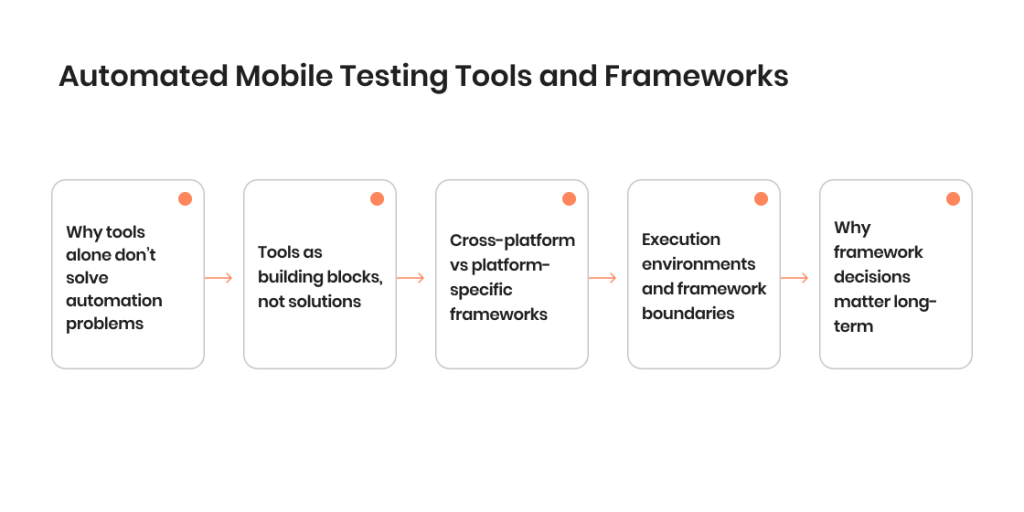
Why tools alone don’t solve automation problems
Modern mobile testing tools are powerful. Most can interact with iOS and Android platforms, drive UI actions, and run tests across different environments. Yet many automation projects still struggle with unstable tests, slow execution, and rising maintenance costs.
The root cause is usually structural. Without a framework, even the best testing tool becomes a collection of disconnected scripts. Tests are hard to reuse, failures are difficult to interpret, and scaling automation across teams or products becomes painful.
Tools as building blocks, not solutions
In practice, mobile automation testing tools act as execution engines. They perform actions, trigger test execution, and report results. What they don’t define is how tests are organized, how data is managed, or how automation fits into the broader testing process.
This is where frameworks come in. A framework determines:
- How test suites are structured
- How test cases are grouped and reused
- How environments and devices are handled
- How failures are logged and analyzed
- How automation supports end-to-end testing and regression coverage
Without these rules in place, automation remains fragile regardless of the toolset.
Cross-platform vs platform-specific frameworks
Framework design is also influenced by how automation is split across platforms.
Cross-platform approaches aim to reuse one test across Android and iOS, reducing duplication but increasing the need for careful abstraction. Platform-specific frameworks accept duplication in exchange for tighter control and greater stability.
Neither approach is inherently better. The right choice depends on application complexity, release frequency, and how much divergence exists between Android and iOS implementations.
Execution environments and framework boundaries
Frameworks also define where and how tests run. This includes decisions about simulators, emulators, real devices, and cloud-based testing platforms.
A well-designed framework separates test logic from execution details. Tests should behave the same regardless of whether they run locally, in CI pipelines, or on remote device farms. This separation is what allows mobile automation testing to scale without rewriting tests for each environment.
Why framework decisions matter long-term
Tools can be replaced. Framework decisions are harder to undo.
Once automation grows beyond a small set of scripts, the framework determines maintenance cost, test reliability, and how quickly automation can adapt to changes in the app or platform. This is why sustainable mobile automation testing depends more on structure and discipline than on choosing the latest tool.
Automated Mobile Testing Tools: What Are They Actually Good At
With how ubiquitous mobile automation has become, right now there is no shortage of mobile automation testing tools. Most of them can run a mobile app, perform tests on Android and iOS, and deliver reports. The differences between various tools start to matter once automation moves beyond a proof of concept and becomes part of the regular delivery process. So, which tools should you consider for your project?
Here is our overview of commonly used mobile automation testing tools, based on real project experience: what they work well for and where teams may run into limitations.
Appium
Appium is often the first serious choice for mobile app automation testing, especially when both Android and iOS need coverage.
Where it works well:
- Cross-platform automation with shared test logic
- End-to-end testing of native and hybrid mobile applications
- Teams that already use Selenium or similar frameworks
- Integration with cloud-based testing platforms and CI pipelines
Where it tends to struggle:
- Test execution speed compared to native tools
- Test stability if UI locators are not carefully designed
- Maintenance effort as apps evolve quickly
Appium works best when automation is treated as an engineering effort, not as a shortcut. Without clear framework rules, test suites can become fragile over time.
Espresso (Android)
Espresso is a native Android automation tool tightly integrated with the Android ecosystem.
Where it works well:
- Android native UI testing with high stability
- Faster test execution compared to cross-platform tools
- Close alignment with Android development workflows
Where it is less practical:
- No support for iOS
- Requires Android-specific knowledge and tooling
- Less suitable for teams aiming for a unified automation approach
Espresso is often chosen when Android quality is critical and platform-specific reliability matters more than reuse.
XCUITest (iOS)
XCUITest is Apple’s native automation framework for iOS applications.
Where it works well:
- Stable UI automation on iOS devices
- Tight integration with Xcode and iOS build processes
- Reliable execution on simulators and real iOS devices
Where limitations appear:
- iOS-only scope
- Requires familiarity with Apple tooling and languages
- Less flexible when teams want shared automation across platforms
XCUITest is commonly used in iOS-focused automation strategies or alongside other tools in mixed setups.
Detox
Detox is a mobile automation testing tool designed primarily for React Native applications. It focuses on gray-box testing, meaning it runs inside the app runtime and synchronizes closely with the app’s lifecycle.
Where it works well:
- React Native apps with predictable UI behavior
- Fast and stable UI testing compared to black-box tools
- End-to-end testing where timing and synchronization matter
- Teams that want quick feedback during active development
Where limitations appear:
- Best suited for React Native; not a general solution for native Android or iOS apps
- Smaller ecosystem compared to more established tools
- Less flexible when testing complex native integrations or hybrid setups
Detox is often chosen when speed and stability are priorities and the app architecture fits its model. It performs best in focused environments rather than large, heterogeneous mobile portfolios.
Selenium-based approaches for mobile web
For mobile web applications, Selenium and related tools are still widely used.
Where they work well:
- Testing mobile web applications and responsive behavior
- Cross-browser testing across mobile browsers
- Reusing existing web automation knowledge
Where they fall short:
- Limited coverage for native app behavior
- No access to mobile OS features or device-level interactions
These tools are useful when mobile and web share functionality, but they do not replace native mobile automation.
Cloud-based execution platforms
Cloud-based testing platforms are not automation tools themselves, but they shape how automation runs.
Where they work well:
- Expanding device coverage without maintaining a device lab
- Running tests in parallel to reduce execution time
- Supporting both Android and iOS devices at scale
Where teams need caution:
- Cost can grow quickly with heavy usage
- Debugging failures may require extra instrumentation
Cloud execution works best when paired with a clear mobile test automation framework that controls what runs, where, and how often.
The takeaway
Most automated testing tools for mobile apps are capable of basic tasks. The real differences appear in stability, maintenance effort, and how well they fit the app and team structure.
Teams usually succeed when they:
- Choose tools based on app architecture and platforms
- Accept that cross-platform reuse comes with tradeoffs
- Invest in framework design before scaling automation
Tools enable automated mobile app testing, but long-term results depend on how those tools are used, combined, and governed.
Find more too
AI in Automated Mobile Application Testing
The introduction of AI has changed a lot of things in testing, but some people tend to overestimate its current impact. With mobile automation testing, the biggest effect is scaling. AI does not replace existing tools; instead, it helps reduce the effort required to keep them working over time. AI-powered solutions can also come in handy where traditional automation starts to break down. This mainly includes unstable UI, frequent changes, and growing test suites. Here is how AI used in mobile automation right now and where it still falls short.
Where AI adds value in mobile automation
AI works best when applied to areas that are expensive or slow to maintain manually:
- UI testing for screens that change often
- Regression testing across large test suites
- Test execution analysis to surface meaningful failures
- Detection of unusual behavior that does not match historical patterns
In these cases, AI helps automated mobile app testing stay useful as the application develops.
Self-healing tests and reduced maintenance
One of the most practical applications of AI in mobile testing automation is self-healing. When UI elements change slightly, AI-based tools can often adapt without requiring immediate updates to test scripts.
This does not eliminate maintenance, but it reduces:
- The number of broken tests after UI changes
- Time spent fixing locators and selectors
- Noise caused by false failures
As a result, automation remains reliable for longer periods without constant intervention.
Smarter test coverage and prioritization
AI can also help decide which tests matter most at a given moment. By analyzing previous test results, usage patterns, and failure history, AI-driven systems can prioritize tests that are more likely to catch issues.
This approach supports:
- Faster feedback during frequent releases
- More focused test execution on critical paths
- Better use of existing automated test suites
Rather than running every test every time, teams can run the right tests when they matter most.
Limits of AI in mobile testing
AI does not remove the need for thoughtful test design. It still depends on quality input data and clear testing goals. Poorly structured automation combined with AI tends to amplify problems rather than solve them.
AI also struggles with areas that require subjective judgment, such as usability, visual appeal, or context-specific user behavior. These areas remain better suited for manual testing.
AI as part of an automation system
In mobile automation testing, AI works best as an enhancement, not a foundation. It strengthens existing automation by improving stability, reducing maintenance, and accelerating test execution.
When used carefully, AI allows automated mobile testing to scale without growing linearly in cost or effort, but when used without a clear strategy, it can add complexity without clear returns.
New blog post: AI in Testing — Does It Live Up to the Hype?

Manual Testing vs. Automated Testing for Mobile Apps
Both manual testing and automated testing play a role in mobile automation testing strategies, but what exactly do they do, and do you actually need both? The difference between manual and automated mobile testing is mainly operational. Each approach handles different types of risk, scale, and effort. Here are the key differences between manual and automated strategies used in testing of mobile applications.
| Aspect | Manual testing | Automated testing |
| Execution speed | Slower, requires human involvement for each test | Fast, repeatable test execution across builds |
| Scalability | Limited by team capacity | Scales across devices and environments |
| Stability | Flexible, adapts to unexpected behavior | Stable when well-designed, fragile if poorly structured |
| Cost | Lower upfront, higher ongoing effort | Higher setup cost, lower cost per repeated run |
| Best suited for | Exploratory testing, usability, edge cases | Regression, end-to-end testing, stable UI flows |
Manual testing is often most effective in early-stage application development, during UI changes, or when behavior is difficult to predict. It allows a tester to react to unexpected results, investigate anomalies, and assess overall experience in ways automated testing cannot.
Automated testing is most valuable once the product stabilizes and release frequency increases. Regression suites, repeated functional testing, and large test coverage areas benefit from automation because the same test can run consistently across Android and iOS without repeating manual steps.
Words by
AQA Expert, TestFort
“Test automation complements but does not replace manual testing, which remains essential for exploratory testing, usability evaluation, and areas requiring human judgement.”
The strongest mobile testing automation strategies combine both. Automation helps teams handle repeatable risk, while manual testing focuses on areas that require judgment. When applied deliberately, the two approaches support stable releases without inflating effort.
How to Choose the Right Mobile Testing Automation Strategy by App Type
Mobile automation testing works best when the approach is diligently chosen, not picked based on what currently trends. The test strategy needs to reflect how the app is built and how it is used. Moreover, the type of the app and its intended audience matter a lot too. Different app types introduce different risks, release patterns, and maintenance costs, which should influence how automation is applied. Here is how to build the right strategy for the most common mobile app types.
Enterprise and regulated applications
Examples include financial systems, healthcare platforms, and internal enterprise tools.
Automation focus:
- High coverage for core workflows and integrations
- End-to-end testing across critical paths
- Stable regression suites for Android and iOS
Role of manual testing:
- Compliance checks
- Complex business rules
- Scenario validation that depends on context
Automation here prioritizes reliability and consistency over speed.
Consumer-facing applications
This category includes eCommerce, social media, and content-driven apps.
Automation focus:
- Core user journeys such as onboarding and purchases
- Cross-device coverage for popular Android and iOS models
- UI testing for stable screens
Role of manual testing:
- Usability and visual quality
- Rapid feedback during UI changes
- Exploratory testing around new features
Automation supports frequent releases, while manual testing absorbs change.
B2B and SaaS applications
Examples include CRM systems, dashboards, and collaboration tools.
Automation focus:
- API and integration testing
- Regression testing for configuration-heavy features
- End-to-end testing for core workflows
Role of manual testing:
- Complex workflows
- Client-specific configurations
- Edge cases that vary by setup
Here, mobile testing automation helps control complexity as feature sets grow.
For a social gaming app with dynamic user interactions and frequent releases, we combined automated mobile app testing with hands-on exploration to minimize regressions without slowing development. Early automation on core user flows reduced repetitive test effort, while manual exploratory testing helped catch UX issues that matter most to players.
Key activities included:
- Integrating functional automation into CI to catch regressions fast
- Exploratory UX testing for onboarding and social sharing logic
- Validating third-party social integrations and stress testing under load
This approach helped us balance speed with quality in a high-change environment.Read the full case study here.
At the end of the day, there is no universal automation ratio that fits every mobile application. Effective strategies focus on where failure would hurt most and apply automation there first, expanding coverage as the product matures.
ROI and Cost of Automated Mobile App Testing
The cost of mobile automation testing is usually easy to estimate. The return, however, is less obvious, at least until testing starts to run at scale. The ROI of automation comes from reducing repeated effort, catching issues earlier, and keeping releases predictable as the app grows.
Words by
AQA Expert, TestFort
“Companies adopt test automation primarily to accelerate regression testing, reduce release risk, and improve feedback speed across frequent delivery cycles.”
Where costs usually come from
Automated mobile app testing typically involves:
- Initial setup of tools and test infrastructure
- Time spent creating and stabilizing test scripts
- Ongoing maintenance as the app changes
- Device access, especially when real devices or cloud platforms are used
These costs are front-loaded. Most of the investment happens before automation starts delivering value.
Where the return shows up
ROI becomes visible once tests are reused across multiple releases. Common sources include:
- Fewer manual regression cycles
- Faster feedback after changes
- Reduced risk of shipping known defects
- Less effort spent repeating the same checks across Android and iOS
Automation does not reduce testing needs; it reduces repetition.
How does it work in practice?
Let’s imagine a mobile app with biweekly releases. Manual regression takes three days of testing per release. After introducing automated regression for core flows, that effort drops to one day focused on exploratory checks.
Over six months, this saves dozens of tester days without reducing coverage.
Now, let’s imagine a different consumer app introduces frequent UI updates. Without automation, regressions appear late and require emergency fixes. With automated mobile testing in place, issues surface earlier, before release, reducing hotfix work and store rating impact.
Automation, AI, and cost curves
Traditional automation usually reaches break-even after several release cycles. AI-assisted automation can shorten that timeline by reducing maintenance effort, but it also increases upfront costs. The tradeoff is lower long-term overhead once test suites grow large.
A realistic view of ROI
Automated mobile app testing delivers the strongest ROI when:
- Releases are frequent
- Core functionality is stable
- Regression risk is high
When these conditions are present, automation shifts testing from a recurring cost into a reusable asset.
For one of our recent projects for a global print-on-demand company handling millions of orders annually, a layered testing strategy was essential. Manual and automated mobile app testing, supported by real-device coverage and CI pipelines, kept performance stable through peak traffic and feature growth. We also introduced AI-focused checks for personalization features without sacrificing core regression coverage. Results included:
- 80% automation coverage, reducing manual effort by 25%
- 15% fewer build failures in CI
- Seamless performance during traffic spikes nearly 50% higher than baseline
- 20% reduction in overall testing costs
This mix helped preserve release speed while increasing confidence in quality across platforms.Read the full case study here.
How We Automate Mobile Testing: Our Approach
Our decade-long approach to mobile automation testing has been shaped by working on products with very different constraints: fast-moving consumer apps, region-specific platforms, and large-scale systems with heavy traffic. While being involved with these projects, we have noticed one persistent pattern: automation only meets expectations when it is used deliberately, with a clear understanding of risk, business requirements, and platform behavior.
Above everything else, we treat automated mobile app testing as a long-term process, not a one-off effort. Our goal is never to just automate everything. We aim to create a system that stays reliable even as the app, devices, and operating systems transform.
Key principles behind our approach:
- Risk-first automation. We start by identifying flows where failure would have the highest impact, then build automation around those paths instead of chasing coverage numbers.
- Platform awareness by default. Android and iOS are treated as related but distinct environments. Automation accounts for platform behavior early rather than forcing an artificial divide.
- Stable core, flexible edges. Core regression and end-to-end paths are automated aggressively, while areas with frequent UI or logic changes remain partially manual or AI-assisted.
- Real devices over assumptions. Automation is implemented on real devices to reflect actual performance, memory behavior, and OS constraints, not just simulator conditions.
- Maintenance as a design concern. Test structure, data handling, and execution logic are designed to reduce breakage when the app changes.
- Continuous improvement. Automation is routinely refined alongside the product, based on production issues, release patterns, and emerging tooling trends.
This approach allows mobile testing automation to scale without becoming brittle, keeping quality signals reliable as products grow and delivery cycles accelerate.
New blog post: AI in Testing — Does It Live Up to the Hype?

Final Thoughts
Even when implemented flawlessly, mobile automation testing rarely delivers instant results. Its value becomes visible as applications grow, releases speed up, and the cost of repetition increases. Over time, automation shifts testing away from reactive fixes toward more predictable quality signals that support steady development.
What separates sustainable automation from short-lived setups is not the tool set or the framework, but how well they adapt to change. Platforms transform and user behavior shifts, which means that apps rarely stay static. Automation that accounts for this reality remains useful long after the first test suite is written, helping teams move forward without accumulating hidden quality debt.
FAQ
 What is mobile automation testing and how is it different from general test automation?
 What is mobile automation testing and how is it different from general test automation?
Mobile automation testing focuses specifically on testing for mobile applications across Android and iOS platforms. Unlike general test automation for web applications, it must account for mobile devices, OS behavior, UI differences, and platform-specific constraints during test execution.
When should a team automate mobile testing instead of relying on manual testing?
Automation makes sense when regression testing becomes repetitive, releases are frequent, or test coverage needs to scale across devices. Manual testing is still useful for exploratory scenarios, but automated mobile app testing reduces repeated effort over time.
Can one test run on both Android and iOS?
In cross-platform testing setups, it is sometimes possible to write one test that suits both Android and iOS apps. However, platform differences often require conditional logic or separate adjustments to keep mobile test automation stable, which means that native iOS and Android applications typically require a different approach to automation.
Do automated testing tools replace testing on real devices?
No. While simulators and emulators are useful, automated testing tools should also run on real devices to reflect performance, memory, and OS-level behavior, both for native and hybrid apps. Relying only on virtual environments can hide device-specific issues.
How does AI improve automated mobile app testing?
Using AI frameworks and tools to automate the testing of iOS and Android apps helps improve test stability, identify flaky patterns, and prioritize test execution. In larger test suites, AI can also reduce maintenance overhead and support smarter regression strategies.
Jump to section
Hand over your project to the pros.
Let’s talk about how we can give your project the push it needs to succeed!