
In November 2025, Cloudflare — a critical piece of internet infrastructure — experienced a massive outage when a configuration change triggered cascading failures across its network. As a result, major websites and applications across the globe experienced downtime or lagging service, disrupting business operations, user access, and transactions.
That incident illustrates a fundamental truth: even the leading tech companies with modern infrastructure cannot assume stability under stress. Every time this happens, it dramatically highlights the gap between “everything working under normal load” and “everything still working when things go wrong.” For product teams, this gap is what software stress testing is designed to close, ensuring systems survive surges, failures, and the unforeseen, rather than failing when the stakes are highest.
But how exactly do you stress test your software to make sure it’s equipped to withstand anything unexpected? Let’s look at the concept, uses, automation potential, and best practices of stress testing in detail.
What Is Stress Testing?
Stress testing is a specialized form of software testing that evaluates how an application behaves under extreme or unpredictable conditions. Instead of checking how a system performs during normal traffic, a stress test deliberately pushes it far beyond expected limits to reveal how it reacts when faced with unusually high user load, resource exhaustion, infrastructure failures, or sudden spikes in activity.
Where functional and performance testing focus on speed and accuracy under typical conditions, software stress testing focuses on resilience. It examines how your application handles overload, how it degrades under pressure, and, most importantly, how quickly it recovers once the load returns to normal. That recovery behavior often matters more to teams than the failure itself.
Why stress testing matters for modern digital products
From a business perspective, stress testing is less about pure engineering curiosity and more about risk management. Modern digital products operate in environments where usage patterns fluctuate dramatically, customer expectations are unforgiving, and even short outages create measurable financial and reputational damage. Among other things, stress testing gives teams insight into:
- How the system behaves when everything goes wrong at once
- What breakpoints exist in the architecture
- How failures cascade across dependent services
- How reliably the system restores itself after overload
To put it simply, stress testing in software development ensures your application can survive the unexpected — whether it’s a viral marketing surge, a holiday sale, a burst of transactions, or a critical infrastructure dependency failing under pressure.
Be prepared even for the unexpected with our stress and performance testing expertise.

Stress Testing vs. Load Testing vs. Performance Testing
Many teams use stress testing, load testing, and performance testing interchangeably, but each serves a different purpose in the software testing strategy. For engineering teams, understanding these differences is essential. Choosing the wrong type of test can create blind spots that only surface during real user activity, often when the stakes are highest. Let’s take a closer look at each approach and when your organization should use it.
Stress testing
A stress test pushes the system far beyond normal operating conditions to uncover how it behaves when overwhelmed. While software stress testing focuses on failure scenarios, its hidden value lies in revealing how quickly the system recovers once the pressure drops. It exposes breakpoints, uncovers hidden architectural weaknesses, and shows how load spikes can cascade across dependent services. Teams rely on stress testing to answer questions like:
- What happens if traffic suddenly triples?
- Will the system recover on its own, or require manual intervention?
- Could an overload corrupt data or disrupt business processes?
Stress testing is the only method that prepares an application for unpredictable real-world events.
Load testing
Load testing evaluates how well the application performs under user load that reflects real or anticipated usage patterns. It does not aim to break the system; instead, it measures how the system behaves when subjected to typical traffic peaks, such as marketing campaigns, onboarding new clients, or seasonal demand. It helps find answers to the questions:
- Is the system ready for the projected user growth?
- How does response time change as load increases?
- Where do performance bottlenecks appear under normal conditions?
Load testing is a core part of ensuring smooth, predictable operation, but it does not test resilience during extreme events.
Performance testing
Performance testing is a broad category that evaluates how fast, stable, and efficient the application is under normal conditions. This includes responsiveness, throughput, memory usage, and other indicators of system performance. This activity helps verify that:
- The application meets the SLAs;
- User experience stays consistent;
- Transaction paths are optimized end-to-end.
While performance testing establishes the baseline, it does not determine how the system behaves when pushed into failure territory — that is the domain of stress and load tests.
To better understand the differences and best applications of stress, load, and performance testing, here is an easily digestible breakdown.
| Aspect | Stress Testing | Load Testing | Performance Testing |
| Purpose | Reveal breakpoints and verify recovery after overload | Validate behavior under expected traffic | Measure speed, stability, and resource usage |
| Focus | Failure scenarios and resilience | Predictable growth and traffic patterns | Overall responsiveness and efficiency |
| What it measures | System limits, failure behavior, recovery | Throughput, response times, bottlenecks under normal load | Latency, throughput, resource consumption |
| When to use | Before high-risk events, scaling, major releases, or infrastructure changes | Before product launches, onboarding major clients, marketing campaigns | During routine releases and optimization cycles |
| Consequences of skipping | Unexpected downtime during surges, data corruption, service disruption | Slowdowns, instability during normal traffic, poor UX | Poor performance, slow features, SLA violations |
Why Do We Need Stress Testing in Software Development?
Modern digital products operate in unpredictable environments where usage can spike without warning. Marketing campaigns go viral, integrations accelerate traffic, external systems fail, and customers expect uninterrupted service regardless of what happens behind the scenes. In this reality, software stress testing becomes not just a QA activity but a crucial element of a thriving ecosystem. It validates how well the application tolerates disruption, protects data, and maintains operations when exposed to extreme or unexpected conditions.
For product owners, the value of stress testing goes far beyond technical optimization. It directly influences revenue stability, customer experience, regulatory compliance, and the company’s ability to scale without costly setbacks. It gives organizations visibility into system limits and prepares them for scenarios that would otherwise cause outages, lost transactions, or service degradation at the worst possible moment.
What happens when you don’t stress test software?
Teams often learn the importance of stress testing only after a failure happens in production. Without proper resilience testing, even a well-architected system can break under sudden or unusual user load, revealing vulnerabilities that regular performance checks never surface.
Common consequences of skipping stress testing include:
- Unexpected downtime during traffic surges, which leads to lost sales and lower customer trust
- Data corruption or incomplete transactions, especially in financial and eCommerce platforms
- Prolonged recovery times, where systems fail to self-heal and require manual intervention
- Cascading failures across services or microservices, amplifying the impact beyond the initial fault
- Support overload as customer-facing teams scramble to handle incident fallout
- SLA violations for B2B or enterprise products, creating contractual and reputational risk
The important thing to remember is that even a short outage can carry a high price. Industries like fintech, healthcare, online retail, and SaaS often measure losses in the thousands or even millions, per hour. Stress testing helps prevent these failures by exposing weak points before they affect real users.
Don’t Wait for Users to Find Your Weak Spots.
We’ll help you prepare for any scenario.
Key Business Scenarios Where Stress Testing Helps
While every digital product benefits from resilience validation, certain moments in the product lifecycle make stress testing indispensable. These are not purely technical triggers — they are business events where failure can directly affect growth, revenue, or brand credibility.
Stress testing is especially important when:
- Preparing for a traffic surge caused by marketing campaigns, promotions, product announcements, or seasonal peaks
- Launching major new features that could increase backend processing or expand API dependency chains
- Scaling to new markets or regions, where new customer segments may increase load beyond the usual patterns
- Onboarding enterprise customers, whose transaction volumes can easily overwhelm systems optimized for consumer use
- Migrating infrastructure, such as moving to the cloud, adopting microservices, or implementing new databases
- Integrating with third-party services, where external slowdowns or failures could impact your own system stability
- Running event-driven businesses, including fintech transactions, booking platforms, streaming services, or gaming apps
In all these scenarios, stress testing provides a clear understanding of how the system behaves under pressure. It allows product owners and CTOs, to make informed decisions about capacity planning, architectural improvements, SLA commitments, and risk mitigation. Instead of guessing whether the system can handle what comes next, you have the data to move forward confidently.
What Are the Types of Stress Testing?
Application stress testing is not a monolithic activity: teams can choose different ways to stress test their products depending on the software specifics, the architecture, and the risks they’re trying to uncover. Some types change the shape of the load, others widen the scope of the systems under pressure, and the rest simulate failures that real users and real traffic eventually trigger. Here are the main types of stress testing and when each one is worth running.
Spike testing
Spike testing hits the system with a sudden, sharp jump in user load, then drops back just as quickly. It shows whether the application absorbs the surge, queues requests, or fails outright, and how fast it returns to normal once the spike passes. This is the closest simulation of a viral post, a flash sale going live, or a push notification sent to the entire user base at once.
Best for: marketing launches, ticket sales, flash promotions, and any product where traffic can multiply within minutes.
Endurance (soak) stress testing
Endurance stress testing keeps the system under heavy load for an extended period, from several hours to a few days. Problems that never appear in a short test surface here: memory leaks, growing queues, connection pools that never fully release, and logs or temporary files that slowly fill the disk. The goal is to see whether performance degrades over time even when the load stays constant.
Best for: platforms that run continuously at high volume, such as streaming services, SaaS products, and payment systems during multi-day sales events.
Resource exhaustion testing
Resource exhaustion testing deliberately limits or consumes the resources the application depends on: CPU, memory, disk space, network bandwidth, or database connections. Testers observe how the system behaves as each resource runs out, whether it degrades gracefully, and whether it recovers once the resource becomes available again.
Best for: cloud and containerized applications with strict resource limits, and any system where one exhausted component can take down the rest.
Distributed stress testing
Distributed stress testing generates load from many machines at once, often across several regions, to reach volumes a single load generator can’t produce. One controller machine coordinates the test, while multiple worker nodes send traffic to the system and report results back. The same approach also stresses distributed architectures themselves, showing how microservices, load balancers, and data replication behave when every node is under pressure at the same time.
Best for: large-scale web platforms, global products serving users in several regions, and microservice-based systems.
Transactional stress testing
Transactional stress testing focuses on transactions that move between two or more applications or services, such as orders passing from a storefront to payment, inventory, and shipping systems. Under extreme load, it reveals data locking, timeouts, duplicate or lost transactions, and inconsistencies between systems that only appear when thousands of transactions run at once.
Best for: fintech, eCommerce, and booking platforms, where every incomplete transaction carries a direct financial cost.
Systemic stress testing
Systemic stress testing puts pressure on multiple applications that share the same infrastructure, such as servers, databases, or message queues. It shows how one overloaded application affects its neighbors: whether it starves them of resources, blocks shared data, or triggers cascading failures across the system.
Best for: enterprise environments and shared platforms where several products or services run on common infrastructure.
Analytical stress testing
Analytical stress testing checks how the system behaves under nonstandard or improbable conditions that still require verification. Instead of increasing traffic alone, it combines load with failures and unusual events. Typical scenarios include:
- An unusually high number of users logging in at the same time
- A database going offline while users are actively accessing it
- A third-party API slowing down or failing during peak traffic
- Large volumes of data being imported into the database all at once
- A scheduled backup or batch job running during the busiest hours
Best for: systems with critical external dependencies, and teams that want to confirm failover and recovery mechanisms actually work.
Now let’s look at how exactly stress testing is done for modern software systems.
How to Perform Stress Testing in 7 Steps
Running a stress test takes seven steps, from picking the flows that matter most to pushing the system past its breaking point and measuring how it recovers. The recovery step is the one teams most often skip, and it usually produces the results business stakeholders care about most.
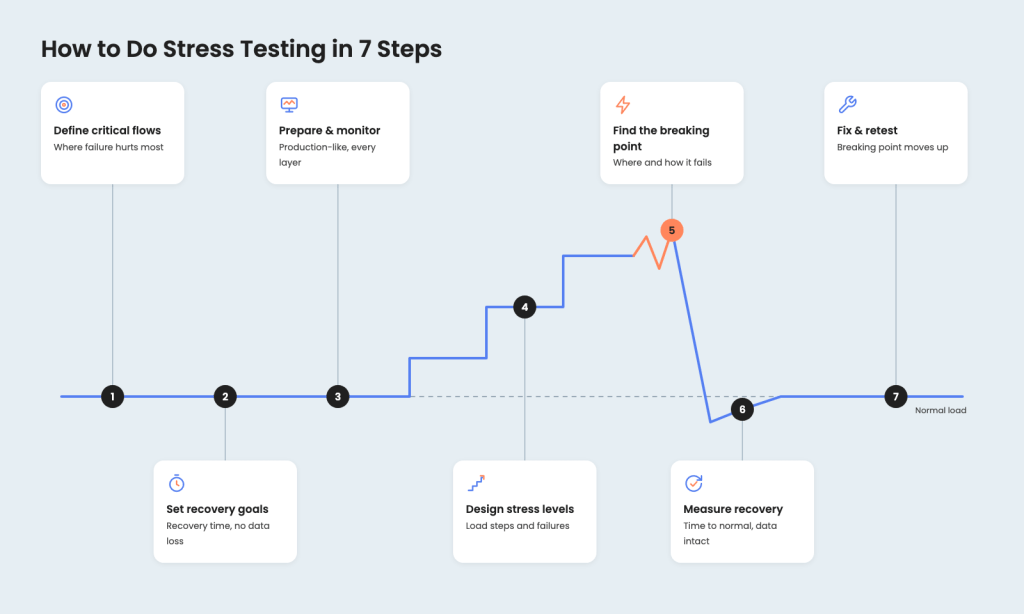
Step 1. Define critical flows and failure questions
Stress testing starts with the user flows where failure would hurt most, such as checkout, payments, login, or core API calls. For each flow, the team writes down the question the test should answer: for example, what happens if traffic triples during a sale?
Step 2. Set recovery goals and pass/fail criteria
Before any load runs, the team agrees on what acceptable failure looks like. Criteria cover how the system may degrade and how fast it must recover once load drops, with targets tied to existing SLAs. Data integrity is non-negotiable: no lost or corrupted transactions.
Step 3. Prepare a production-like environment with full monitoring
The environment has to mirror production closely enough that its breaking point means something. Monitoring covers every layer that can fail under pressure: servers, databases, APIs, message queues, and caches. Test data matches real usage patterns, so bottlenecks appear where they would in production.
Step 4. Design stress levels and failure scenarios
Load escalates in defined steps — for example 2x, 5x, and 10x normal traffic, alongside sudden spikes. Failure scenarios go further, such as a database going offline, a third-party API slowing down, or a large data import running at peak traffic.
Step 5. Push the system to its breaking point
Load increases step by step until the system fails, and the team notes exactly where and how. Graceful degradation, such as slower responses or a queue that holds requests, is a very different result from crashes, dropped transactions, or failures spreading to other services.
Step 6. Remove the load and measure recovery
Once the system breaks, load drops back to normal and the test keeps running. The team measures recovery time and checks two things: whether services restart on their own, and whether every transaction from the overload period completed or rolled back cleanly.
Step 7. Analyze, fix, and retest
The report ranks bottlenecks by business impact and recommends capacity or architecture changes. After fixes, the same scenarios run again to confirm the breaking point moved up. Tests get updated whenever the architecture or traffic patterns change. For testing under expected traffic rather than extreme load, check out our load testing guide.
Ensuring spotless performance even under peak load for 15 Seconds of Fame: Our recently completed project

When to Perform Stress Testing?
Choosing the right moment to run application stress testing is essential for preventing outages, safeguarding revenue, and ensuring smooth growth. In mature organizations, stress testing in software testing is not treated as a one-off exercise but as an ongoing part of the software development lifecycle. As systems evolve, usage patterns shift, and integrations multiply, resilience must be validated again, not assumed.
Timing stress tests strategically helps teams anticipate risks, plan for scale, and maintain stable system performance even under unpredictable conditions. Here are the key points in the lifecycle when QA stress testing delivers the greatest business impact.
Before major releases or architectural changes
Significant updates often introduce new performance behavior that may not surface under standard load testing or routine software quality checks. A stress test performed before a release helps validate that the system can absorb extreme pressure, recover quickly, and protect data integrity even when pushed far beyond typical expectations.
Stress testing should be prioritized when teams are preparing to:
- Redesign backend services or APIs
- Migrate to a new database or storage engine
- Transition to microservices or containerized infrastructure
- Modify authentication, payments, or transaction-heavy processes
- Onboard new third-party providers where failures can multiply
In these moments, system stress testing reveals hidden bottlenecks that traditional performance testing and functional validation cannot detect.
Ahead of high-visibility or high-traffic business events
Many real-world failures occur not because the system is poorly engineered, but because growth or marketing activity triggers sudden spikes in user load. Running stress tests before these events prepares the organization for the best-case business outcome — high demand — without risking downtime.
Stress testing is essential when:
- Launching a major marketing or PR campaign
- Preparing for seasonal peaks such as Black Friday or holiday sales
- Planning high-volume operational periods (for example, financial reporting cycles)
- Entering new markets where usage patterns may differ
- Onboarding enterprise clients with unpredictable traffic profiles
In these scenarios, stress testing provides confidence that the system will maintain stability, protect data integrity, and support business growth without unexpected outages or degradation.
Stress Testing Tools and Frameworks
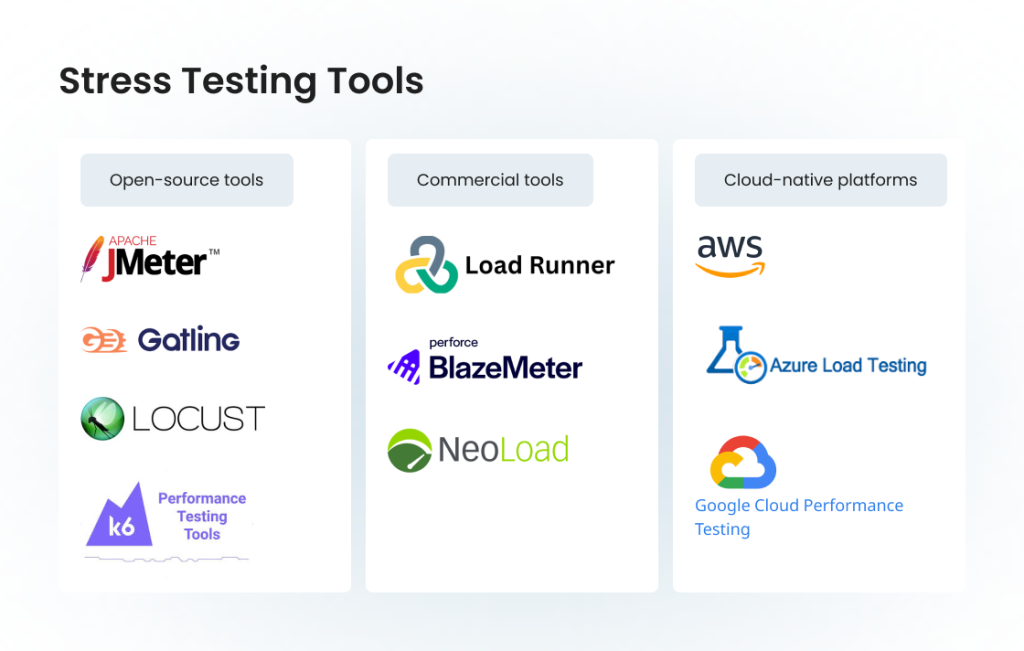
Selecting the right stress testing tool is a crucial part of building a reliable and scalable digital product. While focusing on scripts, environments, and load models, it’s also important to understand what these tools do, how they differ, and what capabilities matter most when testing for resilience. Modern stress testing platforms help teams simulate extreme user load, identify performance bottlenecks, and evaluate how the system behaves during overload, recovery, and failure.
Because software stress testing often involves large-scale simulations and repeated runs, organizations typically rely on specialized testing tool ecosystems that support both execution and analysis. Let’s look at the stress testing tools available today and where they add the most value.
Open-source stress testing tools
Open-source tools provide flexibility, cost efficiency, and strong community support, making them a popular choice for organizations building custom or complex testing workflows.
Apache JMeter
One of the most widely adopted load testing tools, JMeter can simulate heavy concurrent traffic, API calls, and distributed scenarios. It’s well-suited for evaluating software performance under stressful conditions, especially when teams need a customizable framework.
Gatling
Gatling is known for high-performance test execution and real-time metrics. It’s a strong option for teams adopting CI/CD processes because it integrates well with build pipelines and supports scalable test automation.
Locust
A Python-based tool that allows teams to write human-readable scenarios. Locust is ideal for event-driven architectures and services where custom traffic models are needed.
k6
A modern, developer-friendly performance tool designed for cloud-native applications. k6 is lightweight, integrates natively with DevOps tools, and supports both performance testing and advanced system stress testing in distributed environments.
Commercial and enterprise-grade solutions
Paid platforms offer end-to-end ecosystems for managing large, complex, or targeted stress tests. They are designed for teams that prioritize enterprise features such as analytics dashboards, built-in observability, and large-scale distributed execution.
LoadRunner (Micro Focus)
A long-standing industry-standard platform built for enterprise environments. LoadRunner supports complex workflows, deep diagnostics, and very large-scale test scenarios.
BlazeMeter
A cloud-based platform that expands on JMeter and Gatling capabilities. BlazeMeter is ideal for organizations that need rapid, repeatable tests and strong integrations with CI/CD, version control, and cloud infrastructure.
NeoLoad
A performance engineering tool built for large-scale testing, hybrid clouds, and continuous delivery ecosystems. NeoLoad provides strong analytics and automation features for complex distributed systems.
Cloud-native testing platforms
Modern applications often rely on cloud infrastructure, making cloud-based stress testing essential for validating elasticity, failover, and scaling behavior.
AWS Distributed Load Testing
A serverless framework that helps teams run scalable stress test scenarios directly in AWS environments. Ideal for event-driven or microservice-heavy applications.
Azure Load Testing
A managed testing service tightly integrated with Azure monitoring tools. Ensures that stress tests include infrastructure-level insights.
Google Cloud Performance Testing
Allows teams to test Kubernetes workloads and large-scale distributed architectures with detailed system diagnostics.
Stress testing frameworks
Beyond individual tools, many teams rely on stress testing frameworks — structured approaches that define how stress scenarios are designed, executed, and repeated across the delivery lifecycle. A framework is not a single testing tool, but a combination of load models, monitoring practices, and automation steps that make stress testing consistent and scalable.
A typical framework includes:
- Predefined stress scenarios (gradual load increase, spike tests, failover tests)
- Reusable scripts and configuration files
- Integrated monitoring and alerting for system behavior
- CI/CD pipeline steps for repeatable test execution
- Reporting templates for resilience analysis
Popular examples of frameworks to support stress testing efforts include JMeter’s distributed testing mode, where one controller machine coordinates several worker nodes that generate the load, k6’s cloud-distributed execution, Kubernetes-based scaling validation setups, or custom DevOps pipelines that incorporate test automation and performance monitoring. These frameworks allow teams to run large-scale stress scenarios efficiently and ensure that testing remains in line with business growth and architectural changes.
Test Automation for Stress Software Testing
Automation plays a critical role in making software stress testing efficient, repeatable, and reliable. Modern systems are too complex, and traffic patterns are too unpredictable, for organizations to rely solely on manual test execution. By incorporating test automation into stress scenarios, teams can validate resilience at scale and ensure that failure behavior is tested consistently across releases and environments.
Why automate stress testing
Automating stress scenarios enables teams to run large-scale tests more quickly and more frequently, which is especially important in fast-moving development cycles. Automated runs help simulate high user load without requiring manual setup, and they ensure identical conditions across multiple test executions. This improves accuracy, reduces human error, and gives organizations greater confidence in test outcomes.
Automation also helps reduce operational costs. Complex stress scenarios that once required significant engineering and infrastructure coordination can now be executed with minimal manual effort. For businesses preparing for rapid growth or mission-critical events, stress test automation becomes a strategic advantage rather than just a technical convenience.
What you can do with automated testing
Automation supports more than simply pushing traffic through a system. Mature stress testing practices use automation to orchestrate the entire testing workflow, including:
- Automatically scaling load generation across distributed nodes
- Provisioning and resetting environments for consistent results
- Capturing real-time metrics on performance
- Triggering stress scenarios directly from CI/CD pipelines
- Generating standardized reports for resilience analysis
These capabilities make it possible to integrate resilience checks into routine delivery processes, ensuring issues are caught early rather than during peak business moments.
What cannot be fully automated
Despite its value, automation cannot replace human insight entirely. Certain scenarios require expert interpretation, including:
- Unusual failure cases that need architectural diagnosis
- Edge cases where infrastructure dependencies behave unpredictably
- Early-stage prototypes where behavior is too volatile for consistent automation
- Business-level risk decisions that require judgment rather than scripts
Automation ensures consistency and speed, but expert analysis ensures that the results translate into meaningful decisions for scaling, budgeting, and long-term product strategy.
We will take your QA to the next level with a comprehensive automation testing strategy.

Best Practices for Effective Stress Testing
Achieving meaningful results from application stress testing requires more than generating high traffic or pushing infrastructure to its limits. The most effective approaches combine realistic modeling, the right testing tool ecosystem, and disciplined processes that get technology in line with business priorities. These best practices help organizations ensure that every stress test contributes to better stability, improved system performance, and long-term reliability.
1. Match stress scenarios with real user behavior and business priorities
One of the most common mistakes in stress testing is simulating artificial patterns that don’t reflect actual usage. Effective testing begins with understanding which user flows generate revenue, support operations, or carry regulatory obligations, and modeling those interactions under extreme pressure. Synchronizing stress scenarios with real behavior ensures that testing uncovers issues that would impact customers and the business directly.
2. Use a consistent framework and testing tools for repeatability
Whether your team uses JMeter, Gatling, k6, or cloud-native load testing tools, consistency is key. Each type of stress testing, from spike tests to endurance overload, should be executed through a controlled, repeatable framework. This ensures that results are comparable over time and that improvements can be measured accurately as the system evolves.
3. Integrate automation early to support frequent and scalable testing
Modern systems require frequent validation, making automation essential. With proper test automation, teams can schedule recurring stress checks, create distributed environments, and run simulations as part of CI/CD pipelines. As systems grow in complexity, stress test automation becomes crucial for detecting resilience issues before they reach production.
4. Monitor the entire architecture, not just the application layer
Stress testing uncovers more than slow response times — it reveals how different components react under extreme conditions. Effective tests include end-to-end monitoring of databases, queues, APIs, caching layers, and cloud infrastructure. All-around visibility helps teams catch cascading failures that simple stress testing in software may otherwise miss.
5. Evaluate recovery as thoroughly as failure
A system failing under extreme load is expected; what matters is how quickly and cleanly it bounces back. Effective stress testing evaluates recovery time, data integrity, service restarts, and behavior after load returns to normal. This is often more important to business leaders than the overload event itself, as recovery directly impacts downtime, SLA compliance, and customer satisfaction.
6. Continuously update tests as the product and architecture evolve
As the system grows, architecture changes, or integrations are added, stress scenarios must evolve as well. Outdated tests can create a false sense of security. Regularly revisiting assumptions, load models, and critical flows ensures that resilience testing reflects current realities rather than historical behavior.
Take the first step to protect your product against failure — talk QA strategy with us.

Final Thoughts
Stress testing is ultimately an investment in operational resilience. It validates that your systems can withstand extreme conditions, recover quickly, and continue supporting the business when demand, failure, or volatility exceed expectations.
By incorporating stress testing into regular delivery cycles, organizations gain confidence that their applications can scale, meet SLAs, and protect revenue even during unpredictable events. The cost of testing is far lower than the cost of failure, and the companies that recognize this early are the ones best prepared for sustainable growth.
FAQ
 What is stress testing in software engineering?
 What is stress testing in software engineering?
Stress testing in software engineering is the process of pushing an application beyond normal operating conditions to identify breaking points, evaluate recovery, and validate overall resilience. Stress testing ensures a better understanding of how systems behave under extreme pressure, like unusually high load, and helps critical services remain reliable during unexpected spikes or failures.
What is the purpose of stress testing?
The purpose of a stress test is to reveal how software behaves under peak load: how it fails and how quickly it returns to normal operation. This helps organizations improve stability, reduce risk, and ensure that essential workflows can withstand sudden demand surges or infrastructure disruptions.
Which industries can benefit from software stress testing?
Nearly every digital sector benefits from software stress testing, but it is especially vital in finance, eCommerce, gaming, healthcare, logistics, and B2B SaaS. These industries face unpredictable traffic patterns, regulatory pressure, and mission-critical operations where downtime or degraded system performance can create significant business impact.
How is stress testing different from load and performance testing?
Stress testing pushes systems past their limits to examine failure behavior and recovery. Load testing measures how a system performs under expected traffic, while performance testing evaluates speed, stability, and efficiency under normal conditions. Together, stress testing, performance testing, and load testing serve a distinct purpose in validating overall product reliability.
Can stress testing be automated?
Yes. Modern teams use test automation frameworks to run stress scenarios at scale, integrate them into CI/CD pipelines, and repeat them consistently after each release. Automated stress testing improves accuracy, accelerates validation cycles, and makes it easier to detect resilience issues early in development.
Jump to section
Hand over your project to the pros.
Let’s talk about how we can give your project the push it needs to succeed!