
How to ensure seamless operations, customer satisfaction, and digital ecosystem reliability for QSR brands through comprehensive QA testing, automation frameworks, and AI-powered solutions.
The quick service restaurant industry has undergone a dramatic digital transformation. What was once a simple transaction at a counter now involves a complex digital ecosystem spanning mobile ordering, loyalty programs, POS systems, third-party delivery services, and AI-driven personalization. When McDonald’s experienced a global technology outage in 2024 due to a third-party configuration change, stores across multiple countries couldn’t take orders. The incident cost millions in lost revenue and highlighted a critical truth: QSR systems are only as strong as their weakest tested component.
Numbers that impress us, by Restaurant and Cafe researchers:
“Digital orders continue to be an area of focus for the category, with 53 percent of all orders under measure by.
Domino’s and Pizza Hut continue to lead the category in terms of digital orders, with 83 percent and 79 percent respectively of all orders under measure coming digitally. The major brands KFC (62 percent), McDonald’s (54 percent) and Hungry Jack’s (53 percent) all now record more than half of orders coming from these sources.”
With this crazy raise of digital food ordering and delivery, QSR app testing services have evolved from basic functional checks to comprehensive quality assurance strategies that must account for real-time inventory sync, multi-system integration, payment gateway security, and increasingly, AI-powered features that personalize the guest experience.
This guide covers everything QA teams and QSR brands need to know about testing quick service restaurant applications — from core test cases and automation frameworks to the unique challenges in quick service restaurants testing and emerging AI-driven testing approaches.
Key Takeaways (TL;DR)
- QSR apps operate within a complex multi-system architecture (customer app → POS → delivery) — testing must cover all integration points, not just the mobile interface
- Critical testing types include functional, API, performance, security, and usability testing — each addresses different failure modes
- Unique challenges in QSR testing: real-time inventory sync, cross-platform flows, geolocation accuracy, and third-party delivery integrations
- Automation is essential for QSR release cycles — Appium for mobile, REST Assured for APIs, JMeter for performance
- AI is transforming both what we test (personalization engines, chatbots) and how we test (intelligent test generation, self-healing scripts)
- The most successful QSR brands establish Testing Centers of Excellence with shift-left practices and production-like test environments
Is your QSR app ready for peak season?
Request a complimentary QA assessment to identify gaps in your testing coverage

Understanding the QSR Digital Ecosystem
Quick summary: QSR apps aren’t standalone — they’re part of a three-layer ecosystem (customer, operations, delivery) connected by APIs. Testing one layer without the others leaves critical gaps.
Before turning to test cases, it’s essential to understand what makes QSR applications uniquely challenging for any company working through them. Unlike typical mobile apps, a QSR app is just one component in a multi-system architecture that must work in perfect harmony.
The customer-facing layer
The customer app — whether web-based or mobile, a quick-service restaurant or a food delivery app —handles menu browsing, mobile ordering, payment processing, order tracking, and loyalty programs. Leading QSR brands like Starbucks, Domino’s, and Chick-fil-A have set high expectations with features like:
- Real-time menu availability and pricing updates
- Personalized recommendations based on order history
- Scheduled pickup time selection
- Live order tracking from preparation to delivery
- Seamless customer loyalty program integration
- Multiple payment methods including mobile wallets
The restaurant operations layer
Behind the scenes, restaurant apps and POS systems receive orders, manage kitchen workflows, update inventory, and coordinate pickup or delivery. These systems often run on dedicated tablets or terminals and must handle high-volume traffic during peak hours without degradation.
The delivery and integration layer
Third-party delivery services, courier apps, and logistics platforms add another layer of complexity. When a customer orders through a QSR app that partners with DoorDash or Uber Eats, the order flows through multiple APIs that must be tested for latency, error handling, and data accuracy.
This interconnected architecture means that QSR app testing isn’t just about testing one application—it’s about ensuring seamless operations across multiple systems, devices, and integration points.
Is Your Quick Service Restaurant App Testing Strategy Any Good?
Is Your QSR App Testing Strategy Ready for 2026? Answer these 10 questions to assess your QA maturity:
Count 1 point for yes, 0.5 for Partial, and 0 for No
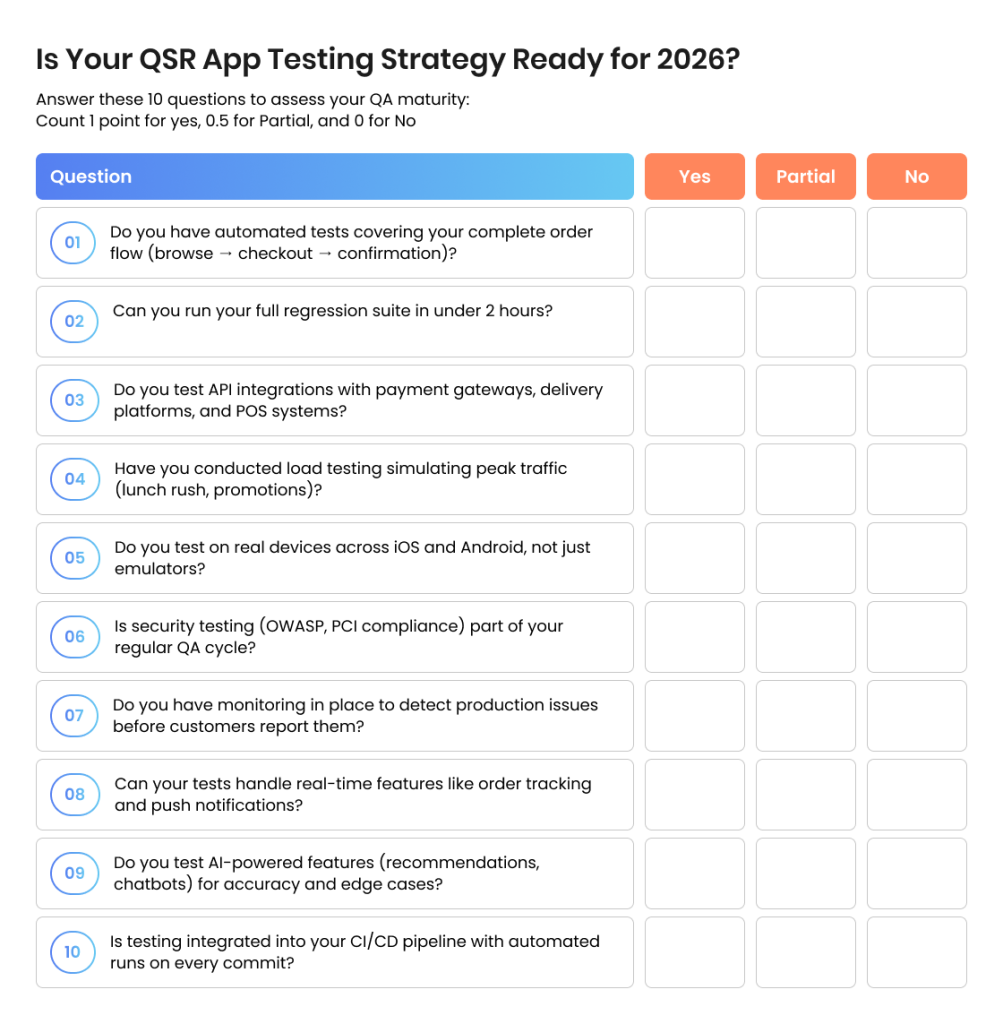
Scoring:
- 8-10 Yes: Your QA strategy is mature — focus on optimization and AI-powered enhancements
- 5-7 Yes: Solid foundation, but gaps exist — prioritize automation and integration testing
- 2-4 Yes: Significant risk exposure — consider a QA audit to identify critical gaps
- 0-1 Yes: Time for a complete QA strategy overhaul — talk to our experts
Want a detailed QA system assessment tailored to QSR industry?

Essential Testing Types for QSR Applications
Quick summary: Five testing types matter most: functional (does it work?), API (do systems talk correctly?), performance (does it handle load?), security (is data safe?), and usability (is it easy to use?).
Functional Testing
Functional testing verifies that every feature works as specified. For QSR apps, this includes testing the complete ordering workflow, from menu selection through payment confirmation. Key functional test cases include:
Menu functionality: Verify that all menu items display correctly with accurate pricing, descriptions, and images. Test that item customization options (size, toppings, modifications) work as expected and update totals correctly.
Cart operations: Ensure items can be added, removed, and modified in the cart. Test quantity adjustments and verify that promo codes and reward balances apply correctly.
Checkout process: Validate the complete payment flow including credit cards, digital wallets (Apple Pay, Google Pay), gift cards, and reward point redemption. Test edge cases like expired cards, insufficient funds, and network timeouts.
Order confirmation: Verify that order confirmation messages display correctly and that order details match what was submitted.
API Testing
Given the multi-system nature of QSR applications, API testing is critical. Every component communicates through APIs — the customer app with the backend, the backend with POS systems, and the POS with third-party delivery services.
API testing for QSR systems should validate:
- Response times under normal and peak load conditions
- Data accuracy and consistency across endpoints
- Error handling when services are unavailable
- Authentication and session management
- Rate limiting and throttling behavior
Tools like Postman, REST Assured, and API automation frameworks integrated into CI/CD pipelines enable continuous API validation with every code deployment.
Performance Testing
QSR applications face unique performance challenges. During lunch rushes, promotional events, or holiday seasons, order volumes can spike dramatically. A testing platform must simulate these conditions to ensure the application performs under pressure.
Performance testing scenarios should include:
- Load testing: Simulate expected peak traffic to verify response times remain acceptable
- Stress testing: Push beyond expected limits to identify breaking points
- Spike testing: Simulate sudden traffic surges (flash promotions, viral social posts)
- Endurance testing: Run sustained load to identify memory leaks or resource degradation
Apache JMeter, Gatling, and LoadRunner are commonly used for QSR performance testing, with results feeding into dashboards that track application performance trends over time.
Security Testing
QSR apps process sensitive payment data and personal information, making security testing non-negotiable. In 2019, a fraudster exploited vulnerabilities in McDonald’s mobile app to steal thousands from users—a stark reminder of what’s at stake.
Security testing for QSR applications should cover:
- Payment gateway encryption and PCI DSS compliance
- Session management and authentication vulnerabilities
- SQL injection and cross-site scripting (XSS) prevention
- API security including authorization and input validation
- Data protection in transit and at rest
Tools like OWASP ZAP, Burp Suite, and dedicated penetration testing services help identify vulnerabilities before malicious actors do.
Usability testing
The user experience directly impacts conversion rates and customer satisfaction. Usability testing evaluates how intuitive the app is for users to navigate menus, customize orders, and complete purchases.
Key usability considerations for QSR apps:
- Speed of the ordering process (time from app launch to order completion)
- Clarity of menu organization and item descriptions
- Ease of applying rewards and promotional codes
- Accessibility for users with disabilities (screen reader compatibility, color contrast)
- Consistency across mobile platforms (iOS and Android)
Release faster with confidence.
TestFort’s end-to-end QA services cover every layer of your QSR digital ecosystem.
Unique Challenges in Testing QSR Systems
Quick summary: QSR testing is harder than typical app testing due to cross-device flows, real-time sync requirements, location dependencies, and heavy reliance on third-party services.
In 2025, mobile apps have effectively become the backbone of the restaurant industry, with more than 60% of restaurant orders now placed through mobile applications and digital channels becoming a primary customer touchpoint rather than a side channel. For QSRs specifically, 70% of consumers say they would use a smartphone app to place orders if it is available, and 36% have already installed five or more QSR apps mainly to access loyalty rewards and exclusive offers. (as pointed by RestWorks)
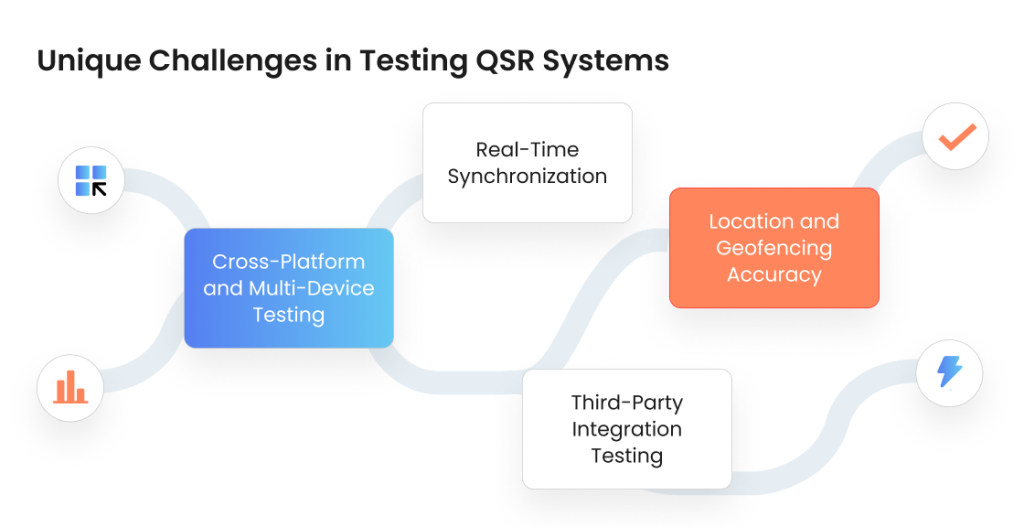
Cross-Platform and Multi-Device Testing
A typical order journey might start on a customer’s iPhone, get received on a restaurant’s Android tablet running the POS application, and be tracked by a delivery driver on yet another device. Testing these cross-device flows presents significant challenges.
Traditional UI testing requires different frameworks for each platform — Appium for mobile, Selenium for web, and platform-specific tools for desktop applications. However, since all these systems communicate via APIs, an API-driven testing approach provides more efficient end-to-end coverage.
By focusing on API interactions, QA teams can simulate complete order flows without needing to automate UI actions across every device type. This doesn’t eliminate the need for UI testing, but it does enable more comprehensive coverage with less complexity.
Real-Time Synchronization
QSR systems require real-time data synchronization across multiple components. When a menu item sells out, that information must propagate to all ordering channels immediately. When an order is prepared, the customer app must reflect the status change within seconds.
Testing real-time synchronization involves:
- Verifying inventory updates propagate correctly across all channels
- Testing order status updates using WebSocket connections or polling mechanisms
- Validating that stale data doesn’t cause order failures or customer confusion
- Simulating network latency to ensure graceful handling of sync delays
Location and Geofencing Accuracy
Location services power several QSR features: finding nearby restaurants, calculating delivery fees, enabling curbside pickup arrival notifications, and routing orders to the correct store. Testing these features requires:
- Validating GPS accuracy under various conditions (urban canyons, indoor locations)
- Testing geofence triggers for curbside pickup notifications
- Verifying correct store assignment based on user location
- Testing location permission handling across mobile platforms
Third-Party Integration Testing
Modern QSR apps integrate with numerous external services: payment processors, delivery platforms, loyalty program providers, and marketing automation tools. Each integration point is a potential failure vector.
Integration testing should verify:
- Correct data exchange with payment gateways (Stripe, Square, etc.)
- Order handoff to delivery service APIs (DoorDash, Uber Eats, Grubhub)
- Loyalty program point accrual and redemption
- Push notification delivery through Firebase or APNS
- Fallback behavior when third-party services are unavailable
Comprehensive QSR App Test Cases
Quick summary: Focus test cases on four critical areas: menu/browse experience, cart/order management, payment/checkout, and order tracking/delivery.
The following test cases cover the most critical scenarios for QSR applications. These should be adapted based on the specific features and architecture of each application.
Why seamlessly working QSR apps matter that much?
“Data from restaurant mobile app benchmarks indicates that 85% of customers now expect restaurants to offer digital ordering options, and 60% of diners prefer ordering via mobile apps over traditional methods. Restaurants that offer a well‑functioning mobile app see a 112% increase in reorder rates compared to those without an app, while users who order directly through a restaurant’s own app spend up to 35% more per transaction than users of third‑party delivery platforms — clear evidence that reliability, performance, and usability of QSR apps have a measurable revenue impact.” (RestWorks)
Menu and Browse Experience
| Test Area | Test Scenarios |
| Menu Display | Verify all categories and items load correctly; images display properly; pricing is accurate; item availability reflects real-time inventory |
| Item Customization | Test all modifier options (size, add-ons, special instructions); verify price adjustments calculate correctly; validate modifier conflicts and dependencies |
| Search and Filter | Test search functionality with various queries; verify filters (vegetarian, allergens, price range) work correctly; test search result relevance |
| Store Selection | Verify nearby stores display with accurate distance; test store hours and availability; confirm menu reflects store-specific offerings |
Order and Cart Management
| Test Area | Test Scenarios |
| Cart Operations | Add, remove, and modify items; adjust quantities; verify subtotal calculations; test cart persistence across sessions |
| Promo Codes | Apply valid codes; test invalid/expired codes; verify discount calculations; test stacking rules and exclusions |
| Loyalty Points | Redeem points for rewards; verify point balance display; test point accrual on orders; validate reward availability |
| Order Scheduling | Select future pickup times; verify time slot availability; test day-ahead ordering; confirm scheduled orders process correctly |
Payment and Checkout
| Test Area | Test Scenarios |
| Payment Methods | Test all supported payment types: credit/debit cards, Apple Pay, Google Pay, PayPal, gift cards, stored payment methods |
| Error Handling | Declined cards, expired cards, insufficient funds, network timeouts, duplicate charge prevention |
| Tips and Fees | Verify tip calculation options; test delivery fee accuracy based on location; validate tax calculations |
| Security | Verify data encryption; test session timeout handling; validate CVV requirement; confirm PCI compliance |
Order Tracking and Delivery
| Test Area | Test Scenarios |
| Status Updates | Verify real-time status changes (received, preparing, ready, out for delivery, completed); test WebSocket or polling updates |
| Live Tracking | Delivery driver location accuracy; ETA calculations; map display and updates; coordinate transformations |
| Notifications | Push notifications at key stages; notification content accuracy; delivery when app is backgrounded; duplicate prevention |
Automation Testing: Automated Frameworks for QSR Testing
Quick summary: Build your automation stack with Appium (mobile), REST Assured or Postman (API), JMeter (performance), and cloud device farms like BrowserStack for coverage.
Manual testing alone cannot keep pace with the rapid release cycles of modern QSR applications. Automation frameworks enable QA teams to run comprehensive regression tests with every deployment, catch issues early, and maintain quality at scale.
Mobile Test Automation
Appium: The de facto standard for cross-platform mobile automation. Appium supports both iOS and Android using a single API, making it ideal for QSR brands that need to maintain apps on both platforms.
XCUITest and Espresso: Native frameworks for iOS and Android respectively. While they require platform-specific test code, they offer better performance and reliability than cross-platform alternatives for complex UI testing scenarios.
Detox: Particularly effective for React Native applications. Many QSR brands use React Native for development efficiency, and Detox provides excellent integration with this framework.
API Test Automation
REST Assured (Java): A mature library for API testing that integrates well with existing Java-based test frameworks and CI/CD pipelines.
Postman/Newman: Postman for interactive API testing and collection development; Newman for running those collections in CI/CD pipelines. Excellent for teams that need to share API tests between developers and QA.
Karate: Combines API testing with performance testing capabilities in a BDD-style syntax. Particularly useful for QSR teams that need to validate both functionality and performance in the same test suite.
Test Management and Orchestration
TestRail: Comprehensive test management that helps QA teams organize test cases, track execution results, and report on quality metrics.
BrowserStack/Sauce Labs: Cloud-based device farms that enable testing across hundreds of device and OS combinations without maintaining physical device labs.
Jenkins/GitHub Actions: CI/CD integration for automated test execution on every code commit, with results feeding back to development teams in real-time.
AI-Powered Testing for QSR Brands: The Next Frontier
Quick summary: AI impacts testing in two ways: new features to test (recommendations, chatbots, dynamic pricing) and new tools for testing (auto-generated tests, visual AI, self-healing scripts).
As QSR applications increasingly incorporate AI-driven features — personalized recommendations, predictive ordering, chatbot customer service — testing strategies must evolve to address these new capabilities. Moreover, AI itself is becoming a powerful tool for optimizing the testing process.
Testing AI-Driven Features
Many leading QSR brands now use AI to personalize the customer experience. Testing these features requires specialized approaches:
Personalized recommendations: Verify that recommendation engines produce relevant suggestions based on order history, time of day, and user preferences. Test edge cases like new users with no history and users with diverse ordering patterns.
Predictive ordering: Some apps now anticipate what customers want to order based on past behavior. Testing must verify prediction accuracy, appropriate timing of suggestions, and graceful handling when predictions are wrong.
Chatbot interactions: AI chatbots handle customer service queries, order modifications, and complaints. Test cases should cover common scenarios, edge cases, handoff to human agents, and natural language understanding accuracy.
Dynamic pricing: Some QSR systems adjust pricing based on demand, time, or inventory. Testing must verify pricing logic accuracy, proper display to customers, and compliance with regulations.
AI-Powered Test Automation for QSRS
AI is also transforming how QA teams approach testing itself:
Intelligent test generation: AI tools can analyze application code, API specifications, and user behavior data to automatically generate test cases that provide comprehensive coverage while focusing on high-risk areas.
Visual testing with AI: Machine learning algorithms can detect visual regressions that traditional pixel-comparison tools might miss, understanding the semantic meaning of UI elements rather than just their exact appearance.
Predictive analytics: AI can analyze test results and code changes to predict which areas of the application are most likely to contain bugs, allowing QA teams to prioritize their efforts effectively.
Self-healing tests: Modern AI-powered testing platforms can automatically update test locators when UI elements change, reducing the maintenance burden of automated test suites.
Log analysis and anomaly detection: AI can process vast quantities of production logs and metrics to identify patterns that indicate emerging issues before they impact customers.
Implementing AI Testing for QSR Applications
To effectively leverage AI in QSR testing, consider these best practices:
- Start with well-defined objectives: Identify specific problems AI can solve, such as reducing test maintenance or improving defect detection
- Ensure quality training data: AI tools need good data to learn from—clean, labeled test results and well-documented bugs
- Maintain human oversight: AI should augment human testers, not replace them. Complex judgment calls still require human expertise
- Measure and iterate: Track metrics like defect detection rate, false positive rate, and time savings to continuously improve AI implementation
Adding AI-powered features like personalized recommendations and chatbots to your QSR app?
Our AI testing specialists ensure your ML models perform as expected.

Best QA Practices for QSR App Testing Success
Quick summary: Winners establish Testing Centers of Excellence, shift testing left in the development cycle, use production-like environments, and always test complete customer journeys.
Establish a Testing Center of Excellence or Outsource It
Leading QSR brands establish dedicated testing centers of excellence (TCoE) that standardize testing practices across all digital products. A TCoE provides:
- Consistent testing methodologies and quality standards
- Shared automation frameworks and tool licenses
- Training and skill development for QA teams
- Metrics and reporting across all projects
- Continuous process improvement based on lessons learned
Shift Left and Test Continuously
Don’t wait until the end of development to start testing. Shift-left testing integrates QA activities earlier in the development lifecycle:
- Review requirements and designs for testability before coding begins
- Write automated tests alongside feature development
- Run tests automatically with every code commit
- Deploy to test environments continuously and run regression suites nightly
Test in Production-Like Environments
QSR applications interact with real-world systems that are difficult to fully replicate in test environments. Where possible:
- Use production-equivalent infrastructure for performance testing
- Test with realistic data volumes and patterns
- Conduct controlled testing in production with feature flags
- Implement robust monitoring to detect issues quickly when they occur in production
Focus on the End-to-End Customer Journey
While unit tests and component tests are essential, the ultimate measure of quality is the customer experience. Ensure testing includes:
- Complete order flows from app launch through delivery confirmation
- Real device testing across popular mobile platforms
- Testing under realistic network conditions (3G, 4G, WiFi, intermittent connectivity)
- Accessibility testing for users with disabilities
Wrapping Up: How to Do Seamless QSR and Food Delivery App Testing in 2026
QSR app testing is far more complex than testing typical consumer applications. The multi-system architecture, real-time synchronization requirements, third-party integrations, and high customer expectations create unique challenges that demand comprehensive testing strategies.
Success requires a combination of approaches: thorough functional testing of all user-facing features, robust API testing to validate system integrations, performance testing to ensure reliability under peak loads, and security testing to protect customer data. As AI features become more prevalent, testing strategies must evolve to validate machine learning models and personalization engines.
The investment in comprehensive QA testing pays dividends through reduced customer complaints, fewer production incidents, faster release cycles, and ultimately, greater customer satisfaction and loyalty. For QSR brands competing in an increasingly digital marketplace, the quality of the mobile ordering experience can be a decisive competitive advantage.
Whether building an in-house QA capability or partnering with specialized QSR app testing services, the key is to start with a clear understanding of the application architecture, define comprehensive test cases that cover critical user journeys, implement automation to enable continuous testing, and continuously evolve testing practices as the application and customer expectations change.
Jump to section
Hand over your project to the pros.
Let’s talk about how we can give your project the push it needs to succeed!