Part 1: Challenges, Types, and Why Salesforce Testing is Different
Part 2: Automation Strategies, Tools, and Practical Implementation (you are here)
In Part 1, we established that Salesforce testing is complex, not just difficult. You can’t solve it by throwing more manual testers at the problem.
Here’s why: Your platform updates three times a year. Each release can break existing functionality in unexpected ways. Your customizations create dependencies across multiple systems. Shadow DOM makes traditional automation tools fail on Lightning components.
This guide covers the practical side of Salesforce testing: sandbox strategies, automation approaches, tool selection, and implementation patterns that actually work.
What you’ll learn
How to structure sandbox environments for effective testing
Which tests to automate first (and which to keep manual)
Salesforce automation testing tools and how to choose between them
Best practices for test automation that reduces maintenance overhead
Real testing scenarios from lead management to integration validation
Building a testing team with the right roles and skills
Let’s start with the foundation: test environments.
Key Takeaways
Automation is mandatory, not optional. Manual testing cannot keep pace with Salesforce release and update cycles, plus your own development velocity.
Start with business value. Test the processes that generate revenue and serve customers first. Perfect testing of critical workflows beats mediocre testing of everything.
Match tools to capabilities. The right Salesforce test automation tools align with your team’s skills and your organization’s needs. Expensive, sophisticated tools are worthless if your team can’t use them effectively.
Plan for maintenance. Test automation involves using tools and frameworks that require ongoing care. Budget 20-30% of the initial effort for continuous maintenance. Tests that aren’t maintained become liabilities.
Integrate testing into development. Testing doesn’t happen after development completes. It starts with requirements definition and continues through deployment and beyond.
Build the right team. Effective testing requires diverse skills: business knowledge, technical expertise, and automation capabilities. Structure teams to support collaboration across these disciplines.
Salesforce Testing Environments: Sandbox Strategy
Every Salesforce testing process starts with the same question: where do we actually run these tests?
Production is obviously out. Testing in your live business environment is how you accidentally delete customer data or break active sales processes during month-end closing.
Salesforce provides sandbox environments specifically for testing. But here’s what most teams get wrong: they treat all sandboxes the same, or they don’t have a clear strategy for which testing happens where.
Types of Salesforce sandboxes and when to use each
Salesforce offers four sandbox types, each designed for different testing needs:
Developer Sandbox
Developer Pro Sandbox
Partial Copy Sandbox
Full Sandbox
Smallest environment (200MB storage)
Refreshable every day
Perfect for unit testing and individual developer work
Use for: Apex test development, custom component testing, isolated feature development
More storage (1GB)
Refreshable every day
Use for: Complex customization testing, small-scale integration testing, automated test script development
Includes sample of production data
Refreshable every 5 days
Use for: User acceptance testing, training environments, testing with realistic data volumes
Complete production replica
Refreshable every 29 days
Use for: Performance testing, end-to-end testing, final pre-production validation, release testing
The automation testing strategy should align with sandbox capabilities. You can’t run meaningful performance tests in a Developer sandbox, and you’re wasting resources if you do unit testing in a Full sandbox.
Sandbox refresh strategy
Here’s the problem nobody talks about: sandbox data gets stale fast.
Your production environment changes daily. New customers, updated opportunities, modified configurations. Meanwhile, your Full sandbox refreshed 3 weeks ago and no longer represents reality.
This creates false negatives in testing. Tests fail because sandbox data doesn’t match production state, not because your code has issues.
Practical refresh approach:
Developer/Developer Pro sandboxes refresh frequently, but they’re for development work, not comprehensive testing. Use these for rapid iteration and automated testing tool development.
Partial Copy sandboxes need strategic refresh timing. Refresh before major releases or significant UAT sessions. The 5-day limitation means you need to plan ahead.
Full sandboxes are your production dress rehearsal. Refresh them before:
Major Salesforce platform releases (use preview instances when available)
Significant deployment packages
Data migration testing
Performance validation under production-scale loads
Pro tip from our team: Don’t refresh all sandboxes on the same schedule. Stagger refreshes so you always have one environment with recent production data while others are being rebuilt.
Struggling with Sandbox Management?
We’ll assess your current sandbox strategy, identify bottlenecks, and design a testing environment structure that supports rapid, reliable validation.
Fresh sandboxes solve one problem and create another: you lose all your carefully constructed test data.
A Partial Copy brings sample production data, but you can’t use real customer information for testing (GDPR, privacy regulations). A Full sandbox has everything, but you still need specific test scenarios that don’t exist in production.
Effective test data strategies:
Synthetic data creation. Build test data that mimics production patterns without using real customer information. Tools like Salesforce’s built-in data loader or third-party solutions like Mockaroo can generate realistic test datasets.
Data templates. Create reusable data sets for common testing scenarios:
Standard lead-to-opportunity workflow with typical data volumes
Complex approval chains with multiple decision points
Integration test data that matches external system formats
Edge cases: null values, maximum field lengths, special characters
Automated data setup. Your test automation solution should include data creation as part of the testing process. Don’t rely on manually created data that someone might accidentally delete.
Data masking for compliance. If you need production-like data for testing, mask sensitive information. Replace customer names, emails, phone numbers with realistic but fake data while preserving data relationships and patterns.
Managing multiple test environments
Most enterprise Salesforce implementations run several testing streams simultaneously:
Development team testing new features
QA running regression tests
Business users conducting UAT
Integration team validating external system connections
Performance team running load tests
Each stream needs its own environment or conflicts become inevitable. One team’s test data corrupts another team’s scenario. Configuration changes for Feature A break testing for Feature B.
Environment isolation strategy:
Assign sandboxes to specific purposes, not teams. You need:
Continuous integration sandbox for automated testing (Developer Pro)
Integration testing sandbox with stable external system connections (Partial Copy)
UAT sandbox with business-representative data (Partial Copy or Full)
Performance testing sandbox with production-scale data (Full)
Release validation sandbox for final pre-production checks (Full)
This might seem like a lot of sandboxes, but the alternative is testing chaos. Teams waiting for environments, tests failing due to conflicting changes, integration testing blocked by development work.
Sandbox cost optimization
Full sandboxes are expensive. Most organizations have license limitations on how many they can create.
Maximize ROI on sandbox investment:
Time-box expensive environments. Full sandboxes for release testing don’t need to run continuously. Spin them up for validation periods, then release the license for other uses.
Share strategically. Multiple teams can share sandboxes if you coordinate timing. Development team uses the environment during sprints, QA team takes over for release testing.
Automate environment setup. Don’t waste expensive sandbox time on manual configuration. Scripts should configure the environment, load test data, and prepare for testing automatically.
Use Developer sandboxes for automation development. Build and refine your test scripts in free Developer sandboxes before running them in expensive environments.
Words by
Igor Kovalenko, Engineering Quality Leader
“We had clients spending $50K annually on Full sandboxes they used maybe 30% of the time. Better planning and automation reduced that to two Full sandboxes used continuously, cutting costs by 60%.”
Why Automate Salesforce Testing
The question isn’t whether to automate Salesforce testing. It’s what to automate first, and how to do it without creating a maintenance nightmare.
Manual testing works until it doesn’t. Small Salesforce org, few customizations, quarterly deployments? You can probably manage with manual test execution. But that’s not where most organizations operate.
The reality: Salesforce releases happen three times a year, whether you’re ready or not. Your business demands new features faster than manual testing can validate them. Integration complexity multiplies with each new system connection.
Here’s what breaks the manual testing model:
Release frequency collision. Platform updates every 4 months. Your development team deploys weekly. Each change requires regression testing of existing functionality. Manual regression testing takes 2-3 weeks. The math simply doesn’t work.
Integration multiplication. Testing a Salesforce-only workflow manually is manageable. Testing a process that touches Salesforce, your ERP system, marketing automation, support platform, and analytics tools? Each integration point doubles the testing complexity.
Customization depth. Enterprise Salesforce orgs average 200+ custom objects and 500+ workflows. Comprehensive manual testing of all interconnections would take months. You have days.
Data volume reality. Your code works perfectly with 100 test records. Production has 500,000 records and different performance characteristics. Manual testing rarely catches governor limit issues before they hit production.
The real ROI of Salesforce automated testing
Forget the generic “automation saves time” arguments. Let’s look at actual numbers from Salesforce testing automation implementations:
Post-automation: 2 QA engineers × 2 days × 4 releases = 1.6 person-weeks + 2 production issues/year = $30K
Net savings Year 1: $120K in issue costs + 34.4 person-weeks redirected to high-value testing
The ROI comes not just from efficiency, but from catching expensive problems before they reach customers.
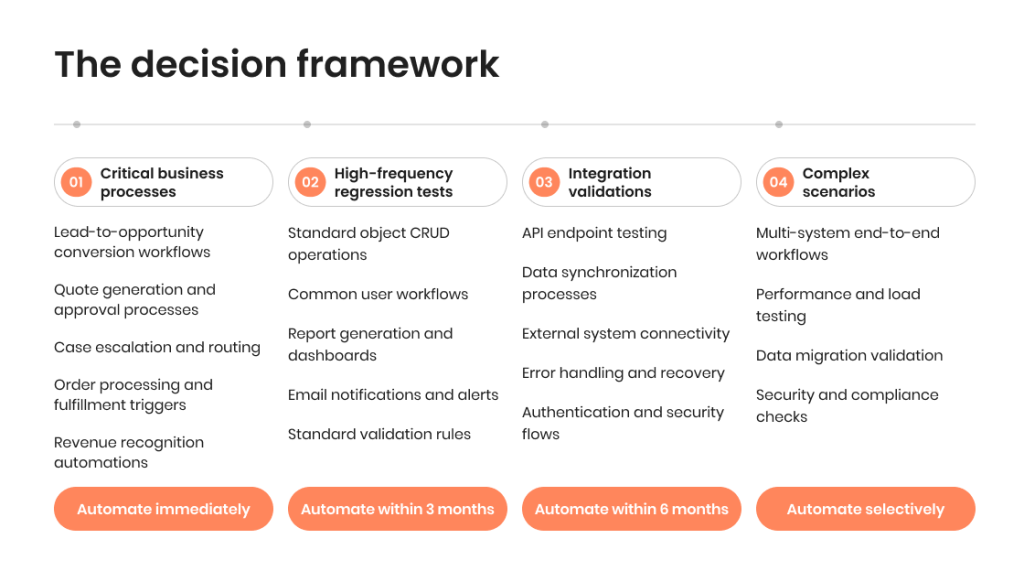
What to automate first: The decision framework
This is where most automation strategies for Salesforce applications fail. Teams try to automate everything simultaneously, burn resources on low-value tests, and end up with brittle test suites that require constant maintenance.
Start with the automation testing approach that protects revenue:
Tier 1: Critical business processes (automate immediately)
Lead-to-opportunity conversion workflows
Quote generation and approval processes
Case escalation and routing
Order processing and fulfillment triggers
Revenue recognition automations
These processes directly impact money. Downtime costs thousands per hour. Automated testing here has immediate business value.
Tier 2: High-frequency regression tests (automate within 3 months)
Standard object CRUD operations
Common user workflows
Report generation and dashboards
Email notifications and alerts
Standard validation rules
These tests run after every deployment. Manual execution is repetitive and error-prone. Automation ROI is clear.
Tier 3: Integration validations (automate within 6 months)
API endpoint testing
Data synchronization processes
External system connectivity
Error handling and recovery
Authentication and security flows
Integration testing requires coordination across teams. Automated testing eliminates scheduling dependencies and enables continuous validation.
Tier 4: Complex scenarios (automate selectively)
Multi-system end-to-end workflows
Performance and load testing
Data migration validation
Security and compliance checks
These scenarios are valuable but complex to automate. Start after core automation is stable.
Ready to Calculate Your Automation ROI?
Not sure which processes to automate first? We’ll identify!
What stays manual in your system testing (and why)
Automated Salesforce testing is not about replacing humans. It’s about freeing them for work that requires human judgment.
Keep these activities manual:
Exploratory testing. No script can replicate a skilled tester’s intuition about where systems might break. Exploratory testing discovers issues that automated tests can’t anticipate.
Usability validation. Does this workflow make sense to users? Is the interface intuitive? These questions require a human perspective.
Edge case investigation. When automated tests fail, humans diagnose why. When production issues occur, humans determine root causes.
Business logic verification. Complex approval processes with multiple decision points need human validation to ensure that the logic actually matches business requirements.
Visual design testing. Layout issues, responsive design problems, accessibility compliance—these need human eyes, not scripts comparing DOM elements.
The best Salesforce testing strategy combines automated regression testing with manual exploratory testing. Automation handles the repetitive validation, and humans focus on thinking and investigation.
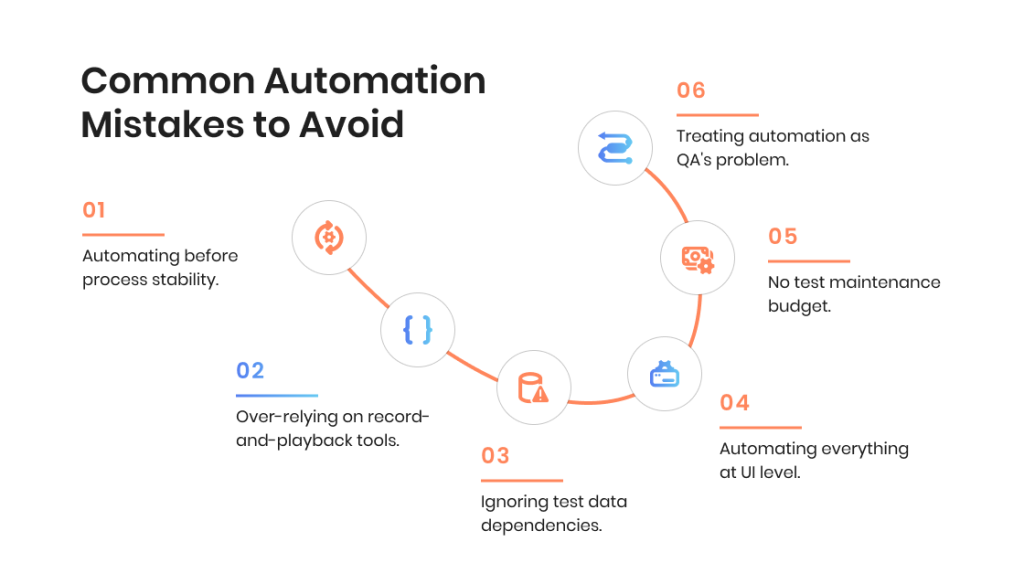
Common Automation Mistakes to Avoid
We’ve seen these patterns kill automation initiatives across multiple organizations:
Mistake #1: Automating before process stability.
Mistake #2: Over-relying on record-and-playback tools.
Mistake #3: Ignoring test data dependencies.
Mistake #4: Automating everything at UI level.
Mistake #5: No test maintenance budget.
Mistake #6: Treating automation as QA’s problem.
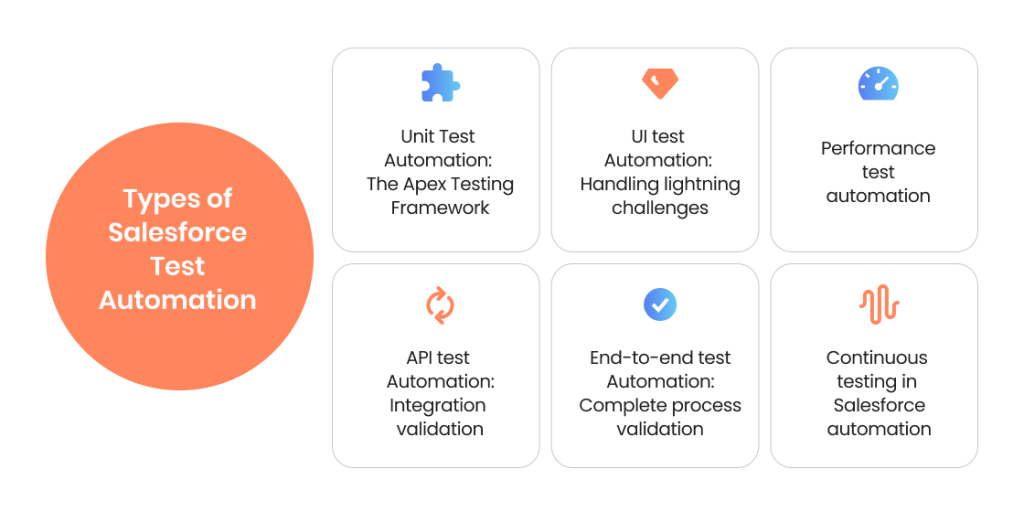
Types of Salesforce Test Automation
Not all automation testing looks the same. Salesforce testing requires different automation approaches for different validation needs. Understanding which type of testing fits which scenario is how you build efficient, maintainable test coverage.
Unit Test Automation: The Apex Testing Framework
Unit testing in Salesforce isn’t optional. The platform requires 75% code coverage before you can deploy to production. But code coverage isn’t the goal — validated business logic is.
What unit test automation covers:
Apex triggers and classes execute business logic at the database level. Unit testing validates this logic works correctly with different data scenarios:
Trigger logic for record creation, updates, deletions
Custom validation rules and error handling
Batch processing and scheduled jobs
Business calculations and data transformations
Governor limit compliance under bulk operations
The reality of Salesforce unit testing
Most organizations treat unit testing as a deployment checkbox. Write enough tests to hit 75% coverage, then move on. This misses the entire point.
Good unit testing catches logic errors before they reach integration or UAT testing. A unit test that fails saves 10-15 hours of debugging time in later testing phases.
Best practices for Apex test automation
Test business logic, not just code coverage. Focus on validating that your triggers and classes actually implement business requirements correctly. Code coverage follows naturally.
Use test data factories. Don’t create test records manually in every test method. Build reusable factories that generate standard test data consistently.
Test bulk operations explicitly. Your trigger works with one record. Does it work with 200 records in a single transaction? Bulk testing catches governor limit issues.
Validate negative scenarios. Test what happens when data is invalid, when users lack permissions, when external systems are unavailable. Error handling is business logic too.
Keep tests independent. Each test should create its own data and clean up after itself. Tests that depend on execution order fail unpredictably.
UI test automation: Handling lightning challenges
This is where Salesforce test automation gets technically interesting. Lightning components use Shadow DOM encapsulation, which means standard automation tools like Selenium struggle to locate page elements reliably.
The shadow DOM problem
Traditional web testing tools identify elements by their DOM structure. Shadow DOM hides component internals from external scripts. Your automation script can see the Lightning component wrapper but not the buttons, fields, and content inside it.
This creates test automation platform challenges:
Element locators break frequently
Dynamic IDs change between page loads
Standard Selenium waits don’t work reliably
Component updates break existing test scripts
Modern approaches to Lightning test automation:
Native Lightning Testing Service (deprecated but worth understanding);
AI-powered test automation tools;
API-first testing strategy;
Hybrid automation approach.
Combine multiple techniques when using salesforce automated testing tools: use UI automation for critical user journeys, API testing for data validation, and visual testing for layout verification.
API test automation: Integration validation
Salesforce API testing is critical because most business processes don’t live entirely within Salesforce. You’re integrating with ERP systems, marketing platforms, support tools, and analytics systems.
What API automation testing covers
REST API endpoints. Validate that your Salesforce org correctly exposes and consumes REST services. Test authentication, data formatting, error handling, and rate limiting.
SOAP API integration. Legacy systems often use SOAP. Test that data exchanges work correctly, handle errors gracefully, and maintain data integrity.
Bulk API operations. Large data imports and exports use the Salesforce Bulk API. Test that bulk operations complete successfully, handle failures appropriately, and respect governor limits.
Streaming API validation. Real-time integrations use the Streaming API. Test that events trigger correctly, subscribers receive notifications, and data stays synchronized.
Why API testing is your automation priority:
API tests are faster than UI tests. No browser loading, no page rendering, no waiting for JavaScript execution. An API test that takes 500ms accomplishes the same validation as a UI test taking 30 seconds.
API tests are more stable. No Shadow DOM issues, no dynamic element IDs, no timing problems with page loads. When APIs break, they break obviously and predictably.
API tests enable integration automation. You can test Salesforce integrations without depending on other teams’ test environments. Mock the external system’s API, validate your Salesforce side independently.
Practical API testing approach
Test happy path and error scenarios. Successful API calls are just the beginning. What happens when:
Authentication fails
Request data is malformed
Rate limits are exceeded
The external system returns errors
Network connections time out
Your Salesforce automation testing should validate that integrations fail gracefully and provide useful error information.
End-to-end test automation: Complete process validation
End-to-end testing validates entire business processes from start to finish, often spanning multiple systems. This is the most valuable and most complex type of automation.
What end-to-end automation covers:
Complete business workflows that touch multiple systems and teams:
Lead generated in marketing system → routed in Salesforce → qualified by sales → converted to opportunity → synced to ERP for credit check → contract generated → order created
Support case created → assigned based on skills → escalated through approval chain → resolution logged → customer notified → feedback collected
These processes represent actual business value. When they break, revenue stops.
What Is The Right Automation Approach for You?
Different processes need different testing strategies. Let’s create the optimal mix of unit, API, UI, and integration testing for your specific needs.
Cross-system dependencies. Your test needs data in System A, configuration in System B, and valid credentials for System C. One system being unavailable blocks the entire test.
Data consistency. The same customer record exists in multiple systems. Your test must validate that data stays consistent across all systems despite different update frequencies and synchronization delays.
Environment coordination. Running end-to-end tests requires coordinating test environments across multiple teams and systems. Sandbox availability becomes a bottleneck.
Effective end-to-end automation strategies
Start with critical revenue paths. Don’t try to automate every possible workflow. Focus on the 3-5 processes that generate the most revenue or handle the most customer volume.
Use service virtualization. Mock external systems when they’re unavailable. This lets you test the Salesforce portion independently without waiting for other teams.
Build in resilience. Tests should handle temporary failures gracefully. Network hiccups, system slowdowns, occasional timeouts — these happen in production and testing.
Implement thorough logging. When end-to-end tests fail, you need to know exactly where the failure occurred and what state the data was in. Comprehensive logging is mandatory.
Performance test automation
Performance testing validates that your Salesforce environment handles production-scale loads. This type of testing catches issues that only appear under realistic data volumes and user concurrency.
What performance automation validates
Page load times under load. Does your Lightning page load in 2 seconds with 100 concurrent users? What about 500 users?
Report generation with large datasets. Reports that work fine with 1,000 records might timeout with 500,000 records.
Bulk data operations. Can your customizations process 50,000 record updates without hitting governor limits?
API response times. Do your integrations maintain acceptable response times during peak usage periods?
Concurrent user scenarios. What happens when your entire sales team logs in simultaneously on Monday morning?
Governor limit validation. This is Salesforce-specific performance testing. Your code must operate within platform limits:
SOQL queries per transaction (100 synchronous, 200 asynchronous)
CPU time limits (10,000ms synchronous, 60,000ms asynchronous)
Performance testing reveals which customizations consume excessive resources and need optimization.
Continuous testing in Salesforce automation
Continuous testing means validation happens automatically as part of your development and deployment pipeline. Code changes trigger test execution. Failed tests block deployment.
What continuous testing requires
Automated test suites. You need comprehensive automated tests that run without human intervention. Unit tests, integration tests, API tests — all executable via command line or CI/CD tools.
CI/CD pipeline integration. Your deployment process automatically runs tests before moving code between environments. Salesforce DX and modern DevOps tools enable this.
Fast test execution. Continuous testing only works if tests are completed quickly. UI tests that take hours don’t fit continuous workflows. Focus on fast unit and API tests for continuous validation.
Clear pass/fail criteria. Tests must have objective success criteria. Manual verification steps break continuous testing.
Rapid feedback loops. Developers need test results within minutes, not hours. This requires optimized test execution and parallel test running.
The continuous testing workflow:
Developer commits code → Automated tests run in CI environment → Tests pass: code moves to integration sandbox → Integration tests run → Tests pass: code awaits UAT approval → UAT completes: code deploys to production with final automated validation.
Continuous testing transforms the testing process from manual validation after development to automated validation during development.
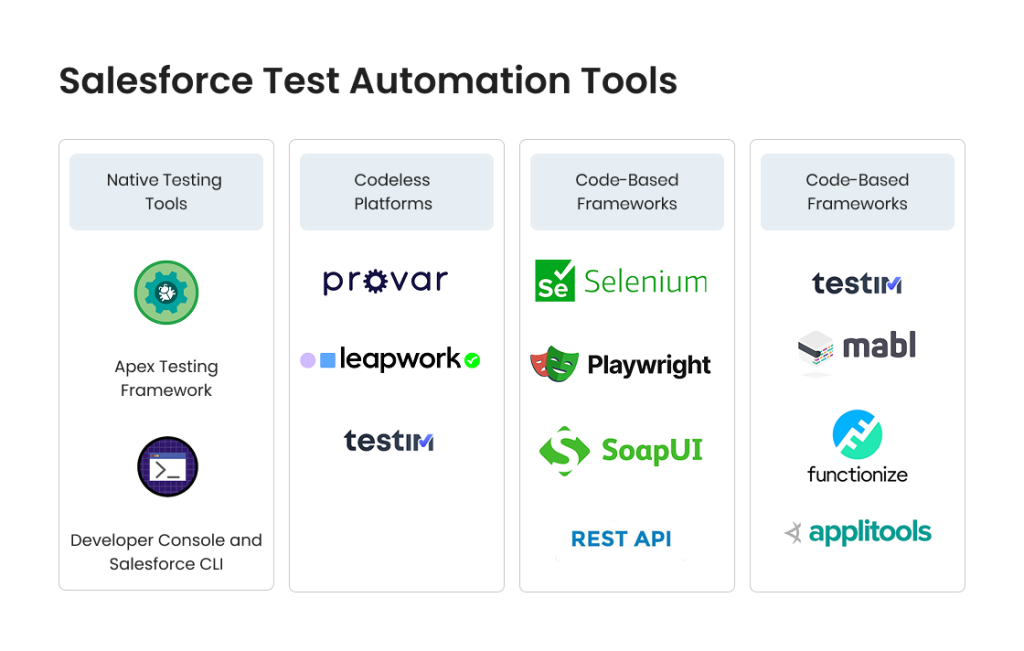
Salesforce Test Automation Tools
Choosing the right testing tool determines whether your automation succeeds or becomes an expensive maintenance burden.
Here’s what makes tool selection difficult in Salesforce: the platform’s unique architecture breaks assumptions that traditional testing tools make. Shadow DOM, dynamic IDs, three-times-yearly platform updates—these challenges require specialized solutions.
We’ll examine the actual tool landscape: native Salesforce capabilities, codeless automation platforms, code-based frameworks, and AI-powered solutions. No vendor marketing. Just what works, what doesn’t, and when to use each approach.
Native Salesforce Testing Tools
Salesforce provides built-in testing capabilities that many organizations overlook while searching for third-party solutions. Understanding native tools is essential because they’re free, well-supported, and designed specifically for the platform.
Apex Testing Framework
This is Salesforce’s native solution for unit testing. Every Apex class, trigger, and custom logic can have associated test classes that validate functionality.
Key capabilities
When to use Apex testing framework
Limitations
Full access to Salesforce data and metadata within tests
Test.startTest() and Test.stopTest() for governor limit reset
System.runAs() for testing as different users
Ability to test bulk operations (up to 200 records)
Code coverage metrics built into the platform
All server-side business logic testing (this is mandatory)
Trigger validation and bulk operation testing
Custom controller and extension testing
Integration testing of internal Salesforce processes
Only tests Apex code, not UI or external integrations
Cannot test across multiple orgs simultaneously
Limited to synchronous testing patterns
No built-in support for external system mocking
Developer Console and Salesforce CLI
These tools execute Apex tests and provide results. Developer Console offers a visual interface for running tests and analyzing coverage. Salesforce CLI enables command-line test execution for CI/CD integration.
The testing process for Apex requires both: Developer Console for interactive development and debugging, CLI for automated execution.
Codeless Test Automation Platforms
Codeless tools promise test automation without programming. Record user actions, replay them as tests. The appeal is obvious: enable business users and manual testers to create automated tests without coding skills.
The reality is more nuanced.
Codeless test automation works well for stable, straightforward workflows. It struggles with complex scenarios, dynamic content, and frequent UI changes. Shadow DOM in Lightning components creates particular challenges for record-and-playback approaches.
Provar
Purpose-built for Salesforce testing automation, Provar understands the platform’s architecture and handles Lightning components better than generic tools.
Strengths
Limitations
Native Salesforce metadata integration
Handles Shadow DOM elements reliably
Reusable test components for common Salesforce operations
API and UI testing in the same platform
Strong Salesforce DX integration
Higher cost than generic automation tools
Requires Provar-specific knowledge for advanced scenarios
Test maintenance still requires technical understanding
Performance testing capabilities are limited
Best fit: Organizations with significant Salesforce customization, teams that need both UI and API testing, companies committed to long-term automation investment.
Leapwork
Visual, flowchart-based test automation designed for users without coding backgrounds. Leapwork emphasizes “no-code” automation across multiple platforms, including Salesforce.
Strengths
Limitations
Intuitive visual interface reduces learning curve
Cross-platform testing (Salesforce plus other systems)
AI-powered element identification adapts to UI changes
Strong reporting and analytics capabilities
Generic platform means less Salesforce-specific optimization
Complex business logic requires workarounds
Limited API testing compared to Salesforce-native tools
Higher per-license cost
Best fit: Organizations testing multiple platforms beyond Salesforce, teams with limited technical resources, scenarios emphasizing UI validation over complex logic testing.
Testim
AI-powered test automation that learns from test execution and adapts to application changes automatically.
Strengths
Limitations
Machine learning reduces test maintenance
Fast test creation and execution
Good integration with CI/CD pipelines
Handles dynamic content better than traditional record-playback
Generic web testing tool, not Salesforce-optimized
Shadow DOM support exists but isn’t native
Best for web applications, less effective for mobile Salesforce
AI features require training period
Best fit: Teams with strong DevOps practices, organizations testing modern web applications alongside Salesforce, scenarios where test maintenance cost is a primary concern.
Testing Critical Processes Right Now?
If you’re facing urgent Salesforce testing challenges — our QA team can help!
Code-based testing tools require programming skills but offer maximum flexibility and control. For complex Salesforce environments with sophisticated customizations, code-based approaches often deliver better long-term ROI than codeless platforms.
Selenium with Salesforce Adaptations
Selenium is the industry-standard web automation framework. Using it for Salesforce testing requires specific adaptations to handle Lightning components and Shadow DOM.
The Selenium challenge for Salesforce:
Standard Selenium cannot penetrate Shadow DOM boundaries. Locating Lightning component elements requires JavaScript execution to access shadow roots.
Advantages
Limitations
Team has strong Selenium expertise already
Testing spans multiple platforms (Salesforce is one of several systems)Budget constraints prevent specialized tool purchase
Microsoft’s modern automation framework with better Shadow DOM support than Selenium. Playwright’s architecture handles dynamic content and asynchronous operations more reliably.
Advantages
Considerations
Built-in Shadow DOM piercing capabilities
Faster and more stable than Selenium
Better handling of modern web applications
Excellent debugging and tracing tools
Newer framework with smaller community than Selenium
Still requires JavaScript/TypeScript programming skills
No Salesforce-specific features or optimizations
Best for teams already invested in Node.js ecosystem
Custom frameworks built on REST/SOAP APIs
Many organizations build their own testing frameworks using Salesforce APIs directly. This approach bypasses UI complexity entirely.
Why custom API frameworks work:
Testing through APIs is faster, more stable, and easier to maintain than UI automation. You validate business logic and data integrity without dealing with Shadow DOM, page loads, or visual elements.
Typical architecture
When to build custom frameworks
Risk factors
Test framework written in Python, Java, or similar
Uses Salesforce REST API for data operations
Validates business rules by checking database state
Can test bulk operations and integrations effectively
Significant development resources available
Heavy integration testing requirements
Need to test Salesforce alongside legacy systems
Existing test frameworks in organization
Requires ongoing development and maintenance
Team dependency on specific developers
Reinventing capabilities that commercial tools provide
UI testing still requires separate solution
AI-Powered Testing Solutions
AI-powered test automation represents the newest evolution in testing tools. These platforms use machine learning to reduce test maintenance, adapt to application changes, and identify issues automatically.
What AI brings to Salesforce testing:
Self-healing tests. When UI elements change (IDs, classes, positions), AI-powered tools update element locators automatically. Tests that would fail with traditional tools continue working.
Visual validation. Instead of checking DOM structure, AI compares screenshots to detect visual regressions. This bypasses Shadow DOM entirely.
Intelligent waiting. Machine learning determines when pages have fully loaded and when elements are ready for interaction, eliminating hardcoded waits.
Anomaly detection. AI identifies unusual patterns in test results or application behavior, catching issues that specific test cases don’t cover.
The current reality of AI testing:
AI capabilities are genuine but not magic. These tools still require initial test creation, maintenance when business logic changes (not just UI), and expertise to configure effectively.
AI excels at handling cosmetic UI changes and dynamic content. It doesn’t replace the need for thoughtful test design or understanding of business requirements.
Tools with significant AI capabilities
When AI-powered tools make sense
Testim (mentioned earlier)
Mabl (AI-native testing platform)
Functionize (machine learning test generation)
Applitools (AI-powered visual testing)
Frequent UI updates that break traditional automation
Visual validation is critical business requirement
Test maintenance cost is major pain point
Budget supports premium tool pricing
Selecting the right tool: Decision framework
No single testing tool fits all Salesforce testing needs. Most successful automation strategies use multiple tools for different testing types.
Match tools to testing types
Unit testing → Apex Testing Framework (mandatory) API testing → Postman, REST Assured, or custom frameworks UI testing → Provar, Selenium, or Playwright depending on team skills Integration testing → API-based tools plus service virtualization Performance testing → JMeter, LoadRunner, or Salesforce-specific tools
Evaluation criteria
#1. Shadow DOM handling capability Can the tool reliably locate and interact with Lightning components? Request a proof-of-concept with your actual Salesforce org before purchasing.
#2. Maintenance overhead How much effort does test maintenance require after Salesforce platform updates? After customization changes? Get specific numbers from existing users.
#3. Team skill alignment Does the tool match your team’s technical capabilities? Codeless tools need business process expertise. Code-based tools need programming skills.
#4. Salesforce-specific features Does the tool understand Salesforce metadata, objects, and workflows natively? Generic web testing tools require more customization.
#5. CI/CD integration Can tests run automatically as part of your deployment pipeline? Command-line execution and programmatic result handling are essential.
#6. Total cost of ownership License costs plus implementation effort plus ongoing maintenance. Calculate ROI over 2-3 years, not just initial purchase price.
#7. Vendor stability and support Is the vendor financially stable? Do they release regular updates? How responsive is technical support when you encounter issues?
Tools are just tools
The automation tool doesn’t make your Salesforce testing strategy successful. Clear objectives, well-designed test scenarios, and team expertise make automation work.
We’ve seen organizations fail with expensive, sophisticated tools because they lacked clear testing strategy. We’ve seen others succeed with basic frameworks because they understood their requirements and designed tests carefully.
Start with automation goals:
Which business processes need protection?
What types of testing deliver the most value?
What skills does your team have?
What’s your realistic maintenance budget?
Then select tools that support those goals. Not the other way around.
Best Practices for Salesforce Test Automation
Automation tools don’t guarantee success. Implementation approach determines whether your testing automation creates value or becomes a maintenance burden.
These best practices come from implementing test automation across dozens of Salesforce orgs — and from fixing automation that other teams implemented poorly.
Test data management strategies
Test data is the foundation of reliable automation. Bad data creates false failures, masks real issues, and wastes time debugging tests instead of applications.
The test data challenge in Salesforce
Your tests need realistic data that represents actual business scenarios. But production data contains sensitive customer information you can’t use in testing. And sandbox refreshes wipe out manually created test data.
Effective approaches
Data factories for reusable test data creation. Build code that generates standard test data on demand. Your tests should create the data they need rather than depending on pre-existing records.
Your tests call TestDataFactory methods instead of creating data manually. Changes to test data structure happen in one place.
Synthetic data generation for volume testing. Tools like Mockaroo or Snowfakery generate large datasets with realistic patterns. Use these for performance testing where you need 100,000+ records.
Data templates for complex scenarios. Some business processes require specific data configurations: approval chains with multiple steps, opportunities with related quotes and line items, cases with complete interaction histories. Create templates for these scenarios.
Automated data cleanup. Tests should clean up after themselves. Don’t leave test records cluttering sandboxes. Use @testSetup methods in Apex or teardown procedures in UI tests. Data masking for compliance. If you must use production data, mask sensitive information. Replace real names, emails, phone numbers with realistic but fake data while preserving data relationships.
Building Automation That Lasts
Our automation implementations include knowledge transfer, documentation, and team training.
Test code is code. It needs version control, code review, and change management just like application code.
What belongs in version control:
All automated test scripts (Apex tests, UI tests, API tests)
Test data factory code
Test configuration files
CI/CD pipeline definitions
Test documentation and scenarios
Why this matters
Without version control, you can’t track who changed tests, why they changed, or revert problematic changes. Test failures become mysteries instead of clear signals.
Branch strategy for test automation
Align test branches with application code branches. Tests for Feature X live in the same branch as Feature X implementation. They deploy together, get reviewed together, fail together.
When features merge to main branch, associated tests merge too. This keeps test coverage synchronized with application features.
CI/CD integration approaches
Continuous testing happens when tests run automatically as part of your deployment pipeline. Code changes trigger test execution without manual intervention.
Building the pipeline
Commit triggers test execution. Developer commits code → CI server detects change → automated tests run in dedicated sandbox → results return to developer.
Failed tests block progression. Tests must pass before code can move to the next environment. This prevents broken code from reaching production.
Parallel test execution. Run test suites simultaneously to get faster results. Unit tests in one thread, integration tests in another, UI tests in a third.
Environment-specific test suites. Different sandboxes run different test types:
Development sandbox: Unit tests only (fast feedback)
Integration sandbox: API and integration tests
UAT sandbox: End-to-end and UI tests
Staging: Full regression suite before production
Salesforce DX enables modern CI/CD
Source-driven development with scratch orgs, metadata API deployments, modular package development. These capabilities make automated testing practical in ways traditional Salesforce development couldn’t support.
Tool integration
Jenkins, GitLab CI, GitHub Actions, Azure DevOps—all can execute Salesforce tests via CLI. Configure your pipeline to:
Run Apex tests via Salesforce CLI
Execute UI tests via your chosen automation tool
Validate code coverage meets minimum thresholds
Deploy only if all validation passes
Test maintenance strategies
This is where most automation initiatives fail. Initial test creation is exciting. Ongoing maintenance is tedious and expensive.
The maintenance challenge
Salesforce updates three times per year. Your customizations change continuously. External systems modify APIs. All of these changes can break automated tests. Organizations that don’t budget for test maintenance end up with test suites that fail constantly, lose trust, and get abandoned.
Reduce maintenance burden through design
Page Object pattern for UI tests. Separate test logic from page structure. When UI changes, you update page objects, not individual tests.
UI changes affect LeadPage class only. All tests using it continue working.
Stable element locators. Use data-test-id attributes instead of dynamic IDs or fragile CSS selectors. Add custom attributes to your Lightning components specifically for testing.
Appropriate abstraction levels. Don’t duplicate code across tests. Extract common operations into reusable functions. But don’t over-abstract either—tests should remain readable.
Regular maintenance windows. Schedule time for test maintenance after each Salesforce release. Review failed tests, update selectors, adjust for platform changes. Don’t let technical debt accumulate.
Test health monitoring:
Test pass rate over time
Flaky tests that fail intermittently
Tests that haven’t run recently
Tests with unusually long execution times
Address declining health before it becomes a crisis.
Documentation that helps to beat the challenges of Salesforce
Test documentation isn’t optional. Three months from now, when tests fail, you need to understand what they validate and why they matter.
What to document
Business requirements each test validates. Connect tests to actual business needs. “This test validates that high-value leads (revenue >$5M, 500+ employees) automatically route to enterprise sales team.”
Test data requirements and setup. What configuration must exist for tests to run? What permissions? What integration settings?
Known limitations. What scenarios don’t these tests cover? What edge cases remain untested?
Troubleshooting guides. When tests fail, what are the common causes and solutions?
Where to document
In the test code itself via comments for technical details. In a wiki or knowledge base for business context and maintenance procedures. In your project management tool linked to user stories.
Documentation that lives separately from tests gets out of sync and becomes useless. Keep it close to the code.
Salesforce Testing Scenarios Guide: Putting Theory Into Practice
Theory and tools matter, but real learning happens through examples. Salesforce is a complex platform where testing for Salesforce applications requires understanding how to validate actual business processes, not just individual features.
We’ve compiled detailed testing scenarios for the most common (and most challenging) Salesforce workflows:
Lead-to-opportunity conversion. Testing multi-system workflows with scoring, routing, and integration validation
Complex approval workflows. Handling parallel approvals, escalations, and time-based triggers
Data migration testing. Validating integrity, performance, and business continuity during migrations
Cross-system integration. Testing order-to-cash processes spanning 5+ systems
Release testing. Pre-validating Salesforce platform updates before production
Performance under load. Governor limits, concurrent users, and bulk operations
Each scenario includes:
✓ Business process breakdown ✓ Testing challenges specific to that process ✓ What to validate (with test case examples) ✓ Automation approach recommendations ✓ Common pitfalls to avoid
Wrapping Up: Building Your Salesforce Testing Strategy
Salesforce is a powerful platform that demands equally sophisticated testing approaches. The testing process cannot be an afterthought or a deployment checkpoint. It’s a strategic capability that protects revenue, ensures compliance, and enables business agility.
Measurings Success
How do you know if your testing efforts are working?
Defect detection rate. Percentage of defects found in testing vs. production. Target: >80% caught pre-production.
Test automation coverage. Percentage of critical scenarios covered by automated tests. Target: 70-80% of regression scenarios automated.
Testing cycle time. Days required for complete regression testing. Target: Multi-week manual cycles reduced to 1-3 days automated.
Production incident reduction. Critical issues per release declining over time. Track trends quarterly.
Test maintenance overhead. Hours spent maintaining tests per sprint. Should stabilize at 20-30% of testing effort after initial buildout.
Release confidence. Subjective but important. Do stakeholders trust test results enough to deploy confidently?
Your Next Steps
If your current thorough testing feels overwhelming, you’re not alone. Most organizations struggle with test coverage, maintenance overhead, and keeping pace with platform changes.
The difference between struggling and succeeding isn’t more tools or more testers. It’s strategic focus on what matters, appropriate automation of repetitive work, and team structures that support collaboration.
Immediate actions
Audit your current state. What testing actually happens today? What critical processes aren’t covered? Where do production issues come from?
Identify quick wins. Which automated tests would provide immediate value? What manual processes consume the most time?
Assess team capabilities. What skills exist internally? What capabilities need development or external support?
Select one critical process. Don’t try to test everything. Pick your most important revenue-generating workflow and test it thoroughly.
Measure baseline metrics. How long does testing take now? How many production issues occur? Establish baselines before implementing changes.
Salesforce efficient testing is essential for protecting business operations and enabling growth. The investment in proper testing pays dividends in prevented incidents, faster deployments, and confident releases.
Testing is not a cost center. It’s risk mitigation that enables business agility. Organizations that test effectively deploy faster, innovate more confidently, and serve customers more reliably.
FAQ
How do I convince leadership to invest in test automation?
Speak their language: business impact and ROI. Calculate the cost of production incidents (downtime hours × hourly revenue impact). Measure time wasted on manual regression testing. Document deployment delays are caused by testing bottlenecks.
Present no-code test automation as risk reduction, not technical improvement. Show how current testing gaps threaten revenue or create compliance risks.
Start with a pilot. Automate one critical process, measure the results, and present the ROI. Leadership responds to demonstrated value better than theoretical benefits.
Which processes should I automate first if I can only automate a few?
Follow the money. Automate processes that directly impact revenue generation or customer service first:
– Lead-to-opportunity conversion and routing – Quote generation and approval workflows – Order processing and fulfillment triggers – Case escalation and resolution processes – Customer onboarding workflows
Then add high-frequency scenarios: tests you run after every deployment or platform update. Automation ROI is highest for tests executed repeatedly.
Avoid automating processes that change frequently. Automation maintenance cost will exceed automation value. Let those processes stabilize before automating.
What if my Salesforce org is too complex to test comprehensively?
No org is simple enough to test comprehensively. Even small implementations have infinite possible scenarios. The goal isn’t comprehensive testing. It’s strategic risk mitigation. Focus on: – Critical revenue-generating processes (test exhaustively) – High-risk changes (test affected areas thoroughly) – Frequent scenarios (automate for efficiency) – Compliance requirements (test what regulations demand)
Accept that some scenarios won’t be tested. Document the gaps, assess the risks, make conscious decisions about what remains untested.
Complexity actually makes automation more valuable, not less. Manual testing becomes overwhelmed by complexity. Automation handles it systematically.
How do I handle testing when we have frequent customization changes?
This is why page object patterns and modular test design matter. When customizations change, you update centralized test components rather than individual tests. Strategies for high-change environments: Test at appropriate levels. Use API testing for business logic validation. UI changes don’t affect API tests. Delay automation of unstable processes. If a workflow changes weekly, automate it after it stabilizes. Build flexibility into tests. Use configuration files for test data, environment URLs, and expected values. Changes happen in configuration, not test scripts. Maintain close collaboration. When developers and QA work together, test updates happen alongside code changes rather than after deployment. Accept higher maintenance cost. Frequent changes mean more test maintenance. This is expected, not a failure of automation.
Should I hire dedicated automation engineers or train existing QA team?
Depends on team size and automation scope: Small teams (1-3 QA): Train existing team members. Dedicated automation engineers don’t make sense at this scale. Focus on automation tools that match current skill levels. Medium teams (4-8 QA): Have 1-2 people specialize in automation while others handle manual testing and UAT. Specialists develop frameworks, generalists use them. Large teams (8+ QA): Dedicated automation engineers become cost-effective. They build frameworks, mentor others, and handle complex technical scenarios. Skill considerations: Automation requires programming mindset even with no-code tools. Some manual testers excel at automation, others don’t. Assess individual aptitudes. External support option: Many organizations bring in contractors for initial automation framework development, then transition to internal maintenance.
How do I test Salesforce integrations when I don’t control the external systems?
This is one of the hardest testing challenges. Several approaches help: Service virtualization. Mock the external system’s API for independent Salesforce testing. Tools like WireMock create realistic API simulators. Coordinated test windows. Schedule monthly or quarterly sessions where all teams make their test environments available simultaneously. Document data requirements clearly. Contract testing. Validate API contracts independently. Test that Salesforce sends correctly formatted requests and handles expected responses. External team tests their side separately. Test in production (carefully). Some organizations use production integrations for testing with test data. This requires careful data flagging to prevent test data from affecting real business operations. Monitoring and observability. In production, robust monitoring catches integration issues quickly. This supplements (not replaces) testing.
Share:
Jump to section
Hand over your project to the pros.
Let’s talk about how we can give your project the push it needs to succeed!
A commercial writer with 13+ years of experience. Focuses on content for IT, IoT, robotics, AI and neuroscience-related companies. Open for various tech-savvy writing challenges. Speaks four languages, joins running races, plays tennis, reads sci-fi novels.








 How do I convince leadership to invest in test automation?
 How do I convince leadership to invest in test automation?