Alpha Testing vs. Beta Testing: Key Differences & Where to Use Each
When to use alpha and beta testing in software development and what are the key differences between the two? Find out how these types of testing impact product quality.
A team delivers a seemingly smooth product release, but users find multiple bugs within minutes. Clearly, the testing stage missed something important, but was is the alpha or the beta stage? That’s exactly where alpha vs. beta testing becomes indispensable, especially in complex software development cycles where timing and strategy directly affect release quality.
Both alpha and beta are types of user acceptance testing, but they serve very different purposes. One looks at the product with the internal knowledge of how it works, the other one is designed to prove it works in real use. In the world where users don’t hesitate to leave a bug-ridden app for the one that offers spotless UX, functionality, and performance, both alpha and beta testing are not optional. In this article, we break down what each phase is, how they differ, when to use them, and how they fit into the modern software development lifecycle.
Where Alpha and Beta Testing Fit in the Software Development Lifecycle
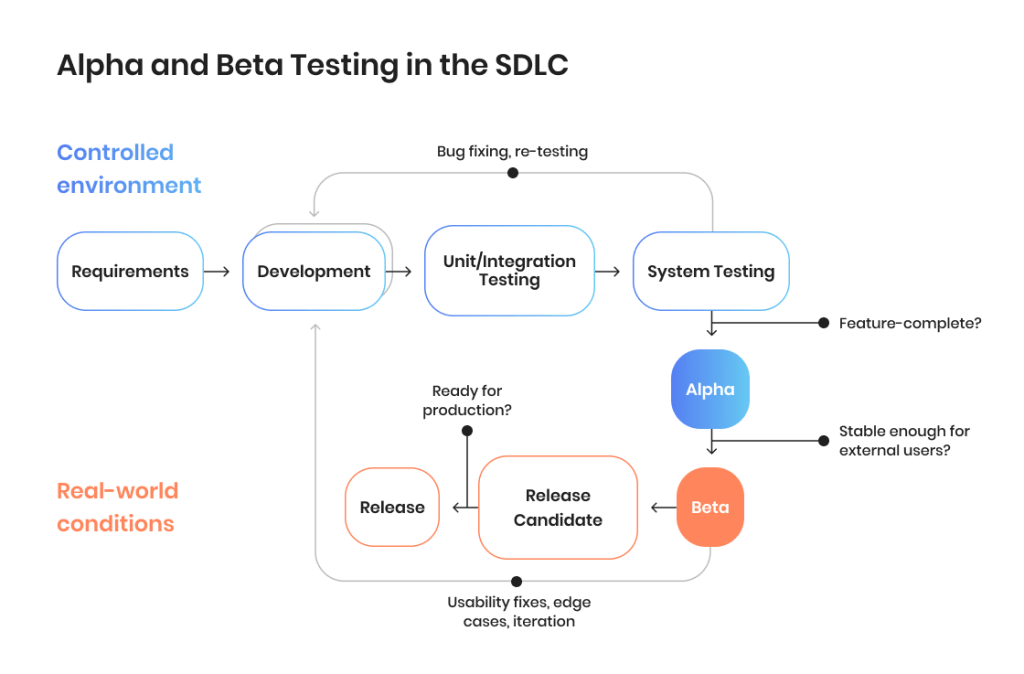
Within a typical software development lifecycle (SDLC), alpha and beta are located between internal testing and release. By this point in the software development process, the product has moved past the pre-alpha stage, where requirements, early design, and initial code are still changing frequently, and is approaching a more stable state that is testable and closer to the product that the end users will receive.
This is where alpha and beta testing in software engineering come into play at different stages of the cycle:
Pre-alpha: requirements are defined, core features are built, and early tests validate architecture
Alpha: internal testing in a controlled environment to identify bugs, usability, and performance issues
Beta: testing performed by external end users to validate the product in real-world conditions
Release candidate/gamma testing: final validation with minimal expected changes before release
Here is the full look at testing stages and the role they play in the SDLC.
Stage
Focus
Who’s involved
Output
Pre-alpha
Requirements, early design, unstable code
Developers
Core functionality emerges
Internal QA
Unit, integration, regression testing
QA & development teams
System becomes feature-complete
Alpha testing
System-level validation in controlled environment
Internal testers, developers
Bugs, integration issues identified
Beta testing
Real-world validation
External users, beta testers
Usability issues, edge cases, feedback
Release candidate
Final validation
QA & product teams
Ready for release
Gamma testing
Near-production checks
Select users
Final confidence
Release
Production use
End users
Live product
The bottom line is: alpha testing takes place when the team needs confidence that the product works as a complete system. Beta testing, in turn, happens when that confidence needs to be confirmed by real users before the final release.
Let’s take game development as an example. For a new game about to be released, alpha might involve dozens of professional software testers. Beta, on the other hand can be performed by thousands of real players trying to “break” the system. Alpha can be viewed as controlled testing, while beta is chaos testing at a large scale, but no one can say that one is more important than the other.
What Is Alpha Testing?
Alpha testing in software testing is an internal testing phase where a nearly finished complete product is tested in a controlled environment before it is delivered to the end users. It is performed by testers and developers within the development team, typically in a testing environment that simulates real conditions — a testing lab or simply a controlled setup.
The goal of alpha testing is to find functional and integration bugs, confirm acceptance criteria, and prepare the product for beta. At this stage, testing focuses on how the full system behaves end to end.
Teams can use both white-box testing and black-box testing techniques. This allows them to analyze the code and integrations internally while also monitoring user-facing behavior.
For example, a QA engineer running an alpha test on a fintech application might work in a staging environment connected to a simulated payment gateway. Alpha testers execute a test plan, run each test case across key flows like payments and refunds, monitor logs, and check how services interact. The goal is to locate issues before real users interact with the product.
Types of alpha testing
Pre-alpha. Prototype-level validation where UI and core flows exist, but features are still incomplete.
Alpha phase 1. Developer-led, focused on white-box testing and early issue detection.
Alpha phase 2. QA-led, focused on black-box testing and system-level validation.
Benefits of alpha testing
Early bug detection is cheaper. Issues are found before they affect real users or later testing phases.
Words by
Igor Kovalenko, QA Lead, TestFort
“A payment processing bug we caught during alpha on a fintech project took four developer-hours to fix; a similar one that slipped to production on a previous project cost the client two weeks of incident management and a formal apology to their enterprise customers.”
Direct developer-tester loop. Faster feedback and quicker fixes within the same team.
Controlled variables. Stable testing environment makes issues easier to reproduce and fix.
Limitations of alpha testing
Internal bias. The team knows the product too well and may miss unexpected user behavior.
Words by
Igor Kovalenko, QA Lead, TestFort
“We once spent three weeks in alpha testing an eCommerce checkout without a single tester questioning the button placement — everyone on the team had muscle memory for it — and within 24 hours of opening beta, 40% of users were dropping off at the confirmation step.”
Artificial environment. Lab or staging conditions do not fully reflect real-world usage.
Limited device and network variety. Testing scope is narrower than what external users will introduce.
Beta testing in quality assurance is a phase where a product is released to real users outside the organization to test it in real-world conditions. It happens after alpha, when the system is stable enough to be presented for external use but still needs evaluation that goes beyond internal testing.
Beta testing is performed by real users who interact with the product using different devices, operating systems, and networks. Unlike alpha, it takes place in uncontrolled environments, which means that usage patterns are impossible to predict fully.
The goal of beta testers is to check usability, uncover edge cases, collect feedback about product quality. The frequent welcome side effect of beta testing is spreading early market awareness before the product launch. Testing here is primarily black-box testing, focused on how the product behaves from a user perspective rather than how it is built.
For example, a team might release a beta version of an iOS application through TestFlight, allowing users to test new features in real time. In a B2B context, a SaaS platform might run a controlled beta with a group of users from its target audience to confirm a new workflow or integration work properly before full release.
Online QA discussions often agree that beta is less about structured testing and more about observing real user behavior. End users explore unexpected paths, misuse features, and create edge cases that internal QA rarely anticipates. This is why beta testing consistently surfaces usability and workflow issues.
Types of beta testing
Closed beta. The product is released to an invited group of users for more controlled feedback.
Open beta. The product is available for public signup, increasing coverage and diversity of usage.
Technical beta. Involves users with specific technical expertise who can provide deeper insights.
Focused beta. Targets feedback on a specific feature or functionality.
Post-release beta. Continues after release to collect feedback for future versions.
Benefits of beta testing
Real-world validation. The product is tested in real environments across diverse devices and conditions.
Broader coverage. A wider group of users interacts with the product in unexpected ways.
User feedback. Direct insights into usability, expectations, and real usage patterns.
Marketing signal. Early access can generate interest and engagement before the official release.
Community building. Engaged users become early adopters and advocates.
Limitations of beta testing
Noisy feedback. Input from users can be inconsistent, unstructured, or hard to prioritize.
Harder to reproduce bugs. Issues in real environments are not always easy to replicate.
Privacy and security concerns. Real user data introduces additional risks if not handled properly.
Perception risk. A buggy beta version can negatively impact how users view the product.
Weak testing structure. Lack of clear feedback channels or test scenarios reduces effectiveness.
Misuse as marketing. Treating beta as a launch instead of a testing phase limits its value.
Poor follow-through. Not acting on feedback before release reduces the impact of beta testing.
Alpha Testing vs. Beta Testing: A Side by Side Comparison
Alpha testing vs. beta testing should not be viewed as two complete opposites. Rather, they are two different but related ways of looking at a software product from two different perspectives. The difference mainly comes down to who performs the testing, where it happens, and what the team is trying to achieve. Let’s look at the key differences between alpha vs. beta testing.
Aspect
Alpha testing
Beta testing
Who’s responsible
Internal testers, developers
External users, beta testers
Environment
Controlled (lab, staging)
Real-world (devices, networks)
Goal
Find bugs, validate functionality
Validate usability, gather feedback
Product state
Feature-complete, unstable edges
Stable but unproven in real usage
Testing type
White-box + black-box
Primarily black-box
Control level
High
Low
Feedback type
Structured, technical
Unstructured, user-driven
Risk covered
Technical
User experience
When to use
Before external exposure
Before full release
The most immediate difference is who is involved. Alpha testing is performed internally by testers and developers within the development team, while beta testing relies on real users outside the organization. This shift changes both the type of feedback and how predictable the testing process is.
The second difference is where testing happens. Alpha takes place in a controlled testing environment, such as staging or lab setups, where variables can be managed. Beta testing happens in real-world conditions across different devices, networks, and usage patterns that the team cannot fully control.
Finally, there is a difference in what each phase is trying to achieve. Alpha testing focuses on identifying functional and integration issues and confirming that the product meets acceptance criteria. Beta testing focuses on usability, edge cases, and how the product performs when real users interact with it in everyday scenarios.
Eliminate quality and efficiency gaps in your testing process with a QA audit
Doing both alpha and beta testing takes time and resources, so it’s not uncommon for teams to wonder: “Do we really need both?” The short version of the answer for most products: yes, both alpha and beta testing are needed, because they deal with different risks at different points in the software development process. If you’re wondering which comes first, alpha or beta testing, the answer is always alpha first, followed by beta once the product is stable enough to be presented to external customers, even if it’s not a wide release yet.
That said, there are cases where teams adjust this approach:
Alpha only. Suitable for an internal tool, a tightly scoped release, or a hotfix where external validation adds little value. Here, internal testing is enough to validate functionality and reliability.
Words by
Igor Kovalenko, QA Lead, TestFort
“We skipped beta for an internal admin panel used by eight people and it was fine. But when we applied the same logic to a customer-facing feature six months later, we had to roll it back within a day because real users interacted with it in ways no one on the team had imagined.”
Beta only. Rare, but can make sense when the main unknown is user behavior — for example, a fully redesigned UX where real usage patterns matter more than controlled validation. Even then, some level of internal testing typically still happens.
Both alpha and beta testing. The default for most products. This is especially important for consumer-facing applications, SaaS platforms with a diverse user base, or any release where usability and real-world behavior are as critical as functional correctness.
Alpha exists to locate and eliminate technical risk, while beta effectively deals with product and user experience risk. Skipping either means accepting that certain aspects of the application are not going to be fully tested, meaning that a wider rollout can reveal flaws in how the system works or in how people actually use it.
For example, in game development discussions, teams note that “alpha,” “beta,” and even “pre-alpha” are sometimes used loosely and vary by company or project. The common takeaway is: don’t treat these as rigid labels — treat them as signals of readiness and risk level.
Here is a quick look at when you need alpha testing, beta testing, or both.
Scenario
Best approach
Why
Internal tool/admin system
Alpha
Limited audience, low UX risk
Hotfix/minor update
Alpha
Fast validation needed, low exposure
UX-heavy redesign
Beta-heavy
Real user behavior is key
Consumer-facing app
Both
High usability + scale risk
SaaS platforms with diverse users
Both
Different environments and use cases
Regulated product (fintech, healthcare, etc)
Strong alpha + controlled beta
Security and reliability critical
What Comes After Beta? Release Candidate and Gamma Testing
After beta testing, teams move to the release candidate. Release candidate, or RC, is a version of the product that is considered stable enough and ready for release, but minor bugs are expected at this point. The goal of this stage is no longer to discover new issues, but to confirm that previously identified bugs are resolved and that the application is ready for production.
Some teams also include gamma testing as a final step in their testing procedure. Gamma testing is performed on a near-final build and focuses on areas like performance, security, and usability, creating conditions that closely resemble production. It is typically viewed as the last check before release, so anything more than a minor change is neither expected nor allowed.
In modern CI/CD-driven software development, many teams skip a formal gamma phase. Continuous testing, automated regression suites, and real-time monitoring often cover the same risks more efficiently throughout the development lifecycle. Instead of a separate stage, gamma testing is distributed throughout earlier phases and then during post-release monitoring.
How Automation Fits Into Alpha and Beta Testing
Automation is a mainstay of software testing in 2026, but it plays very different roles in alpha and beta: one focuses on controlled evaluation, the other on checking real-world behavior at a large scale. In alpha testing, automation is built directly into the testing process and continuous integration. Teams rely on it to check stability and catch regressions early. Here is how it works:
In alpha testing, automation is deeply embedded into the testing process and CI pipelines. Teams rely on it to check stability continuously and catch regressions early:
Regression suites run on every build to ensure existing functionality is not broken.
Unit and integration tests validate core logic and service interactions as code changes.
API contract tests ensure services communicate correctly across the application.
Smoke tests run on every commit to quickly confirm that critical flows are not broken.
Visual regression tests detect unintended UI changes after updates.
At this stage, automation is about control, repeatability, and fast feedback within the development team.
In beta testing, automation shifts from testing to monitoring and learning. Since real users are involved at this stage, the focus is on assessing user behavior rather than strictly performing test scenarios:
Automated telemetry tracks how users interact with features in real time.
Crash reporting tools like Sentry or Firebase Crashlytics capture failures across devices and environments.
Feature flag-enabled rollouts allow teams to gradually expose functionality and limit risk.
In-app feedback widgets collect qualitative user feedback directly within the product.
A/B testing helps validate design and UX decisions based on actual user behavior.
Here, automation supports decision-making rather than execution. It helps teams understand what users actually do, not just what the system is supposed to do.
Together, these approaches ensure that alpha testing looks at the system under controlled conditions, while beta testing evaluates it in the real world, with automation adapted to each context.
Alpha Testing vs. Beta Testing: Choose the Right Approach for Release-Readiness
At the end of the day, understanding the core difference in alpha testing vs. beta testing is easy. Alpha looks at the product internally in a controlled environment, while beta offers an external look, where testing is performed by real users in real-world conditions.
To better see their place in modern QA, it’s handy to look at them both as types of user acceptance testing, which means that for most products, both are necessary. Alpha deals technical risk before a wider release, while beta ensures usability and proper real-world behavior. However, companies often lack the resources to do both properly without making any quality sacrifices. If you need help at any stage of alpha or beta testing, working with an external team from TestFort can help you balance internal testing, external assessment, and automation, giving you full confidence in your releases, speeding up delivery, and ensuring your product gets the right reception.
FAQ
What is the difference between alpha and beta testing?
Alpha is internal testing in a controlled environment to find bugs and validate functionality. Beta is testing with real users in real-world conditions to validate usability and gather feedback.
Which comes first, alpha or beta testing?
Alpha testing comes first, followed by beta once the product is stable enough for external users.
Who performs alpha testing?
Alpha testing is done by testers and developers within the development team, sometimes with input from internal stakeholders.
Who performs beta testing?
Beta testing is performed by external users or a selected group of users from the target audience.
Is alpha testing black-box or white-box?
Both. Teams use white-box testing for internal analysis and black-box testing for user-facing validation.
How long does alpha testing take?
Alpha testing usually continues for a few days to a few weeks, depending on product complexity and issue volume.
How long does beta testing take?
Beta testing typically goes on for several weeks, depending on user feedback cycles and testing scope.
What is the difference between alpha, beta, and release candidate?
Alpha is internal validation, beta is external validation, and a release candidate is a near-final version ready for release with only minor fixes expected.
Share:
Jump to section
Give your product quality a boost with expert-level testing and QA
Inna is a content writer with close to 10 years of experience in creating content for various local and international companies. She is passionate about all things information technology and enjoys making complex concepts easy to understand regardless of the readers tech background. In her free time, Inna loves baking, knitting, and taking long walks.
An experienced QA engineer with deep knowledge and broad technical background in the financial and banking sector. Igor started as a software tester, but his professionalism, dedication to personal growth, and great people skills quickly led him to become one of the best QA Team Leads in the company. In his free time, Igor enjoys reading psychological books, swimming, and ballroom dancing.







 What is the difference between alpha and beta testing?
 What is the difference between alpha and beta testing?